Fabrick Pass - Payment Initiation Outbound
Introduction
The Fabrick Pass AIS & PIS Services for Corporates product allows FPP to initiate payments to its customers. The constraint is that the debit account (one or more of one) must be held by FPP. In the following paragraphs, all the endpoints exposed by the platform will be described in detail: both relating to the actual payment part and to the configuration, such as customer management.
Setup
In order to use the PISP service, the FPP must provide, in addition to the census personal data, its own account data (IBAN). Each account will be identified by a DebtorAccountId¸ a unique ID associated with the FPP account that cannot be changed; a DebtorAccountCode will also be assigned which can later be updated by FPP according to its own naming convention criteria. These parameters will be useful for carrying out operations within the PISP service.
In addition, the following credit checks will be carried out:
- KYC Onboarding
- Acquisition of personal data (including residence and domicile);
- Check on reliable external databases;
- Remote identification;
- AML questionnaire (self-declaration);
- Risk profile.
- KYC continuously (variable frequency on the level of risk)
- Confirmation of residence/domicile;
- Confirmation of the AML questionnaire.
In addition, we require the following information for legal entities:
-
Company data acquisition (e.g. company name, SAE / ATECO, turnover, number of employees)
-
Legal representative/beneficial owners recognition;
-
Check on reliable external databases (search, CRIF report).
The FPPs will have the control endpoints that will allow them to carry out queries on their data (debtor) and on the data of their users who will use the service (creditors).
Debtor Accounts Management
This section will list and describe the endpoints that will allow the FPP to query its data and modify some parameters.
Search Debtors Accounts
The POST SearchDebtorsAccounts endpoint allows FPPs to obtain the list of whitelisted accounts that it has available to initialize payments. It is possible to obtain both the complete list (no body request) or filter by the following account parameters:
- account: an object that describes the debtor account, with the following parameters:
- currency: the currency of the account
-
- value: the value that identify the account
-
- valueType: the type of the value
- bankEnvironment: it can be LIVE or SANDBOX
- bankId: unique code assigned by Fabrick to the bank
- bankServiceCode: it indicates the customer service code and it is defined by the bank
- companyId: unique code assigned by Fabrick to the company
- debtorAccountCode: it is the code associated with the account, settled during the setup phase
- debtorAccountId: unique code assigned by Fabrick to the account
- serviceId: unique code assigned by Fabrick to the service associated with the company
Below there is an example of the request:
POST /api/fabrick/pass/v4.0/initiate/conf/outbound/white-lists/debtor-accounts/search

{
    "account": {
        "value": "IT90P0306901000100000633153",
        "valueType": "IBAN",
        "currency": "EUR"
    },
    "debtorAccountCode": "ISP sandbox PROVA 3"
}
Below there is an example of response where the list with the complete information of the available accounts is shown:
{
    "status": "OK",
    "payload": {
        "list": [
            {
                "bankId": 2,
                "account": {
                    "value": "IT90P0306901000100000633153",
                    "valueType": "IBAN",
                    "currency": "EUR"
                },
                "companyId": 22,
                "serviceId": 1241,
                "createdDatetime": "2023-03-06T14:26:23.260+0000",
                "updatedDatetime": "2023-03-06T14:35:14.190+0000",
                "debtorAccountId": 1444,
                "debtorAccountCode": "ISP sandbox PROVA 3",
                "bankServiceCode": "ALLPRODUCTS",
                "bankEnvironment": "SANDBOX"
            }
        ]
    }
}
The list is an object that contains the following data:
- account: an object that describes the debtor account, with the following parameters:
- currency: the currency of the account
- value: the value that identify the account
- valueType: the type of the value
- bankEnvironment: it can be LIVE or SANDBOX
- bankId: unique code assigned by Fabrick to the bank
- bankServiceCode: it indicates the customer service code and it is defined by the bank
- companyId: unique code assigned by Fabrick to the company
- createdDatetime: the moment when the debtor account was created
- debtorAccountCode: it is the code associated with the account, settled during the setup phase
- debtorAccountId: unique code assigned by Fabrick to the account
- serviceId: unique code assigned by Fabrick to the service associated with the company
- updatedDatetime: the moment when the debtor account was last updated
Account Debtor Details
The GET getDebtorAccount endpoint allows you to view information relating to a single FPP account:
GET /api/fabrick/pass/v4.0/initiate/conf/outbound/white-lists/debtor-accounts/{debtorAccountId}
In the path it requires the parameter debtorAccountId, a unique code assigned by Fabrick to the account.
Update Debtor AccountCode
The PUT updateDebtorAccount endpoint allows FPPs to modify the debtorAccountCode:
PUT /api/fabrick/pass/v4.0/initiate/conf/outbound/white-lists/debtor-accounts/{debtorAccountId}

{
  "debtorAccountCode": "ISP sandbox PROVA"
}
In the path it requires the parameter debtorAccountId, a unique code assigned by Fabrick to the account.
The output will show the change just made with the account information.
Debtor Accounts Management - AISP details
With the Pass AIS & PIS Services for Corporates product it is possible to aggregate debit accounts in order to keep control of them and obtain information relating to balances and movements via the APIs described in this section. It is also possible to aggregate accounts for the sole purpose of reading even se not used to make payments.
Aggregate a new bank account
It is possible to add a new account via POST aggregateNewAccount
POST /api/fabrick/pass/v4.0/access/outbound/aggregation

{
    "completionRedirectUrls": {
        "onSuccess": "https://www.fabrick.com",
        "onFailure": "https://www.google.it"
    }
}
where:
completionRedirectUrls is an object that contains within the URL parameters where the user will be redirected at the end of the workflow:
- onFailure: URL in case of error of the procedure
- onSuccess: URL in case of success of the procedure
In response, the initiationRedirectUrl will be returned to which the customer will be redirected to proceed with account aggregation.
{
    "status": "OK",
    "payload": {
        "initiationRedirectUrl": "...s/v4.0/outbound-aggregation/...",
        "status": "WORK_IN_PROGRESS",
        "workflowId": "abcd1234-1234-5678-7654-12345abcdefg",
        "createdDatetime": "2024-02-05T10:25:04.282+0000"
    }
}
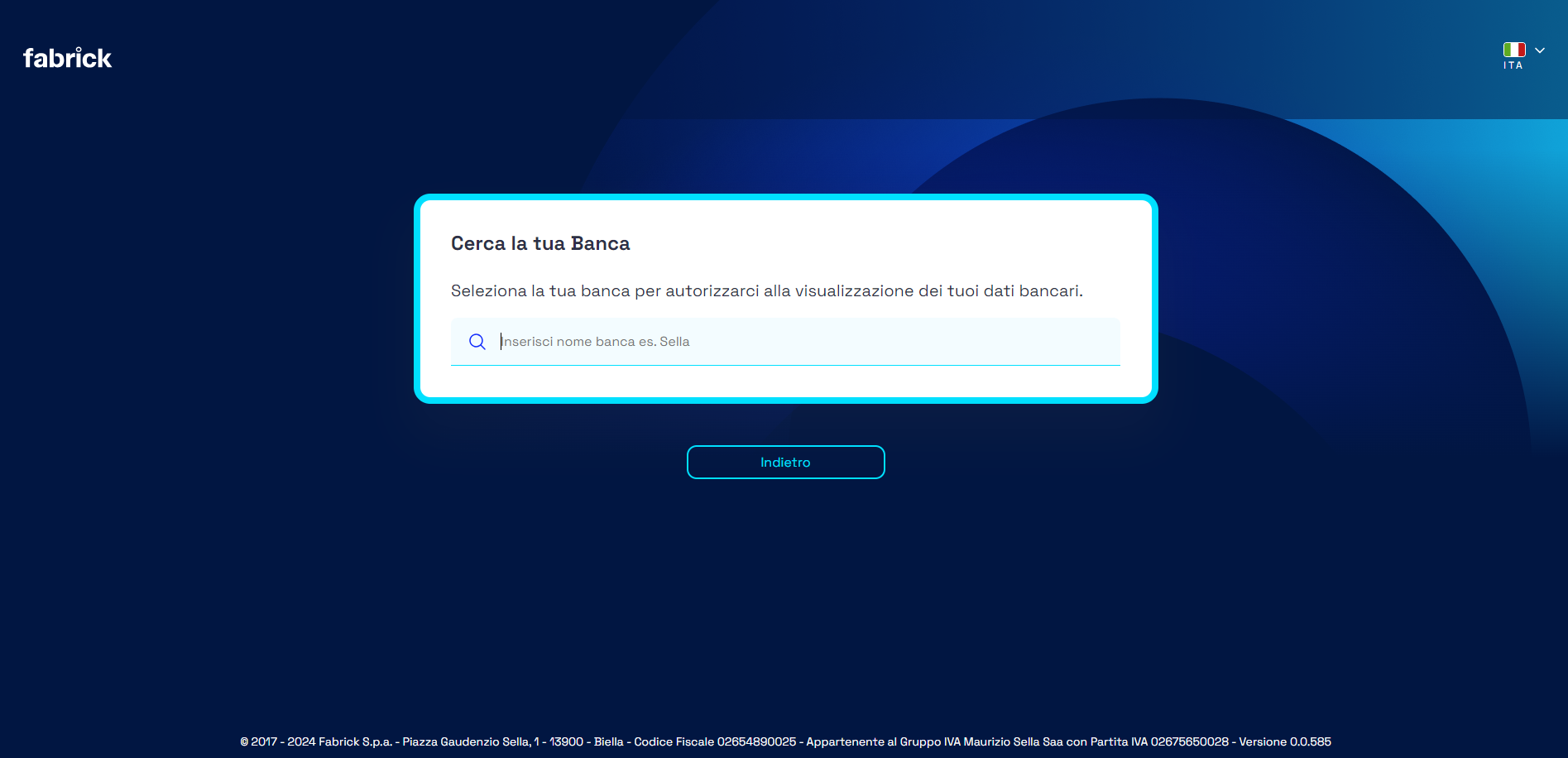
The page on which the PSU will land is shown below:
Once the bank is selected, the PSU will display the following screen
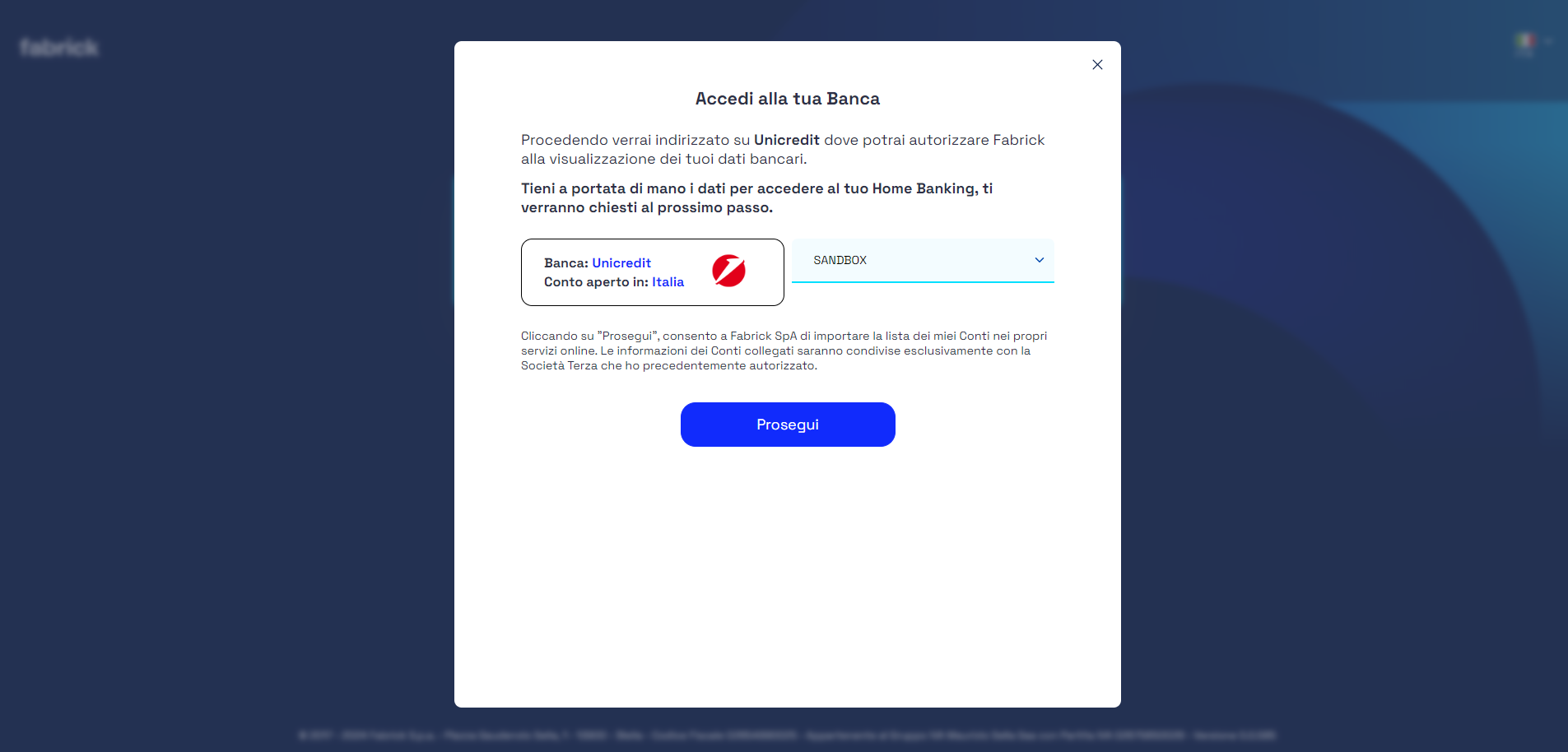
Obviously the choice between SANDBOX and LIVE only appears in the pre-production environment.
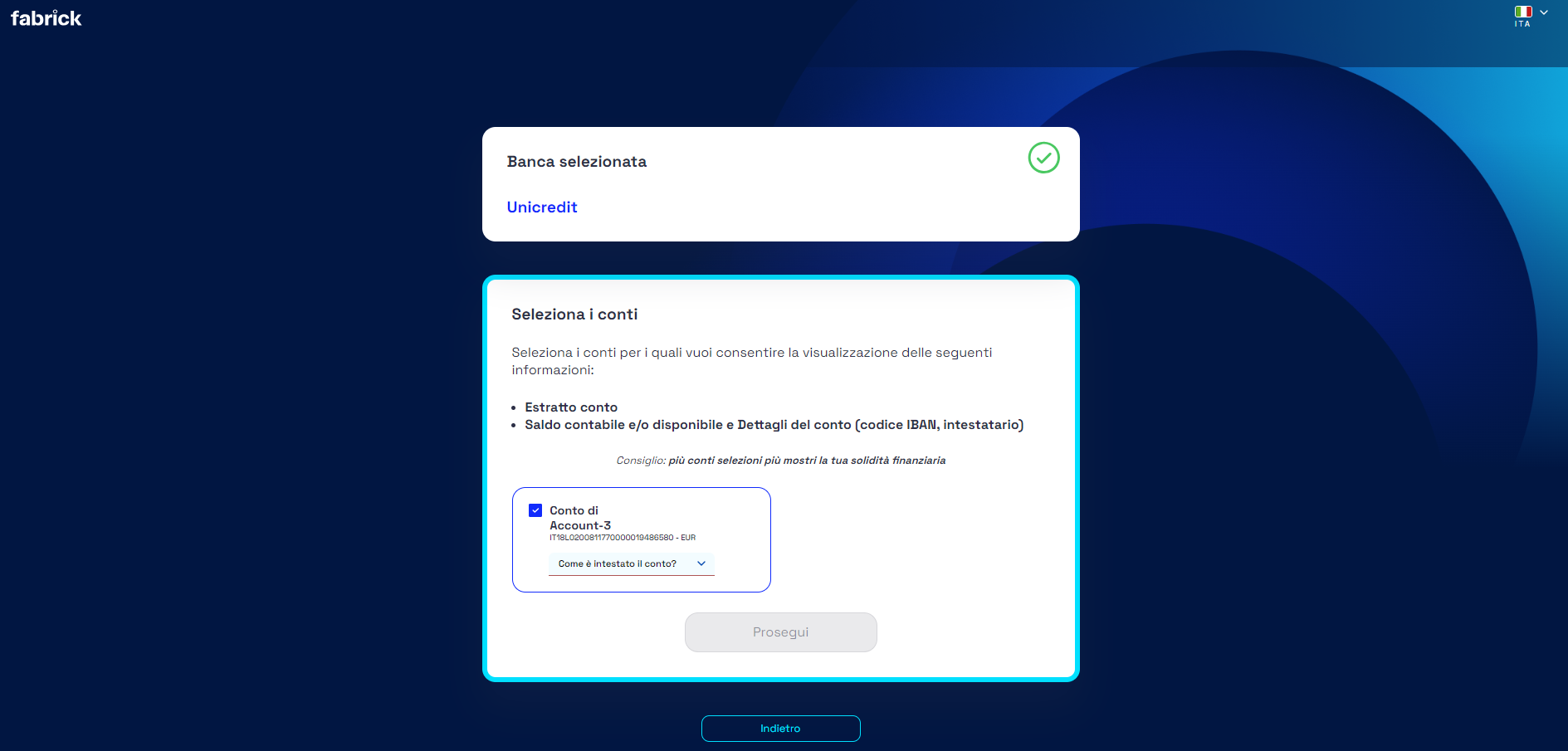
Subsequently the PSU will have to select whether it is the owner or delegate as shown in the following screenshot:
At this point the PSU will arrive at a summary screen:
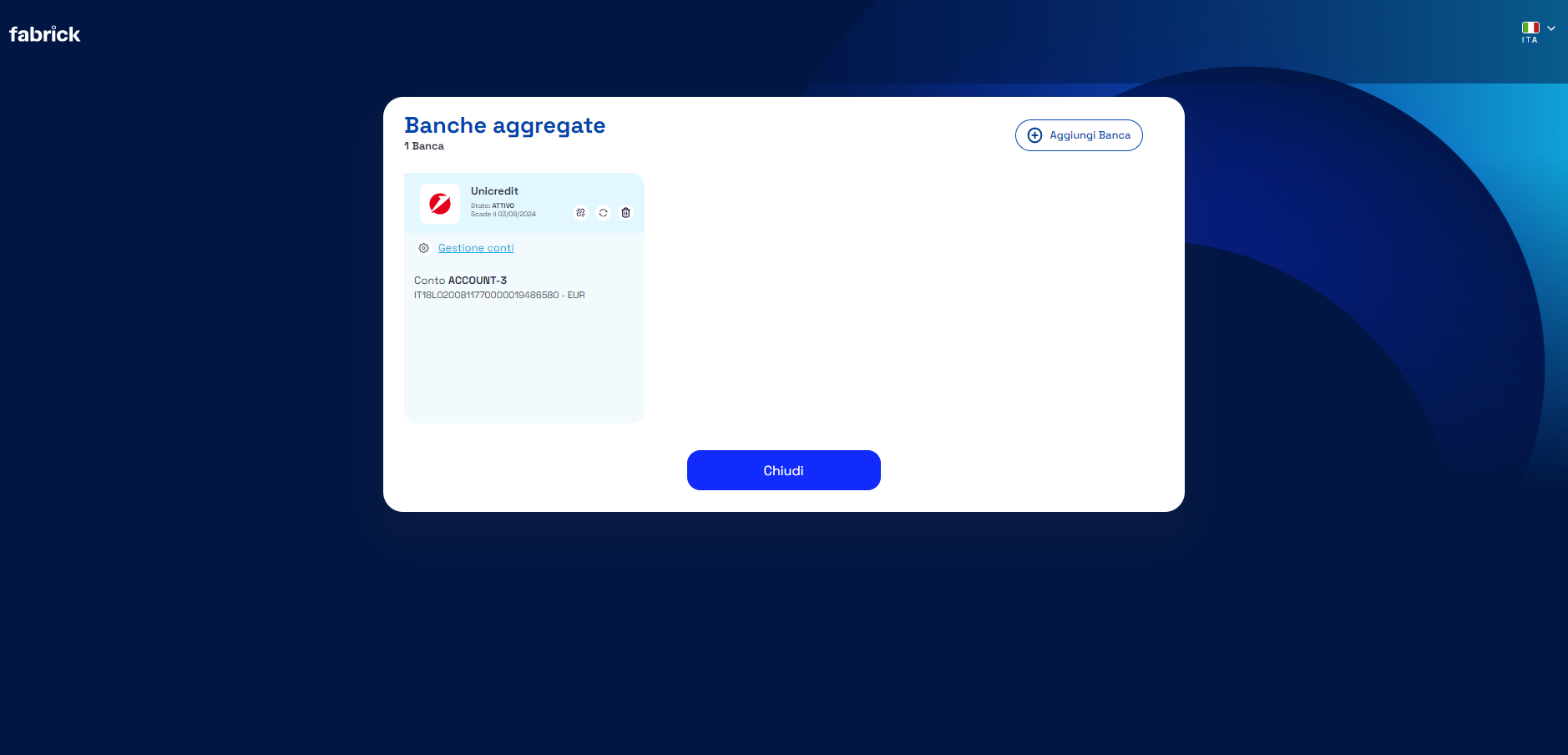
From this page it is possible to carry out all operations relating to aggregate accounts:
Add Bank
This function will start the flow to allow a new aggregation.
Disconnect
This feature will remove the consent, meaning Fabrick will no longer have the ability to update the accounts connected to that consent.
Renew
This function will renew the consent.
Delete
This function will delete the account completely, it will then be necessary to proceed with a new aggregation in case you want to restore the same account. For Fabrick it will always be a new account, it will therefore not be reconciled with the previously deleted one.
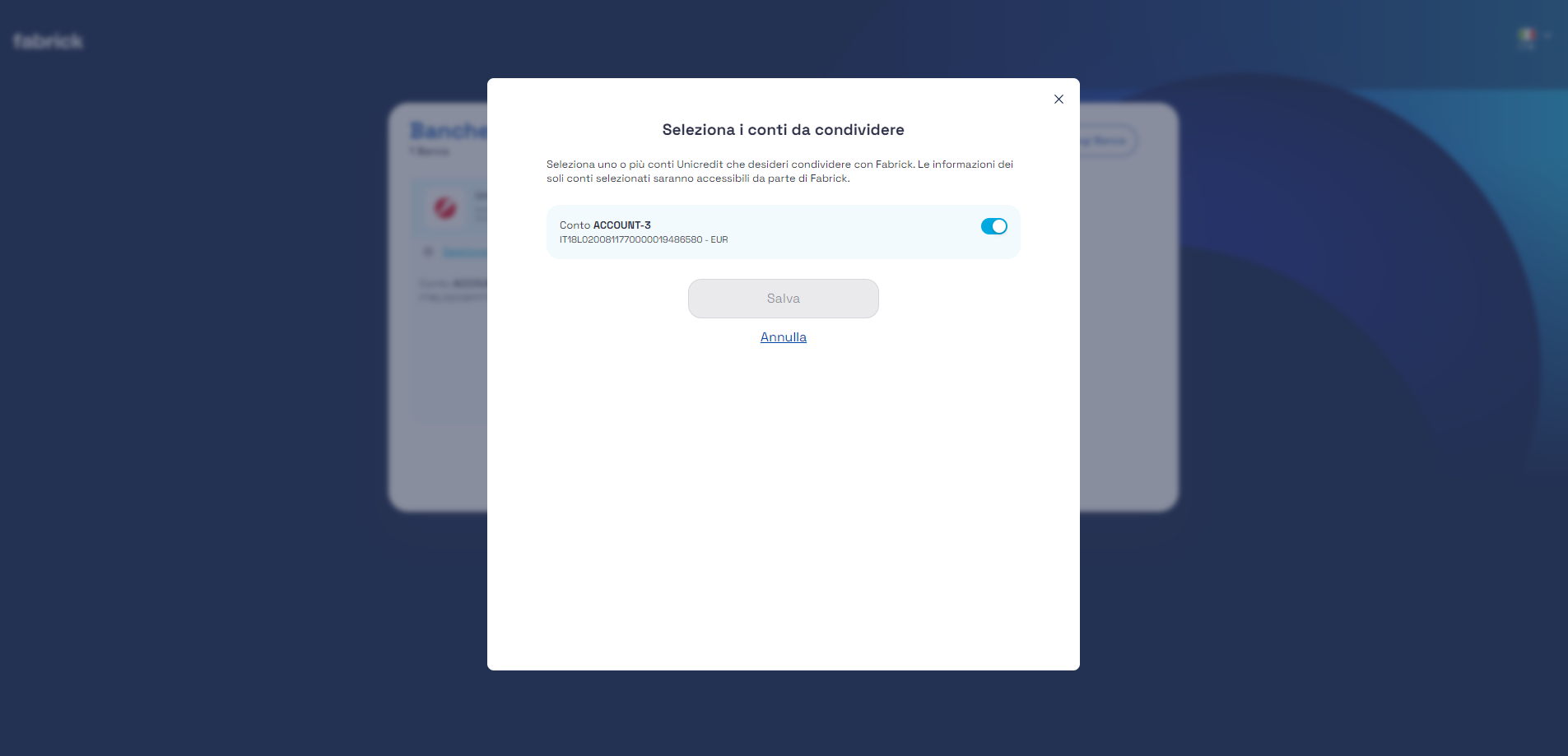
Account Management
This function allows you to select the accounts that will be made visible to the FPP via subsequent APIs.
Get accounts list
Using GET getAccounts it is possible to retrieve the list of aggregated accounts
GET /api/fabrick/pass/v4.0/access/outbound/accounts
For details on the response, see the Accounts details document.
Get balances
Using GET getBalances it is possible to retrieve the list of aggregated accounts
GET /api/fabrick/pass/v4.0/access/outbound/accounts
For details on the response, see the Balances details document.
Get transactions list
Using GET getTransactions it is possible to retrieve the list of aggregated accounts
POST /api/fabrick/pass/v4.0/access/outbound/accounts/transactions/search

{
  "fromDate": "2024-02-07T11:10:18.825Z",
  "toDate": "2024-02-07T11:10:18.825Z",
  "fromCreatedDate": "2024-02-07T11:10:18.825Z",
  "toCreatedDate": "2024-02-07T11:10:18.825Z",
  "offset": 0,
  "limit": 0,
  "sortBy": "string",
  "future": true,
  "accountIds": [
    0
  ],
  "type": "string"
}
For details on the response, see the Transactions details (PFM) document.
Creditors Management
The endpoints that will be illustrated in the following paragraphs will be useful for FPP to manage its creditors. Through the use of the APIs that will be described, it will be possible to:
- Create a new creditor
- Get the creditors list
- Update the creditor information
- Delete a creditor
- View information relating to a single creditor account
Create Creditor
Through the POST createCreditor endpoint it is possible to create a new creditor account as showed in the following sample:
POST /api/fabrick/pass/v4.0/initiate/outbound/creditor-accounts
{
    "account": {
        "currency": "EUR",
        "value": "IT50B0306901000100000002043",
        "valueType": "IBAN"
    },
    "address": {
        "street": "Via Roma",
        "buildingNumber": "1",
        "city": "Milano",
        "postalCode": "20153",
        "countryCode": "IT"
    },
    "bankEnvironment": "SANDBOX",
    "creditorName": "MARIO ROSSI",
    "creditorCode": "INTESA_SANDBOX"
}
The following data can be specified in the call input:
- account: an object that describes the creditor account, with the following parameters:
- currency: the currency of the account
-
- value: the value that identify the account
-
- valueType: the type of the value
- address: an object that describes the creditor address, with the following parameters:
- buildingNumber
- city
- countryCode
- postalCode
- street
- bankEnvironment: it can be LIVE or SANDBOX
- creditorCode: it is the code associated with the account, it can be chosen by the FPP
- creditorName: it is the creditor name
The unique code associated with the user creditorAccountId with the creation datetime (createdDatetime), the last updated datetime (updatedDatetime), the information about the company (companyId and serviceId) and the information entered in the input will be returned.
{
    "status": "OK",
    "payload": {
        "creditorAccountId": 67370,
        "creditorName": "MARIO ROSSI",
        "companyId": 22,
        "serviceId": 1241,
        "creditorCode": "INTESA_SANDBOX",
        "address": {
            "street": "Via Roma",
            "buildingNumber": "1",
            "city": "Milano",
            "postalCode": "20153",
            "countryCode": "IT"
        },
        "createdDatetime": "2023-03-07T13:56:28.028+0000",
        "updatedDatetime": "2023-03-07T13:56:28.028+0000",
        "account": {
            "value": "IT50B0306901000100000002043",
            "valueType": "IBAN",
            "currency": "EUR"
        }
    }
}
Search Creditors
With the POST searchCreditors endpoint you can search the list of your creditors. It is possible to filter by all the parameters of the body request. Below there is an example of the request:
POST /api/fabrick/pass/v4.0/initiate/outbound/creditor-accounts/search

{
    "creditorCode": "INTESA_SANDBOX1"
}
Below there is an example of response where the list with the complete information of the available creditors is shown:
{
    "status": "OK",
    "payload": {
        "list": [
            {
                "creditorAccountId": 67370,
                "creditorName": "MARIO ROSSI",
                "companyId": 22,
                "serviceId": 1241,
                "creditorCode": "INTESA_SANDBOX1",
                "address": {
                    "street": "Via Roma",
                    "buildingNumber": "1",
                    "city": "Milano",
                    "postalCode": "20153",
                    "countryCode": "IT"
                },
                "createdDatetime": "2023-03-07T13:56:28.028+0000",
                "updatedDatetime": "2023-03-07T13:58:26.019+0000",
                "account": {
                    "value": "IT70R0306948420100000000180",
                    "valueType": "IBAN",
                    "currency": "EUR"
                }
            }
        ]
    }
}
Update Creditor Info
The PUT updateCreditor endpoint allows you to update the creditor information. In the path it requires the parameter creditorAccountId, a unique code assigned by Fabrick to the creditor account. For a user it is possible to modify all the following parameters:
In the following sample we will update the creditorCode:
PUT /api/fabrick/pass/v4.0/initiate/outbound/creditor-accounts/{creditorAccountId}

{
    "creditorCode":"INTESA_SANDBOX1"
}
In response you will get all the creditor information:
Delete Creditor
The DEL deleteCreditor endpoint allows you to delete a creditor:
DELETE /api/fabrick/pass/v4.0/initiate/outbound/creditor-accounts/{creditorAccountId}
In the path it requires the parameter creditorAccountId, a unique code assigned by Fabrick to the creditor account.
The response returns the information of the user just deleted.
Account Creditor Details
The GET getCreditorAccount endpoint allows you to view information relating to a single creditor account:
GET /api/fabrick/pass/v4.0/initiate/conf/outbound/white-lists/creditor-accounts/{creditorAccountId}
In the path it requires the parameter creditorAccountId, a unique code assigned by Fabrick to the creditor account.
The information relating to the single creditorAccountId will be output
Payment Flow with UI Fabrick Pass
Fabrick provides its own User Interface to be able to process payments in a transparent way for FPPs. In this case, the FPP will have at its disposal a set of APIs that it can call to switch from its own interfaces to that of Fabrick PASS and proceed with all the steps useful for payment.
Create Payment Workflow
Through the endpoint POST CreatePaymentWorkflow the FPP will have to transmit to Fabrick the useful data to initialize the payment flow and in response it will receive a link where the user will be redirected for payment:
POST /api/fabrick/pass/v4.0/initiate/outbound/payment-requests

{
    "completionRedirectUrls": {
        "onSuccess": "https://www.google.com",
        "onFailure": "https://www.google.com"
    },
    "debtorAccountId": 1202,
    "description": "Utenze",
    "targetAmount": 0.1,
    "targetCurrency": "EUR",

    "creditorAccount": {
        "value": "IT50I0503456841900000000013",
        "valueType": "IBAN",
        "currency": "EUR"
    },
    "creditorAddress": {
        "street": "Via Roma",
        "buildingNumber": "1",
        "city": "Milano",
        "postalCode": "20153",
        "countryCode": "IT"
     },
    "creditorName": "Mario Rossi"
}
The following data can/must be specified in the call input:
-
companyId: unique code assigned by Fabrick to the company
-
completionRedirectUrls: object that contains within the url parameters where the user must be redirected at the end of the workflow:
- onFailure: url in case of error of the procedure
- onSuccess: url in case of success of the procedure
-
creditorAccount: an object that describes the creditor account, with the following parameters:
- currency: the currency of the account
- value: the value that identify the account
- valueType: the type of the value
-
creditorAccountId: unique code assigned by Fabrick to the creditor account
-
creditorAddress: an object that describes the creditor address, with the following parameters. Optional parameter, but required city and countryCode by some banks in the case of a foreign IBAN:
- buildingNumber
- city
- countryCode
- postalCode
- street
-
creditorName: it is the creditor name
-
debtorAccountId: unique code assigned by Fabrick to the account
-
description: a short description
-
fppSubscriptionId: unique code assigned by Fabrick to the subscription of the company
-
paymentCode: optional parameter, can be used by FPP, by entering a code, to be able to reconcile payments. Max length 70 char
-
paymentDurationDays: it is an integer and indicates the link duration in days and it can assume a value between 1 and 30 days
-
serviceId: unique code assigned by Fabrick to the service associated with the company
-
targetAmount: the amount of the payment (in whole or decimal format)
-
targetCurrency: the currency of the payment according to the ISO 4217 Alpha 3 model, for example EUR
NOTE: se both creditorAccountId and creditorAccount are present in the request, the match entered when creating the debtor must be exact.
Below there is an example of response:
{
    "status": "OK",
    "payload": {
        "paymentRequestId": "c2a0b01d-0624-44d9-a766-82491bcfd6e2",
        "status": "WORK_IN_PROGRESS",
        "createdDatetime": "2023-03-07T15:11:02.769+0000",
        "initiationRedirectUrl": "https://agata-fabrick-fabrick.dmz.tst/web/fabrick/pass/v4.0/payment-request-outbound/c2a..."
    }
}
The following information is available in the payload:
- createdDatetime: the moment when the workflow was created
- paymentRequestId: Unique id of the initialized workflow (not to be confused with the paymentId) represents the code of the user's authorization workflow towards the Fabrick Pass UI.
- status: status of the workflow (see Workflow status document)
- initiationRedirectUrl: the url that redirect the PSU to the Fabrick page to proceed with the payment
At the time of the creation the displayed status will be WORK_IN_PROGRESS. The other statuses having been completed can be displayed on the endpoint GET payment-requests
Step UI Fabrick Pass
When the user is redirected to the Fabrick Pass UI, the following steps will be performed:
- Transactional Data Summary: the PSU is redirected to the Fabrick web page (co-brended FPP) where it displays the payment information. This information cannot be changed in any way by the customer. On this screen it will be possible to customize a series of elements such as the title, the sub-title and any description of the service that FPP makes available to the user. These elements must be communicated to Fabrick who will proceed with the change of the display elements. With reference to the other screens, only the title chosen by the FPP will be shown.
- Type of payment selection: the PSU select the type of payment, that can be sepa-credit-transfers or instant-sepa-credit-transfers
- SCA: Fabrick redirects the PSU to the website of the Account Rooting Institute to perform the SCA and authorize the payment.
- Operation outcome: the PSU finally returns to the FPP application where it displays the operation's result.
Payment Details
Through the endpoint GET getPayment the FPP will be able to get the information relating to the payment flow:
GET /api/fabrick/pass/v4.0/initiate/outbound/payment-requests/{paymentRequestId}
In the path it requires the parameter paymentRequestId, a unique code assigned by Fabrick to the initialized workflow. Please refer to the document Pisp Details for more details.
Payment Status VS Workflow status
At the end of the payment workflow in response to the GET getPayment, information regarding the status of the workflow and payment will be displayed:
{
    "status": "OK",
    "payload": {
        ...
        "status": "WORK_IN_PROGRESS",
        ...
        "payment": {
            ...
            "pispStatus": "AUTHENTICATED",
            ...
        }
    }
}
The Workflow status (payload.status) concerns graphic elements and user UX (see Workflow details doc); the Payment Status (payload.payment.pispStatus) gives indications on the actual payment.
Payment status is the element to be considered the most. If the payment object is present we suggest to ignore totally the workflow status.
For example a user could close the browser to authorize the payment through his own smartphone, in this case the workflow status will remain in WORK_IN PROGRESS, but the payment was successfully authorized.
What se the payment object is missing? In this case the payment was never initialized and then the workflow can be canceled or waiting for it to expire automatically.
For detailed information about the payment statuses and their relative meaning, it is possible to consult the FabrickPassPisp documentation.
Deepening
In terms of completeness of the documentation, we report the expected behavior. After 1h from the creation of a workflow, se this has not yet reached a final state, it will be forced according to the following rules:
-
will be set to EXPIRED se the payment is RECEIVED
-
will be set to COMPLETED_SUCCESS se the payment is PENDING or EXECUTED
-
will be set to COMPLETED_FAILURE se the payment is REJECTED or CANCELED
Once the workflow has a final state it cannot change anymore. For example, se after three hours the payment changes status passing from RECEIVED to EXECUTED, the workflow will still remain in EXPIRED.
Utilities APIS
Fabrick also exhibits validation services for individual payment data, thus giving the FPP the possibility to carry out checks before initializing the actual payment phase creating a dynamic and pre-filled UI. The advantage is to prevent possible errors by users giving the possibility of immediately identifying the reason. For details see Payment Details document.