Non-Payment Authentication (NPA)
Non-Payment Authentication (NPA) is a 3D Secure 2 authentication flow (3DS2) that allows merchants to verify the cardholder and save the data without charging the card.
Unlike a traditional payment, where 3DS authentication and the financial transaction occur simultaneously, with NPA the process is limited to the authentication phase alone.
The result is an authenticated card token that can be used for subsequent transactions (e.g., recurring payments or one-click payments).
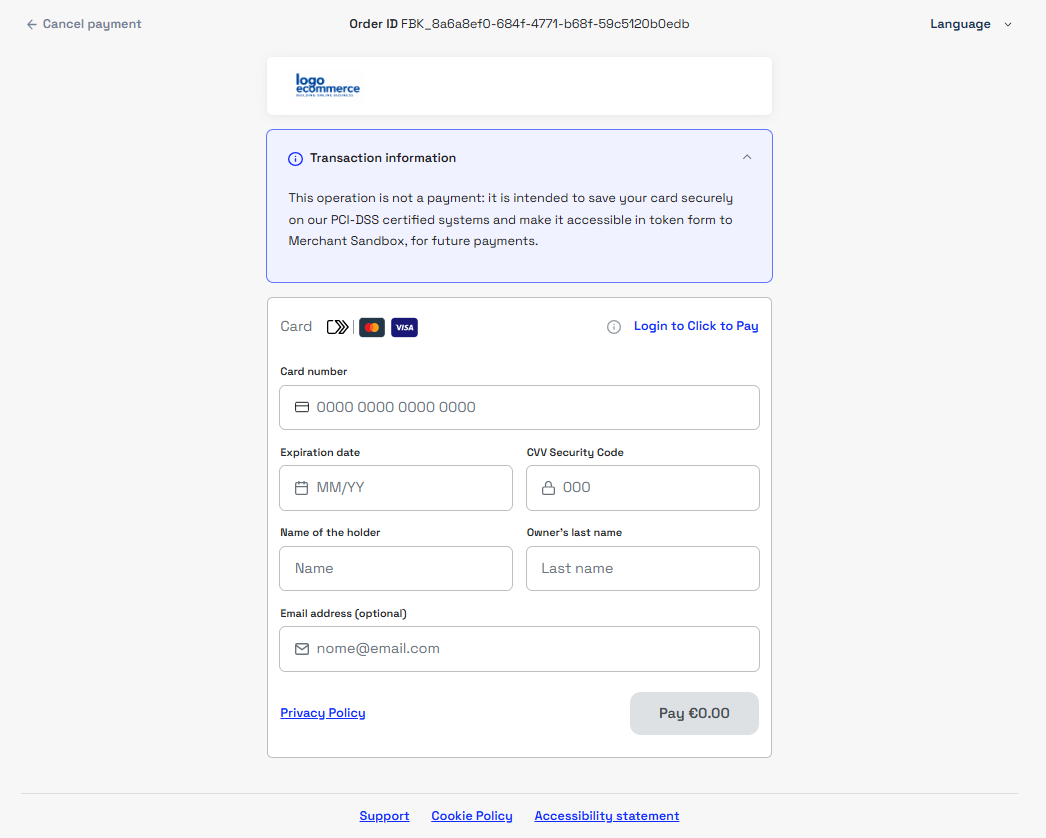
NPA is recommended in the following scenarios:
- Card tokenization during registration, prior to a purchase
- Cardholder verification without requesting a payment
The NPA flow does not generate any financial transactions.
To make a payment, you must initiate a new transaction.
Backoffice Configuration
To receive 3DS authentication details at the end of the transaction, you must enable the ThreeDS field in the Gestpay backoffice.
Without this configuration, NPA transactions will function correctly but will not return 3DS information.
Configuration path: Payment Page → Fields & Parameters → ThreeDS
Available settings:
- No Display → integrations that do not use the Fabrick payment page
- Payment Page → integrations that use the Fabrick payment page

For both configurations, you must enable the threeDS field in the Fields & Parameters section.

Integration Flow
The NPA flow is supported by all integration types offered by Fabrick.
Supported Integrations
Initializing the NPA Request
To initiate an NPA flow, you must make a payment/create call on the server side, setting the following parameters:
amountto0to avoid charging any amount.transDetails.typeset toNPAto instruct the system to process the transaction as authentication onlypaymentTypeset to[“CREDITCARD”]to instruct the system to display only the credit card form on the payment page.requestTokenset toMASKEDPAN.
The paymentType parameter is not required in API Only integrations, where the card form is managed directly by the merchant.
The requestToken parameter allows you to obtain a token for the authenticated card to be used for future transactions.
See Tokenizzazione.
Request
POST /api/v1/payment/create
Host (sandbox): sandbox.gestpay.net
Host (production): ecomms2s.sella.it
Authorization: apikey ****************
Content-Type: application/json
{
  "shopLogin": "GESPAY12345",
  "amount": "0", //no charge
  "currency": "EUR",
  "shopTransactionID": "FBK_OrderID",
  "paymentType": ["CREDITCARD"], //display card information entry page
  "requestToken": "MASKEDPAN", //card token request
  "transDetails": {
    "type": "NPA" //authentication-only transaction
}
Response
{
  "error": {
    "code": "0",
    "description": "request correctly processed"
  },
  "payload": {
    "paymentToken": "d3026f8c-88e3-4862-a962-c0fa29e0f266",
    "paymentID": "2423879934511",
    "userRedirect": null,
    "qrCode": null
  }
}
3DS Authentication Process
For all hosted integrations, the authentication phase is handled directly by Fabrick.
In API-only integrations, the merchant must manually handle the authentication phase by redirecting the buyer to the URL returned after the card data is submitted.
After the card data is submitted, the system returns error 8006 in the payload.transactionErrorCode field, indicating that buyer authentication must be completed.
The authentication URL is available in the payload.userRedirect.href field.
Transaction Details
At the end of the flow, Fabrick returns the authentication result and the card token.
For more details, see the section Transaction Details and Payment Notification of the integration specification used
To verify the complete authentication details, you can use the GET payment/detail endpoint, passing the paymentID.
Request
GET /api/v1/payment/detail/{paymentID}
Host (sandbox): sandbox.gestpay.net
Host (production): ecomms2s.sella.it
Authorization: apikey ****************
Content-Type: application/json
Response
{
    "error": {
        "code": "0",
        "description": "request correctly processed"
    },
    "payload": {
        "transactionType": "detail",
        "transactionResult": "AUTHENTICATED",
        "transactionState": "",
        "transactionErrorCode": "",
        "transactionErrorDescription": "",
        "bankTransactionID": "1318",
        "shopTransactionID": "",
        "shopTransactionID_2": "",
        "authorizationCode": "",
        "paymentID": "",
        "currency": "",
        "country": "",
        "company": "",
        "tdLevel": "",
        "threeDS": {
            "authenticationResult": {
                "authenticationLevel": "2C",
                "authenticationStatus": "Y",
                "authStatusReason": "",
                "challengeResultTransStatus": "",
                "XID": "87dc52d7-a059-4afa-8763-bf4a86e3ede9",
                "AV": "MTIzNDU2Nzg5MDA5ODc2NTQzMjE=",
                "ECI": "05",
                "AVAlgorithm": "",
                "threeDsVersion": "2.1.0"
            },
            "transDetails": {
                "authData": "",
                "authMethod": "02",
                "authTimeStamp": "202504281041",
                "acsID": "bc7007fe-45fc-471d-999e-d6111951999e"
            }
        },
        "events": null,
        "buyer": null,
        "risk": null,
        "customInfo": null,
        "alertCode": "",
        "alertDescription": "",
        "cvvPresent": "",
        "dcc": null,
        "maskedPAN": "",
        "paymentMethod": "",
        "productType": "",
        "token": "40G5KMXUQQ613101",
        "tokenExpiryMonth": "05",
        "tokenExpiryYear": "27",
        "tokenDetails": {
            "TokenValue": "40G5KMXUQQ613101",
            "TokenExpiryMonth": "05",
            "TokenExpiryYear": "27",
            "TokenProvider": "AXERVE",
            "CardDetails": {
                "CardSuffix": "3101",
                "CardExpiryMonth": "05",
                "CardExpiryYear": "27",
                "CardHolderName": null
            },
            "CardAssets": {
                "CardArt": {
                    "Type": null,
                    "MediaContents": null,
                    "Height": null,
                    "Width": null
                },
                "BrandLogo": {
                    "Type": null,
                    "MediaContents": null,
                    "Height": null,
                    "Width": null
                }
            }
        },
        "fraudPrevention": null,
        "automaticOperation": null
    }
}
In the response, the fields relevant to an NPA flow are:
| Field | Description |
|---|---|
transactionResult | Authentication result: AUTHENTICATED / DECLINED |
threeDS.authenticationResult.authenticationLevel | 3DS authentication level |
threeDS.authenticationResult.authenticationStatus | Authentication status |
threeDS.authenticationResult.authStatusReason | Result reason code |
threeDS.authenticationResult.ECI | Electronic Commerce Indicator, populated only in case of a positive result |
tokenDetails.TokenValue | Card token |
tokenDetails.TokenExpiryMonth / tokenDetails.TokenExpiryYear | Token expiration |
NPA transactions with a negative result return transactionResult: “DECLINED” and provide the error details in the authenticationStatus and authStatusReason fields.
Authentication Details and Error Handling
authenticationLevel
The authenticationLevel field indicates the type of 3DS authentication flow applied to the transaction
| Value | Description |
|---|---|
1H | 3DS 1.0 half — Partial 3DS 1.0 authentication. |
1F | 3DS 1.0 full — Full 3DS 1.0 authentication. |
2F | 3DS 2.0 frictionless — 3DS 2.0 authentication without buyer interaction. |
2C | 3DS 2.0 challenge — 3DS 2.0 authentication with challenge completed by the buyer. |
2E | 3DS 2.0 exemption — 3DS 2.0 authentication with exemption applied. |
OL | One leg — Transaction processed as a one-leg transaction; authentication not required. |
TR | External TRA — Transaction processed as an external Transaction Risk Analysis (TRA). |
NA | No authentication — No authentication performed. |
authenticationStatus
The authenticationStatus field indicates the outcome of the authentication.
| Value | Description |
|---|---|
Y | Frictionless — the issuer has successfully authenticated the buyer without requiring any explicit interaction. Authentication is considered successfully completed, and the transaction may proceed. |
C | Challenge — the issuer requires verification of the buyer. The buyer must complete authentication via the challenge, using the URL provided in the payload.userRedirect.href field. The outcome of the transaction will depend on the result of the challenge. |
N | Not Authenticated — the issuer decides not to grant buyer authentication based on its own risk assessments. In this scenario, the challenge phase is not initiated, as authentication is not authorized by the issuer. The transaction therefore ends with a negative outcome. |
U | Authentication Could Not Be Performed — authentication cannot be performed due to a technical error at the Directory Server (DS) or Access Control Server (ACS). From the transactional flow perspective, the outcome is handled as N. |
A | Attempted to Authenticate — authentication was attempted but not completed (e.g., due to technical or channel limitations), while allowing the process to continue. The result is treated as Y for the purposes of the flow and liability. |
R | Rejected — the issuer explicitly rejects the authentication request. Authentication is not completed, and the result is handled as N, resulting in a failed transaction. |
authStatusReason
The authStatusReason field specifies the reason for the result returned by the issuer or the ACS. If authenticationStatus: N or U, this field provides a numeric code that identifies the specific cause of the rejection or the inability to authenticate.
| Code | Description |
|---|---|
01 | Card authentication failed |
02 | Unknown Device |
03 | Unsupported Device |
04 | Exceeds authentication frequency limit |
05 | Expired card |
06 | Invalid card number |
07 | Invalid transaction |
08 | No Card record |
09 | Security failure |
10 | Stolen card |
11 | Suspected fraud |
12 | Transaction not permitted for cardholder |
13 | Cardholder not enrolled in service |
14 | Transaction timed out at the ACS |
15 | Low confidence |
16 | Medium confidence |
17 | High confidence |
18 | Very High confidence |
19 | Exceeds ACS maximum challenges |
20 | Non-Payment transaction not supported |
21 | 3RI transaction not supported |
22 | ACS technical issue |
23 | Decoupled Authentication required by ACS but not requested by 3DS Requestor |
24 | 3DS Requestor Decoupled Max Expiry Time exceeded |
25 | Decoupled Authentication was provided insufficient time to authenticate cardholder |
26 | Authentication attempted but not performed by the cardholder |
27 | Preferred authentication method not supported |
28–79 | Riservati per uso futuro EMVCo (valori non validi fino a definizione EMVCo) |
80–99 | Riservati per uso del Directory Server (DS) |
Below is an example of a payment/detail response with a negative result DECLINED, in which transactionErrorCode and transactionErrorDescription are empty and the cause of the error can be determined from authenticationStatus and authStatusReason:
Request
GET /api/v1/payment/detail/{paymentID}
Host (sandbox): sandbox.gestpay.net
Host (production): ecomms2s.sella.it
Authorization: apikey ****************
Content-Type: application/json
Response
{
  "error": {
    "code": "0",
    "description": "request correctly processed"
  },
  "payload": {
    "transactionType": "detail",
    "transactionResult": "DECLINED",
    "transactionState": "",
    "transactionErrorCode": "",
    "transactionErrorDescription": "",
    "threeDS": {
      "authenticationResult": {
        "authenticationLevel": "2C",
        "authenticationStatus": "N",
        "authStatusReason": "19",
        "XID": "29797f4c-52c7-404e-8ce5-6e17d946e38d",
        "AV": "",
        "ECI": null,
        "threeDsVersion": "2.1.0"
      },
      "transDetails": {
        "authMethod": "02",
        "authTimeStamp": "202504281129",
        "acsID": "96be2efb-3f2d-49c5-93f5-c8d7e9ec0107"
      }
    },
    "token": "40G5KMXUQQ613101",
    "tokenExpiryMonth": "05",
    "tokenExpiryYear": "27"
  }
}
In this example, authenticationLevel: “2C” indicates that the 3DS2 with challenge flow was requested for the transaction; this value describes the type of flow, not the outcome of the authentication.
authenticationStatus: “N” indicates that authentication was denied, while authStatusReason: ‘19’ specifies the cause “Exceeds ACS maximum challenges” — the maximum number of challenges allowed by the ACS has been exceeded.