Fabrick Guaranteed Payments
Fabrick Guaranteed Payments is an end-to-end fraud prevention solution for online merchants that uses an artificial intelligence system to assess the risk level of transactions (Powered by Riskified). Additionally, in the event of fraud, the merchant is entitled to reimbursement for the dispute incurred on transactions initially approved by Fabrick Guaranteed Payments. When a merchant joins the Fabrick Guaranteed Payments protection program, they can choose between two operating modes:
- Shop Protection: in this mode all transactions are sent to Fabrick Guaranteed Payments for evaluation.
- Select & Submit: it is possible to choose to evaluate only certain transactions considered suspicious. It is still necessary to send all transaction data to Fabrick Guaranteed Payments and specify which transactions should be reviewed by setting the
SubmitForReviewflag to1.
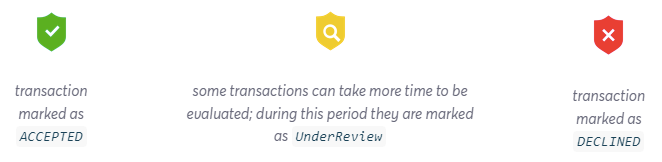
Based on this data, Fabrick Guaranteed Payments returns a risk response (ACCEPTED, DECLINED, UnderReview).
The risk indicator for each analyzed transaction is shown in the Back Office Active Report with a green, red, or (in rare cases) yellow shield.
The merchant can decide whether to proceed with the transaction based on the response, but is not required to follow the evaluation result. For example, it is possible to proceed with a transaction that has a DECLINED outcome.
Fabrick Guaranteed POST and Fabrick Guaranteed PRE
The service can also be integrated in post-authorization or pre-authorization mode:
-
Post-authorization mode: offers greater analysis accuracy. In this case, the fraud prevention system is not bound by strict time constraints and can therefore return the most accurate prediction of the order's risk. This mode is recommended when applicable. With this integration, the average response times of Fabrick Guaranteed Payments are less than 3 seconds. In rare cases, processing times may be longer: during this period the transaction is marked as
UnderReview. Only authorized transactions are analyzed (and can receive an outcome from the service). -
Pre-authorization mode: is optimized to provide faster response times and is ideal for scenarios where payments must be completed with capture performed simultaneously with authorization. With this integration, transactions rejected by the service will not be authorized.
The service is available upon request by contacting your commercial representative. You will be asked for some materials to enable the service, there will be a test period, and once in production, there will be a one- or two-week period called Shadow mode, during which the service outcome should not be taken into consideration.
Reimbursement for Fraudulent Transactions
The service allows you to request reimbursement for transactions approved by the service that subsequently result in a fraud dispute. To open a reimbursement case, you must:
- Send, within 7 days of the chargeback date (for fraud-type disputes only), an email to frodi@fabrick.com with the subject: "Reimbursement request - ShopLogin - BankTransactionID"
ShopLogin is the Fabrick code through which the transaction was processed. BankTransactionID is the unique numeric code that Fabrick assigns to each transaction.
-
The email must include the following completed template and:
-
Proof of delivery (POD), in PDF format named "ShopLogin_BankTransactionID" (e.g. 9000001_321.pdf). Or alternatively
-
A valid tracking number and the carrier's full name.
-
The frodi@fabrick.com mailbox handles exclusively "reimbursement for fraudulent transactions" cases and, upon request, provides further information on the outcome returned by the service. For dispute management, please contact your reference acquirer.
A reimbursement request may, exceptionally, be rejected. For example, as stated in the contract:
"To allow the merchant to benefit from the reimbursement, the shipping address shown on the proof-of-delivery document must match the address shown in the order that was submitted for evaluation by the Service. Fabrick will not reimburse if the shipment was sent to a different address, if it was re-routed to a different address, including any pick-up facility
of postal offices. Fabrick recommends that the merchant does not authorize re-routing of the shipment to their freight forwarders."
How to Implement Fabrick Guaranteed Payments
Fabrick Guaranteed Payments requires:
- Installing the user tracking snippet called Store Front Beacon. It can be installed on both a website and a mobile app.
- Sending the
session_idacquired from the script to Fabrick Payment Orchestra via the related web service.
Supported Integrations
Installing Store Front Beacon
On a Web Page
Store Front Beacon is a code snippet inserted in the pages of the online store. It is important that the code is placed in the header or footer of the site so that information is collected from every page. It is loaded asynchronously and does not affect page load times.
Implementation steps:
- Copy the JavaScript snippet below and replace the highlighted variables:
- Store Domain: agreed identifier used to identify the merchant
- Session ID: unique identifier created when a user lands on the site. It must be created at the beginning of the user's visit to the store, not when the cart is created.
- Note: the Session ID must also be sent to Fabrick Payment Orchestra in the
OrderDetails.FraudPrevention.BeaconSessionIDfield.
- Note: the Session ID must also be sent to Fabrick Payment Orchestra in the
- Paste the beacon JavaScript snippet into the site's HTML.
<script type="text/javascript">
//<![CDATA[
(function() {
  function riskifiedBeaconLoad() {
    var store_domain = '<YOUR DOMAIN>';
    var session_id = 'SESSION ID GOES HERE - as passed to Order->cart_token';
    var url = ('https:' == document.location.protocol ? 'https://' : 'http://')
      + "beacon.riskified.com?shop=" + store_domain + "&sid=" + session_id;
    var s = document.createElement('script');
    s.type = 'text/javascript';
    s.async = true;
    s.src = url;
    var x = document.getElementsByTagName('script')[0];
    x.parentNode.insertBefore(s, x);
  }
  if (window.attachEvent)
    window.attachEvent('onload', riskifiedBeaconLoad)
  else
    window.addEventListener('load', riskifiedBeaconLoad, false);
})();
//]]>
</script>
For additional details on the Store Front Beacon integration and configuration, the complete technical documentation is available at the following link.
Single Page Applications (SPA)
Store Front Beacon supports sites whose content is loaded dynamically without a traditional full page reload. To track dynamically loaded content as distinct pageviews, send a pageview hit to the Beacon and specify the page name as a String parameter.
RISKX.go('/new-page')
For Single Page Applications that may need to change the Session ID value (due to user inactivity, for example), specify the newly generated Session ID as a String parameter.
RISKX.go(url) // sends a beacon reading using the session ID defined in the initial script
RISKX.setSid('newSessionID') // updates the session ID
RISKX.go(url) // sends a beacon reading using the new session ID
For additional details on the Store Front Beacon integration and configuration, the complete technical documentation is available at the following link.
On a Mobile App
SDK available for iOS and Android. Integration details and technical documentation are available at the following link.
Sending Transaction Data to Fabrick Payment Orchestra
Once enabled, you need to send cart and buyer details in the OrderDetails section of our APIs.
The fields to populate (with Required/Recommended/Optional indication and constraints such as sizes and accepted values) are described here: api.gestpay.it/#orderdetails.
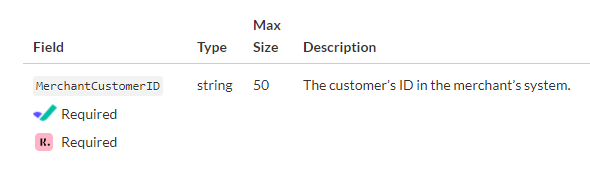
Constraints must be respected, so it is recommended to add field validations before sending them.
Separating Authorization and Capture
It is recommended to separate the authorization and capture (settlement) of the transaction, configurable from the Gestpay Merchant Back Office (MBO).
- Authorization: reserves funds on the buyer's account/card.
- Capture: charges the reserved funds.
- Cancellation: releases the reserved funds.
Configuration:
Gestpay MBO -> Configuration > Environment > M.O.T.O.
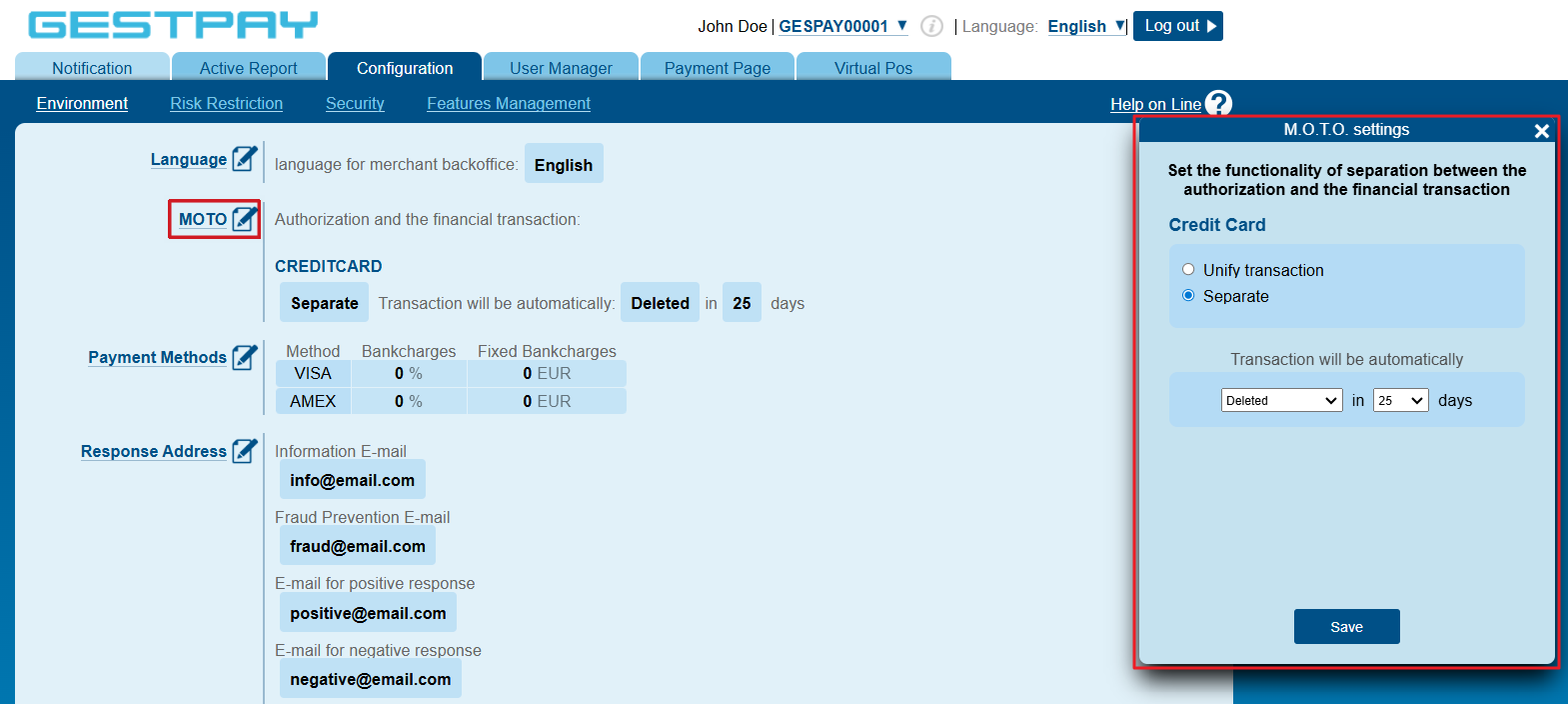
From MBO it is possible to separate capture from authorization by setting an automatic behavior that captures or cancels the transaction within x days from the authorization date. The maximum configurable delay is 25 days (Banca Sella), but you need to verify with your acquirer what the actual authorization duration is.
During this time window it is still possible to capture or cancel the transaction via API or manually from the Dashboard.
For cancellation requests, you must indicate the reason in the cancelReason field (e.g. "Out of stock" or "Suspected Fraud").
Service Outcome
To obtain the final score (i.e., the values of RiskResponseCode and RiskResponseDescription), you need to use a transaction read call:
When using the post-authorization version, since the service is asynchronous, notifications and responses to authorization calls may have RiskResponseCode and RiskResponseDescription populated with a temporary outcome.
In most cases, the outcome is updated within 3 seconds.
Possible values for riskResponseCode:
| Value | Description |
|---|---|
| submitted | The transaction is under review |
| declined | Transaction not approved by Fabrick Guaranteed Payments |
| created | The transaction was received by Fabrick Guaranteed Payments |
| captured | Only for Select&Submit, returned for transactions not flagged for review |
| approved | Transaction approved by Fabrick Guaranteed Payments |
| other | Error returned by Fabrick Guaranteed Payments |
Testing Fabrick Guaranteed Payments in Sandbox
In Sandbox you can test various scenarios using the card 4775718800002026 and providing one of the following email addresses in the field:
{
  ...
  "OrderDetails": {
    ...
    "CustomerDetail": {
      ...
      "PrimaryEmail": "",
      ...
    }
    ...
  }
  ...
}
| Final outcome | |
|---|---|
| test@approve.com or any | ACCEPTED |
| test@decline.com | DECLINED |
Test scenarios are not valid for Fabrick Advice
Before proceeding with production activation, you will need to send Fabrick some tests on standard scenarios.
Below are some examples:
- Transaction authorized and approved by the service, then captured.
- Transaction authorized and approved by the service, then cancelled.
- Transaction authorized and rejected by the service, then cancelled.
Execute and document all possible scenarios, always verifying that the sum of items and shipping costs, net of any discounts, corresponds to the amount sent for authorization. For example, for merchants who sell both physical goods and digital products, a transaction including both types of items must be executed. It is also useful to place orders with a shipping address different from the billing address to cover this verification scenario as well.
Payload and Usage Scenarios
During implementation, it is strongly recommended to refer to orderdetails, which describes the field constraints. The amount requested for authorization must match what is present in OrderDetails, and it is important to pass the buyer's IP address in the clientIP field as shown in the examples.
The post-payment-create call is common to all integration modes.
Below are some example request bodies for specific scenarios (e.g. goods, travel, accommodation, etc.).
Depending on the integration adopted or the features used, it may be necessary to add additional fields.
For example, to generate a link via create, you need to include:
{
...
  "paymentChannel": {
    "channelType": ["LINK"]
  }
...
}
Goods
POST payment/create
Request
POST /api/v1/payment/create
Host (sandbox): sandbox.gestpay.net
Host (production): ecomms2s.sella.it
Authorization: apikey ****************
Content-Type: application/json
{
   "shopLogin":"GESPAY12345",
   "amount":"19.52",
   "currency":"EUR",
   "shopTransactionID":"OrderID_001",
   "clientIP":"213.218.53.171",
  "OrderDetails":
    {
       "FraudPrevention": {
          "SubmitForReview": "1",
          "Source": "web",
          "SubmissionReason": "rule_decision",
          "BeaconSessionID": "0ab076e5-632739d7-0f55cf66-a11ce4b7",
          "VendorID": "",
          "VendorName": ""
       },
       "CustomerDetail": {
          "FirstName": "Luther",
          "Lastname": "Hargreeves",
          "PrimaryEmail": "test@approve.com",
          "VerifiedEmail": "false",
          "MerchantCustomerID": "Buyer0711",
          "CreatedAtDate": "2017-13-16 15:28"
       },
       "ShippingAddress": {
          "FirstName": "Katniss",
          "Lastname": "Everdeen",
          "StreetName": "Via Castello, 52",
          "CountryCode": "IT",
          "State": "Biella",
          "StateCode": "BI",
          "City": "Ronco Biellese",
          "ZipCode": "13848",
          "PrimaryPhone": "0152434640"
       },
       "BillingAddress": {
          "FirstName": "Eleanor",
          "Lastname": "Shellstrop",
          "StreetName": "Via dei Ponderanesi, 2",
          "CountryCode": "IT",
          "State": "Biella",
          "StateCode": "BI",
          "City": "Ponderano",
          "ZipCode": "13875",
          "PrimaryPhone": "0152434640"
       },
       "ProductDetails": [
          {
             "ProductCode": "94711",
             "SKU": "18SK",
             "Name": "SOCKS",
             "Quantity": "2",
             "Price": "4",
             "Type": "physical",
             "RequiresShipping": "true",
             "Category": "Clothing",
             "SubCategory": "Socks",
             "Brand": "UAClothes"
          },
          {
             "ProductCode": "94718",
             "SKU": "27SK",
             "Name": "SWEATSHIRT",
             "Quantity": "1",
             "Price": "5",
             "Type": "physical",
             "RequiresShipping": "true",
             "Category": "Clothing",
             "SubCategory": "Shirt",
             "Brand": "UAClothes"
          },
          {
             "ProductCode": "883",
             "SKU": "Giftcard883",
             "Name": "Giftcard_5",
             "Quantity": "1",
             "Price": "5",
             "Type": "digital",
             "RequiresShipping": "false",
             "DigitalGiftCardDetails":{
                    "SenderName": "Luther Hargreeves",
                    "DisplayName": "Percy Jackson",
                    "GreetingMessage": "Congratulations! This should help with the honeymoon.",
                    "Recipient":{
                        "Email": "test@approve.com",
                        "Phone": "3491234568"
                    }
                }
            }
       ],
        "ShippingLines": [
          {
            "Price": "9.52",
            "Title": "DHL Express Ship EUROPE",
            "Code": "72-B03"
          }
        ],
       "DiscountCodes": [
            {
                "Amount": "8",
                "Code": "Winter"
            }
        ]
    }
}
Travel/Accommodation
POST payment/create
Request
POST /api/v1/payment/create
Host (sandbox): sandbox.gestpay.net
Host (production): ecomms2s.sella.it
Authorization: apikey ****************
Content-Type: application/json
{
   "shopLogin":"GESPAY12345",
   "amount":"1251",
   "currency":"EUR",
   "shopTransactionID":"OrderID_001",
   "clientIP":"213.218.53.171",
  "OrderDetails":
    {
    "FraudPrevention": {
        "SubmitForReview": "1",
        "Source": "web",
        "SubmissionReason": "rule_decision",
        "BeaconSessionID": "0ab076e5-632739d7-0f55cf66-a11ce4b7"
    },
    "CustomerDetail": {
        "MerchantCustomerID": "Buyer0711",
        "FirstName": "Luther",
        "Lastname": "Hargreeves",
        "PrimaryEmail": "test@approve.com",
        "CreatedAtDate": "2017-13-16 15:28",
        "VerifiedEmail": "false"
    },
    "BillingAddress": {
        "FirstName": "Eleanor",
        "Lastname": "Shellstrop",
        "StreetName": "Via dei Ponderanesi, 2",
        "City": "Ponderano",
        "ZipCode": "13875",
        "State": "Biella",
        "CountryCode": "IT",
        "PrimaryPhone": "0152434640",
        "StateCode": "BI"
    },
    "DiscountCodes": [{
            "Amount": "121",
            "Code": "Winter"
        }
    ],
    "AccommodationDetails": [{
            "City": "Berlin",
            "CountryCode": "DE",
            "Title": "Welcome Hotel BE",
            "CheckInDate": "2021-11-20T14:00:00+2",
            "CheckOutDate": "2021-11-22T14:00:00+2",
            "ProductId": "DE714",
            "Rating": "3",
            "NumberOfGuests": "2",
            "AccommodationType": "Hotel",
            "RoomType": "Double",
            "Price": "342",
            "Quantity": "1",
            "CancellationPolicy": "Non-Refundable"
        }, {
            "City": "Madrid",
            "CountryCode": "ES",
            "Title": "Welcome Hotel MD",
            "CheckInDate": "2021-12-06T22:00:00+2",
            "CheckOutDate": "2021-12-08T12:00:00+2",
            "ProductId": "ES9411",
            "Rating": "3",
            "NumberOfGuests": "2",
            "AccommodationType": "Hotel",
            "RoomType": "Double Deluxe",
            "Price": "200",
            "Quantity": "1",
            "CancellationPolicy": "Non-Refundable"
        }
    ],
    "TravelTicketDetails": [{
            "ArrivalCity": "Berlin",
            "ArrivalCountryCode": "DE",
            "ArrivalDate": "2021-10-24T06:00:00+2",
            "ArrivalPortCode": "TXL",
            "CarrierCode": "UA",
            "CarrierName": "United Airlines",
            "DepartureCity": "New-York",
            "DepartureCountryCode": "US",
            "DepartureDate": "2021-10-22T06:00:00-4",
            "DeparturePortCode": "EWR",
            "LegId": "UA0711",
            "LegIndex": "1",
            "RouteIndex": "1",
            "TicketClass": "Economy",
            "Price": "200",
            "Quantity": "2",
            "Title": "EWR-TXL"
        }, {
            "ArrivalCity": "Zurich",
            "ArrivalCountryCode": "CH",
            "ArrivalDate": "2021-12-06T04:00:00+2",
            "ArrivalPortCode": "ZRH",
            "CarrierCode": "LX",
            "CarrierName": "SWISS",
            "DepartureCity": "Berlin",
            "DepartureCountryCode": "DE",
            "DepartureDate": "2021-12-05T22:00:00+2",
            "DeparturePortCode": "TXL",
            "LegId": "LX1194",
            "LegIndex": "1",
            "RouteIndex": "2",
            "TicketClass": "Economy",
            "Price": "100",
            "Quantity": "2",
            "Title": "TXL-ZRH"
        }, {
            "ArrivalCity": "Madrid",
            "ArrivalCountryCode": "ES",
            "ArrivalDate": "2021-12-06T18:00:00+2",
            "ArrivalPortCode": "MAD",
            "CarrierCode": "IB",
            "CarrierName": "Iberia",
            "DepartureCity": "Zurich",
            "DepartureCountryCode": "CH",
            "DepartureDate": "2021-12-06T06:00:00+2",
            "DeparturePortCode": "ZRH",
            "LegId": "IB0794",
            "LegIndex": "2",
            "RouteIndex": "2",
            "TicketClass": "Economy",
            "Price": "100",
            "Quantity": "2",
            "Title": "ZRH-MAD"
        }
    ],
    "PassengerDetails": [{
            "FirstName": "Marty",
            "LastName": "McFly",
            "DateOfBirth": "1980-04-02",
            "NationalityCode": "US",
            "InsuranceType": "Silver",
            "InsurancePrice": "30",
            "PassengerType": "Adult"
        }, {
            "FirstName": "Emmett",
            "LastName": "Brown",
            "DateOfBirth": "1960-06-09",
            "NationalityCode": "US",
            "InsuranceType": "",
            "InsurancePrice": "",
            "PassengerType": "Senior"
        }
    ],
    "ShippingLines": [{}]
    }
}
Donations
POST payment/create
Request
POST /api/v1/payment/create
Host (sandbox): sandbox.gestpay.net
Host (production): ecomms2s.sella.it
Authorization: apikey ****************
Content-Type: application/json
{
   "shopLogin":"GESPAY12345",
   "amount":"5",
   "currency":"EUR",
   "shopTransactionID":"OrderID_001",
   "clientIP":"213.218.53.171",
  "OrderDetails":
    {
       "FraudPrevention": {
          "SubmitForReview": "1",
          "Source": "web",
          "SubmissionReason": "rule_decision",
          "BeaconSessionID": "0ab076e5-632739d7-0f55cf66-a11ce4b7"
       },
       "CustomerDetail": {
          "FirstName": "Luther",
          "Lastname": "Hargreeves",
          "PrimaryEmail": "test@approve.com",
          "VerifiedEmail": "false",
          "MerchantCustomerID": "Buyer0711",
          "CreatedAtDate": "2017-13-16 15:28"
       },
       "BillingAddress": {
          "FirstName": "Eleanor",
          "Lastname": "Shellstrop",
          "StreetName": "Via dei Ponderanesi, 2",
          "CountryCode": "IT",
          "State": "Biella",
          "StateCode": "BI",
          "City": "Ponderano",
          "ZipCode": "13875",
          "PrimaryPhone": "0152434640"
       },
       "ProductDetails": [
          {
            "ProductCode": "79411",
            "SKU": "411SK",
            "Name": "5 Eur Donation",
            "Quantity": "1",
            "Price": "5",
            "Type": "digital",
            "RequiresShipping": "false",
            "Category": "Single Donation"
          }
       ],
        "ShippingLines": [{}],
        "DiscountCodes": [{}]
    }
}