Fabrick Verification Of Payee
Flow Description and APIs
Fabrick offers an API solution for Payee Verification that allows you to verify payment data, i.e., name or identification codes and IBAN for a payment transaction. The API returns a response indicating whether or not the beneficiary's name matches the name registered in the payment system (responding PSP). This documentation provides details on how to implement the API, with particular attention to the distinction between natural persons and legal persons, and the management of single and bulk requests.
The API operating flow is represented in the following sequence diagram:
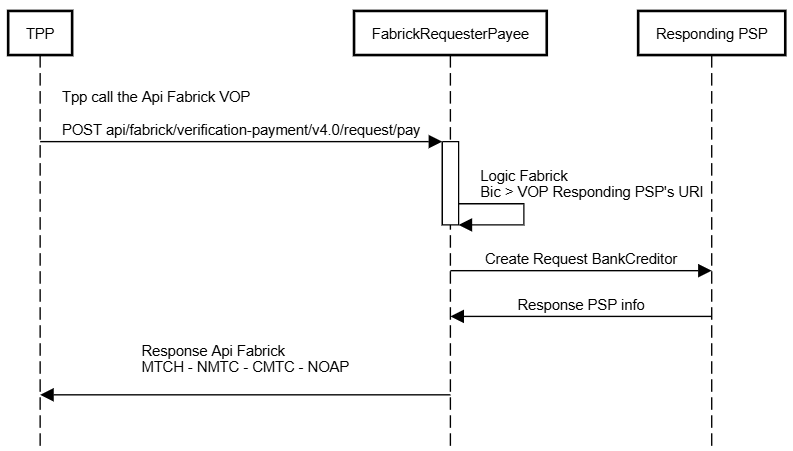
Below is a basic example of the API:
POST /v4.0/vop/verify

{
    "ownerName": "Mauro Rossi",
    "iban": "DE02100100109307118603"
}
Headers
Required Headers
In addition to the Auth-Schema and Api-Key headers common to Fabrick products, the product requires the following headers:
- X-Request-Code: GUID of the VOP request. This is a unique identifier (GUID) associated with the VOP request and is generated by the caller to accurately track and identify the transaction within the system.
- X-RequestDateTime: Timestamp of the VOP request. This field is subject to consistency verification: the date must correspond to the current day and the time must be consistent with the time the request was sent. Otherwise, the call will be rejected. ISO 8601 format example: 2025-02-05T10:15:32.456Z
- X-Operation-Code: Unique code of the transfer or transaction associated with the VOP request.
Header Encoding
All headers used in requests will be encoded in UTF-8 to ensure correct interpretation of special characters and compatibility with the system.
Request
- If the subject is a natural person (Natural Person), identification is performed using the ownerName + IBAN combination.
- If the subject is a legal entity (Legal Entity), it is possible to use either the ownerName + IBAN combination or the ownerIdentification + IBAN combination.
Request for Natural Person
The request for an individual includes at least the beneficiary's name and the IBAN of their bank account. It is optional to also provide a description of the payment.
{
    "ownerName": "Mauro Rossi",
    "iban": "DE02100100109307118603",
    "description": "Payment description"
}
Parameters:
- ownerName: contains the name of the beneficiary, who may be a natural person or a legal entity (company). This parameter is required for natural persons. Example: "Fabrick SPA" (legal entity) or "Mauro Rossi" (natural person).
- iban: the IBAN (International Bank Account Number) value that uniquely identifies the bank account. It is used to facilitate international transactions and must follow a standard format. Example: "DE02100100109307118603".
- description: optional field providing an additional description of the account used.
Request for Legal Entity
For a legal entity, you can choose the same method as for a natural person, or use the ownerIdentification + IBAN combination. Below is an example:
{
    "iban": "DE02100100109307118603",
    "ownerName": "Azienda Spa",
    "description": "Payment description",
    "ownerIdentification": {
        "value": "549300DTUYXVMJXZNY75",
        "type": "VERLEI",
        "nameProprietary": ""
    }
}
The ownerIdentification object contains the unique identification code assigned to a legal entity and the type of identifier used. This serves to verify the legal entity associated with the IBAN.
-
value: the actual identification code of the legal entity. Example: "549300DTUYXVMJXZNY75".
-
type: the type of identification code. Below is the list of supported types:
- NAME: used when the ownerName parameter is present in the request.
- INACNO – Support for additional information on the payment account number.
- VERLEI – Support for the VERLEI code (Legal Entity Identifier) to identify the payment counterparty.
- VERBIC – Support for anyBIC to identify the payment counterparty.
- VCBANK – Support for the identification code of the BANK of the payment counterparty.
- VCCBID – Support for the CBID identification code of the payment counterparty.
- VCCHID – Support for the CHID identification code of the payment counterparty.
- VCCINC – Support for the CINC identification code of the payment counterparty.
- VCCOID – Support for the COID identification code of the payment counterparty.
- VCCUST – Support for the CUST identification code of the payment counterparty.
- VCDUNS – Support for the DUNS (Dun & Bradstreet) identification code of the payment counterparty.
- VCEMPL – Support for the EMPL identification code of the payment counterparty.
- VCGS1G – Support for the GS1G identification code of the payment counterparty.
- VCSREN – Support for the SREN identification code of the payment counterparty.
- VCSRET – Support for the SRET identification code of the payment counterparty.
- VCTXID – Support for the TXID identification code of the payment counterparty.
- VCBDID – Support for the BDID identification code of the payment counterparty.
- VCBOID – Support for the BOID identification code of the payment counterparty.
- VCPROP – Support for a proprietary code to identify the payment counterparty. In this case, it will be necessary to specify the nameProprietary parameter, indicating the name of the proprietary code.
Response
The API will return a response indicating whether there is a match between the beneficiary's name and the one registered in the system. The possible responses are as follows:
- Response with Exact Match (MTCH)
- Response with Partial Match (CMTC)
- Response with No Match (NMTC)
- Response with Impossibility of Verification (NOAP)
1. Response with Exact Match (MTCH)
The beneficiary's name exactly matches the one registered in the PSP's system.
// Natural Person
{
    "status": "OK",
    "payload": {
        "id": "7f8f3c4e-319f-4a3a-9d83-4e4c2cbfe9f2",
        "requestCode": "123e4567-e89b-12d3-a456-426614174000",
        "operationCode": "bonifico-537",
        "pspProcessingTimes": "300",
        "requestDateTime": "2025-02-05T10:15:32.456Z",
        "ownerName": "Mauro Rossi",
        "iban": "DE02100100109307118603",
        "description": "Payment description",
        "matchType": "MTCH"
    }
}

// Legal Entity
{
    "status": "OK",
    "payload": {
        "id": "3cb95c33-e2e3-4f94-b3ad-bab9a6141e9a",
        "requestCode": "123e4567-e89b-12d3-a456-426614174000",
        "operationCode": "bonifico-537",
        "pspProcessingTimes": "300",
        "requestDateTime": "2025-02-05T10:15:32.456Z",
        "ownerIdentification": {
            "value": "549300DTUYXVMJXZNY75",
            "type": "VERLEI"
        },
        "iban": "DE02100100109307118603",
        "description": "Payment description",
        "matchType": "MTCH"
    }
}
2. Response with Partial Match (CMTC)
The beneficiary's name partially matches the name registered in the PSP's system. This can happen when there is a slight difference in the name (e.g., typing errors).
// Natural Person
{
    "status": "OK",
    "payload": {
        "id": "d11fd2a9-2350-4c9b-a3d4-ea24c67084ab",
        "requestCode": "123e4567-e89b-12d3-a456-426614174000",
        "operationCode": "bonifico-537",
        "pspProcessingTimes": "300", // milliseconds
        "requestDateTime": "2025-02-05T10:15:32.456Z",
        "ownerName": "mauro Rosso",
        "iban": "DE02100100109307118603",
        "description": "Payment description",
        "matchType": "CMTC",
        "matchedName": "Mauro Rossi"
    }
}

// Legal Entity
{
    "status": "OK",
    "payload": {
        "id": "1fcb92d4-2f14-4e34-b2e3-dfc70d0fa89f",
        "requestCode": "123e4567-e89b-12d3-a456-426614174000",
        "operationCode": "bonifico-537",
        "pspProcessingTimes": "300", // milliseconds
        "requestDateTime": "2025-02-05T10:15:32.456Z",
        "ownerName": "Fabbrick SPA",
        "iban": "DE02100100109307118603",
        "description": "Payment description",
        "matchType": "CMTC",
        "matchedName": "Fabrick SPA"
    }
}
3. Response with No Match (NMTC)
No match was found for the beneficiary's name.
// Natural Person
{
    "status": "OK",
    "payload": {
        "id": "8bde1ce2-d591-4200-8fbd-926c9f5e1d90",
        "requestCode": "123e4567-e89b-12d3-a456-426614174000",
        "operationCode": "bonifico-537",
        "pspProcessingTimes": "300", // milliseconds
        "requestDateTime": "2025-02-05T10:15:32.456Z",
        "ownerName": "Mauro Rossi",
        "iban": "DE02100100109307118603",
        "description": "Payment description",
        "matchType": "NMTC"
    }
}

// Legal Entity
{
    "status": "OK",
    "payload": {
        "id": "23ef65d1-88d4-44ec-962a-301d1cb80e5c",
        "requestCode": "123e4567-e89b-12d3-a456-426614174000",
        "operationCode": "bonifico-537",
        "pspProcessingTimes": "300", // milliseconds
        "requestDateTime": "2025-02-05T10:15:32.456Z",
        "ownerIdentification": {
            "value": "549300DTUYXVMJXZNY75",
            "type": "VERLEI"
        },
        "iban": "DE02100100109307118603",
        "description": "Payment description",
        "matchType": "NMTC"
    }
}
4. Response with No Verification Possible (NOAP)
It was not possible to verify the beneficiary's name for technical reasons.
// Natural Person
{
    "status": "OK",
    "payload": {
        "id": "6b83b3f2-15fc-42c6-8bc4-d3995b36f34a",
        "requestCode": "123e4567-e89b-12d3-a456-426614174000",
        "operationCode": "bonifico-537",
        "pspProcessingTimes": "300", // milliseconds
        "requestDateTime": "2025-02-05T10:15:32.456Z",
        "ownerName": "Mauro Rossi",
        "iban": "DE02100100109307118603",
        "description": "Payment description",
        "matchType": "NOAP"
    }
}

// Legal Entity
{
    "status": "OK",
    "payload": {
        "id": "e2a3769c-7e5a-47c1-9fe7-74588e80e6c3",
        "requestCode": "123e4567-e89b-12d3-a456-426614174000",
        "operationCode": "bonifico-537",
        "pspProcessingTimes": "300", // milliseconds
        "requestDateTime": "2025-02-05T10:15:32.456Z",
        "ownerIdentification": {
            "value": "549300DTUYXVMJXZNY75",
            "type": "VERLEI"
        },
        "iban": "DE02100100109307118603",
        "description": "Payment description",
        "matchType": "NOAP"
    }
}
The API returns a response in JSON format, in which the main information is whether the beneficiary name provided in the request matches the one registered in the PSP system. The response consists of two main elements: the status field, which confirms the processing of the request, and the payload, which contains all the detailed information on the verification performed. The payload also contains the request parameters.
Within the payload, the following parameters are present:
- id: unique identifier assigned by Fabrick to the individual VOP request (UID type). Example: "e2a3769c-7e5a-47c1-9fe7-74588e80e6c3"
- requestCode: unique UID of the request provided by the caller in the request headers. Used to uniquely track the request (included in the headers). Example: "123e4567-e89b-12d3-a456-426614174000"
- operationCode: unique code of the transaction associated with the beneficiary name verification request, provided by the client in the headers. Example: "bonifico-537"
- requestDateTime: date and time provided by the caller in the request, representing the time the request was sent from the client's perspective (included in the headers). ISO 8601 format. Example: "2025-02-05T10:15:32.456Z"
- pspProcessingTimes: processing time of the request by the responding PSP, expressed in milliseconds. Example: "300"
- matchType: indicates the type of match between the beneficiary name provided and the one registered in the PSP system. Can take four values:
- "MTCH" → Exact match (the name provided matches exactly the one registered).
- "CMTC" → Partial match (the name provided is similar but presents minor differences).
- "NMTC" → No match (the name provided is not present in the PSP system).
- "NOAP" → Unable to verify (verification could not be performed due to technical issues).
- matchedName: represents the correct name registered in the PSP system, returned only in case of partial match (matchType CMTC).
List of Types Managed by the PSP
As indicated above, in the case of a legal entity, it is possible to request VOP verification by passing different types of information (parameter type), and each PSP can decide independently which ones to display and manage. To find out the different types managed, Fabrick provides the GET getPspType service.
POST {{domain}}/v4.0/vop/owner-type

{
  "iban": "IT69T0326822300052545868410"
}
The response will contain the list of types exposed by the PSP, as shown in the following example:
{
  "status": "OK",
  "payload": {
    "iban": "IT69T0326822300052545868410",
    "supportedCodes": [
      "LEI",
      "BIC",
      "CBID",
      "VAT",
      "VCDUNS"
    ]
  }
}
Retrieving the Details of a Past VOP Request
Search
Fabrick provides a search service that allows you to retrieve all VOP requests made in the past.
POST {{domain}}/v4.0/vop/verify/search

{
}
The response will return the complete list:
{
  "list": [
    {
      "id": "403d5945-cf71-4cc9-bce8-9c323e84eeae",
      "requestCode": "03a7c380-152f-4981-b87a-9241b58863ca",
      "operationCode": "VOP",
      "requestDateTime": "2025-07-08T07:47:21.041Z",
      "ownerName": "Paolo Verdi",
      "iban": "IT69T0326822300052545868410"
    },
    ...
    {
      "id": "081af3f6-ea7b-4d6b-9069-565820fec015",
      "requestCode": "15338105-0fb5-4362-a5ff-3afe539f80a6",
      "operationCode": "VOP",
      "requestDateTime": "2025-07-08T12:25:28.869Z",
      "ownerName": "Mario Rossi",
      "iban": "IT69T0326822300052545868410"
    }
  ]
}
Filtering is possible by various parameters, including:
- requestCode (e.g.: "c67984d3-8055-40d5-ae1b-3a0040fab9d1")
- operationCode (e.g.: anOpeCode)
- fromRequestDateTime (e.g.: "2025-07-07T15:19:17.225Z")
- toRequestDateTime (e.g.: "2025-07-07T15:19:17.225Z")
- ownerName
- matchedName (e.g.: "Mauro Rossi")
- ownerIdentification
- iban (e.g.: IT75Z0300203280000400162700)
- description
- matchType (e.g.: NMTC)
Details via requesterId
Alternatively, it is possible to retrieve the details of a VOP request via its unique ID using the GET GetVopInfoById service:
{{domain}}/v4.0/vop/verify/{{requesterId}}
The response will contain a single element with the details of the VOP request:
{
  "status": "OK",
  "payload": {
    "id": "4129eeeb-b111-475c-b71b-ad01ef9332cf",
    "requestCode": "d3f2ef1e-d0ee-4582-b5a4-5591a8df15f5",
    "operationCode": "anOpeCode",
    "pspProcessingTime": 216,
    "requestDateTime": "2025-07-08T15:18:12.442Z",
    "ownerName": "Mauro Rossi",
    "iban": "IT40S0542811101000000123456",
    "matchType": "MTCH"
  }
}
Bulk Mode (only for PSP)
The API supports bulk mode for performing multiple IBAN checks in a single request. Two operating modes are available: synchronous and asynchronous.
Both modes use the same input (headers and body), but the type of response differs. In the synchronous case, all results are returned directly in the response; in the asynchronous case, they are sent via S2S notification.
Below is an example.
Required Headers
- X-Bulk-Request-Code: GUID of the VOP request. It is a unique identifier (GUID) associated with the VOP request and is generated by the caller to accurately track and identify the transaction within the system (unique GUID per request).
- X-Bulk-RequestDateTime: Timestamp of the VOP request. This field is subject to consistency verification: the date must correspond to the current day and the time must be consistent with the time the request was sent. Otherwise, the call will be rejected. ISO 8601 format example: 2025-02-05T10:15:32.456Z
- X-Bulk-Operation-Code: code associated with the bulk operation (which can be used in searches). This will also be returned in individual response objects as operationCode.
Synchronous Request
POST {{domain}}/v4.0/vop/verify/bulk/sync
Asynchronous Request
POST {{domain}}/v4.0/vop/verify/bulk
Body
{
  "list": [
    {
      "ownerName": "Mauro Rossi",
      "iban": "DE02100100109307118603",
      "description": "Payment description",
      "requestCode": "guid1"
    },
    {
      "iban": "DE02100100109307118777",
      "description": "Payment description",
      "ownerIdentification": {
        "value": "549300DTUYXVMJXZNY75",
        "type": "VERLEI"
      },
      "requestCode": "guid2"
    },
    {
      "ownerName": "Riccardo Olivetti",
      "iban": "DE02100100109307118555",
      "description": "Payment description",
      "requestCode": "guid3"
    },
    {
      "iban": "DE02100100109307118888",
      "description": "Payment description",
      "ownerIdentification": {
        "value": "5535353546211",
        "type": "VERLEI"
      },
      "requestCode": "guid4"
    }
  ]
}
If the requestCode parameter is included in one of the objects in the list, it must be present in all elements; otherwise, the error Request not valid will be returned.
Synchronous Bulk Verification
In synchronous mode, the results will be returned directly within the response. This mode is therefore recommended when the number of requests (elements of the list object) is limited, for obvious optimization reasons.
Below is an example response; as anticipated, it will directly contain the final outcome:
{
    "status": "OK",
    "payload": {
        "bulkId": 23212,
        "bulkOperationCode": "bonifico-537",
        "bulkRequestCode": "123e4567-e89b-12d3-a456-426614174000",
        "bulkRequestDateTime": "2025-02-05T10:15:32.456Z",
        "list": [
            {
                "id": "a1c2cb45-8f4c-4dc7-a177-1a734232a4ed",
                "pspProcessingTimes": "300",
                "requestCode": "guid1",
                "operationCode": "bonifico-537",
                "requestDateTime": "2025-02-05T10:15:32.456Z",
                "ownerName": "Mauro Rossi",
                "iban": "DE02100100109307118603",
                "description": "Payment description",
                "matchType": "NMTC"
            }
        ]
    }
}
Where:
- bulkId: unique identifier of the bulk request (global). Useful for overall processing tracking.
- id: identifier of the single VOP verification request. Useful for any calls to the detailed services of the single verification.
This mode immediately processes the entire list and returns the result in the same response. It is ideal for small volumes. Below is another example containing the response to 4 VOP requests. As you can see, successful cases are separated from error cases:
{
    "status": "OK",
    "payload": {
        "bulkId": 23212,
        "bulkOperationCode": "bonifico-537",
        "bulkRequestCode": "123e4567-e89b-12d3-a456-426614174000",
        "bulkRequestDateTime": "2025-02-05T10:15:32.456Z",
        "list": [
            {
                "id": "a1c2cb45-8f4c-4dc7-a177-1a734232a4ed",
                "pspProcessingTimes": "300",
                "requestCode": "guid1",
                "operationCode": "bonifico-537",
                "requestDateTime": "2025-02-05T10:15:32.456Z",
                "ownerName": "Mauro Rossi",
                "iban": "DE02100100109307118603",
                "description": "Payment description",
                "matchType": "NMTC"
            },
            {
                "id": "0c215a74-8b17-4bcf-9ae6-c6c1911d3e91",
                "pspProcessingTimes": "300",
                "requestCode": "guid2",
                "operationCode": "bonifico-537",
                "requestDateTime": "2025-02-05T10:15:32.456Z",
                "iban": "DE02100100109307118603",
                "description": "Payment description",
                "matchType": "NMTC",
                "matchedIdentification": {
                    "value": "549300DTUYXVMJXZNZ75",
                    "type": "VERLEI"
                }
            }
        ],
        "errors": [
            {
                "id": "7917266d-d6e2-46a3-968f-cdd30f8e3f30",
                "pspProcessingTimes": "300",
                "requestCode": "guid3",
                "operationCode": "bonifico-537",
                "requestDateTime": "2025-02-05T10:15:32.456Z",
                "ownerName": "Riccardo Olivetti",
                "iban": "DE02100100109307118555",
                "description": "Payment description",
                "errorCode": "VOP-001",
                "errorDescription": "EDS Not Found!"
            },
            {
                "id": "22e9c690-02a0-47fc-9e3f-087a3ea7e32c",
                "pspProcessingTimes": "300",
                "requestCode": "guid4",
                "operationCode": "bonifico-537",
                "requestDateTime": "2025-02-05T10:15:32.456Z",
                "iban": "DE02100100109307118888",
                "description": "Payment description",
                "ownerIdentification": {
                    "value": "5535353546211",
                    "type": "VERLEI"
                },
                "errorCode": "VOP-002",
                "errorDescription": "Connection Error!"
            }
        ]
    }
}
Asynchronous Bulk Verification
Asynchronous bulk verification allows multiple verification requests to be sent in a single call, initiating processing in the background. This mode is particularly suitable for managing large lists and allows for efficient management of requests by the PSP.
In this case, the response will only indicate that the request has been accepted and will not return any results. The response does not yet contain the results, but only a reference to the processing in progress:
{
  "status": "OK",
  "payload": {
    "bulkId": 23212,
    "bulkOperationCode": "bonifico-537",
    "bulkRequestCode": "123e4567-e89b-12d3-a456-426614174000",
    "bulkRequestDateTime": "2025-02-05T10:15:32.456Z",
    "status": "PENDING"
  }
}
The processing of an asynchronous request is managed through a state system. The status of the request can be monitored in two ways:
- Polling: the Requester can monitor the status via the API
GET /vop/verify/bulk/{{bulkId123}} - Callback: the Requester can expose an endpoint and Fabrick will deliver the various outcomes via S2S notification
Below are all the values that the status can assume:
| Status | Description |
|---|---|
| PENDING | The bulk request has been successfully received and is being processed. |
| COMPLETED | All checks have been successfully completed. The response from each PSP may be positive or negative. The status only indicates that all responding PSPs have responded correctly without any technical errors. |
| ERROR | At least one error occurred during processing, meaning that not all requests received a response from the responding PSP. |
Polling
In this case, it will be possible to retrieve the results via two APIs: the first — the only one of the two to be managed in polling — allows you to retrieve the status of the bulk request, indicating when all requests have been completed.
Once the status completed response has been obtained, you can call the corresponding API to retrieve the details and statuses of all requests made.
GET getBulkRequest
GET {{domain}}/v4.0/vop/verify/bulk/{{bulkId}}
Returns the status at the aggregate level:
{
  "status": "OK",
  "payload": {
    "bulkId": 23212,
    "bulkOperationCode": "bonifico-537",
    "bulkRequestCode": "123e4567-e89b-12d3-a456-426614174000",
    "bulkRequestDateTime": "2025-02-05T10:15:32.456Z",
    "status": "COMPLETED"
  }
}
Once the polling phase is complete, the details can be obtained via the GET getBulkDetails API:
GET {{domain}}/v4.0/vop/verify/bulk/{{bulkId}}/details
The response will contain the list of all elements, as shown in the example:
{
  "status": "OK",
  "payload": {
    "bulkId": 23212,
    "bulkOperationCode": "bonifico-537",
    "bulkRequestCode": "123e4567-e89b-12d3-a456-426614174000",
    "bulkRequestDateTime": "2025-02-05T10:15:32.456Z",
    "status": "COMPLETED",
    "list": [
      // List of elements with a valid response
    ]
  }
}
As already noted, two different lists may be returned: the first containing requests with a valid response, and the second containing requests that resulted in an error:
{
  "status": "OK",
  "payload": {
    "bulkId": 23212,
    "bulkOperationCode": "bonifico-537",
    "bulkRequestCode": "123e4567-e89b-12d3-a456-426614174000",
    "bulkRequestDateTime": "2025-02-05T10:15:32.456Z",
    "status": "ERROR",
    "list": [
      // List of elements with a valid response
    ],
    "errors": [
      // List of elements with errors
    ]
  }
}
The bulkId and id parameters have the same meaning described previously.
S2S Notification
In this case, polling can be avoided because Fabrick will send an S2S notification to a selected endpoint once the bulk verification is complete.
This is the recommended choice.
For full details on this mode, please refer to the specific document "S2S Notifications."
Error Management
This section lists all the error codes returned. Errors include an identification code (code) and a description (description).
| Error Description | Error Code | HTTP Code | Additional Notes |
|---|---|---|---|
| Internal server error (from Fabrick) | VOP-001 | 500 | Internal Server Error – Fabrick's VoP service is reachable but temporarily unavailable. |
| Invalid IBAN | VOP-002 | 400 | Not Valid – The IBAN code provided is invalid. |
| Invalid X-RequestDateTime | VOP-003 | 400 | Not Valid – The date/time format is incorrect or does not comply with the ISO 8601 standard. |
| Unsupported OwnerIdentificationType | VOP-004 | 400 | Not Valid – The identification type provided is not supported by the VoP schema. |
| Malformed message | VOP-005 | 400 | Not Valid – The message does not comply with the required format. |
| RequestCode already exists | VOP-006 | 400 | Not Valid – The identification code provided is not unique. |
| BIC not found | VOP-007 | 404 | Not Valid – It was not possible to derive the BIC from the IBAN provided. |
| Responding PSP not found | VOP-008 | 404 | Not Found – The PSP is not present in the EDS registry. |
| Responding PSP not active | VOP-009 | 403 | Forbidden – The PSP is not enabled to handle VoP requests as a responding PSP. |
| ID type not supported by Responding PSP | VOP-010 | 400 | Unprocessable Entity – The PSP does not support the requested check type, according to the EDS registry data. |
| Error response from Responding PSP | VOP-011 | 400 | Bad Request – The responding PSP generated an error in response to the VoP request. |
| Authorization Issue | VOP-012 | 401 | Unauthorized – The PSP responds with code 401 (e.g., CLIENT_INVALID or CLIENT_INCONSISTENT). |
| Internal server error (from Responding PSP) | VOP-013 | 502 | Internal Server Error – The PSP responds with code 500 as specified. |
As already seen in the previous sections, errors are returned within the errors array, as shown in the following example:
{
    "status": "KO",
    "errors": [
        {
            "id": "78d2a929-5562-45e2-9883-e3d9e7c49be2",
            "pspProcessingTimes": "300",
            "requestCode": "guid3",
            "operationCode": "bonifico-537",
            "requestDateTime": "2025-02-05T10:15:32.456Z",
            "ownerName": "Riccardo Olivetti",
            "iban": "DE02100100109307118555",
            "description": "Payment description",
            "errorCode": "VOP-002",
            "errorDescription": "Responding PSP not found"
        }
    ]
}
Example bulk case with mixed results — successful cases and cases with errors:
{
  "status": "OK",
  "payload": {
    "bulkId": 23212,
    "bulkOperationCode": "bonifico-537",
    "bulkRequestCode": "123e4567-e89b-12d3-a456-426614174000",
    "bulkRequestDateTime": "2025-02-05T10:15:32.456Z",
    "list": [
      {
        "id": "b3781739-5fc2-4a2a-9984-998ee4a85bfc",
        "pspProcessingTimes": "300",
        "requestCode": "guid1",
        "operationCode": "bonifico-537",
        "requestDateTime": "2025-02-05T10:15:32.456Z",
        "ownerName": "Mauro Rossi",
        "iban": "DE02100100109307118603",
        "description": "Payment description",
        "matchType": "NMTC"
      },
      {
        "id": "0f3bbf52-c52b-462c-933b-0d7c44f6ab40",
        "pspProcessingTimes": "300",
        "requestCode": "guid2",
        "operationCode": "bonifico-537",
        "requestDateTime": "2025-02-05T10:15:32.456Z",
        "iban": "DE02100100109307118777",
        "description": "Payment description",
        "matchType": "NMTC",
        "matchedIdentification": {
          "value": "549300DTUYXVMJXZNY75",
          "type": "VERLEI"
        }
      }
    ],
    "errors": [
      {
        "id": "540f6ab4-e7fd-40c1-a7f5-0e76b6ff7484",
        "pspProcessingTimes": "300",
        "requestCode": "guid3",
        "operationCode": "bonifico-537",
        "requestDateTime": "2025-02-05T10:15:32.456Z",
        "ownerName": "Riccardo Olivetti",
        "iban": "DE02100100109307118555",
        "description": "Payment description",
        "errorCode": "VOP-002",
        "errorDescription": "Responding PSP not found"
      },
      {
        "id": "941e289a-4bd3-4ed3-9081-580c9e7a0ff6",
        "pspProcessingTimes": "300",
        "requestCode": "guid4",
        "operationCode": "bonifico-537",
        "requestDateTime": "2025-02-05T10:15:32.456Z",
        "iban": "DE02100100109307118888",
        "description": "Payment description",
        "ownerIdentification": {
          "value": "5535353546211",
          "type": "VERLEI"
        },
        "errorCode": "VOP-001",
        "errorDescription": "VoP Fabrick service unreachable"
      }
    ]
  }
}