Transaction state
Overview
To check the state, details and events of a transaction in the Fabrick Dashboard, refer to its documentation (available in Italian).
Specifically:
To check the state, details and events of a transaction via API, use the payment/detail REST call.
The correct reading comes from the combination of:
transactionResulttransactionStatetransactionErrorCode
In practice:
| Information | Purpose |
|---|---|
transactionResult | The outcome of the transaction. |
transactionState | The current technical stage reached by the transaction. |
transactionErrorCode | The error code, if any. |
| Transaction events | Captures, cancellations and refunds: the operations executed on the transaction |
A transaction with transactionResult = APPROVED and transactionState = MOV means that a capture has been requested, but the actual credit must be verified with the party handling the settlement.
Transaction state
| transactionResult | transactionState | transactionErrorCode | Meaning |
|---|---|---|---|
UNSUBMITTED | - | - | Instance created, no payment method chosen yet. |
WAITING | - | - | Method chosen, waiting for a response. Only when payment/submit is used. |
AUTHENTICATED | - | - | Only in the card scenario with an authentication-only request: Non-Payment Authentication (NPA). |
PENDING | AUT | 0 | Payment started, waiting for an OK/KO outcome. Typical of asynchronous methods. |
APPROVED | AUT | 0 | Transaction authorized. |
APPROVED | PRE | 0 | Transaction authorized, capture request not yet completed. Depends on the method used. |
APPROVED | MOV | 0 | Transaction partially or fully captured. It stays in this state if it is refunded, but not in full. |
APPROVED | CAN | 0 | Transaction authorized and then cancelled. |
APPROVED | STO | 0 | Transaction fully refunded. |
DECLINED | AUT | ≠ 0 (e.g. 74) | Transaction failed. |
Transaction events
The current state of the transaction is a snapshot of the moment the check is made. This information is necessary, but not always enough to understand everything that has happened on the transaction. The events associated with the transaction show whether operations such as the following have been executed:
- capture
- cancellation
- refund
| Event | Operation | Typical effect on the transaction | transactionState after the event |
|---|---|---|---|
AUT | Authorization | The transaction reaches the authorization stage. It can end positively or negatively. | AUT |
MOV | Capture | The transaction is fully or partially captured. Only a successfully authorized transaction can be captured. | MOV |
CAN | Cancellation | The transaction is cancelled. Only a successfully authorized transaction can be cancelled. | CAN |
PRE | Capture booking | The capture has been requested but not yet completed. | PRE |
REQ | Refund booking | The refund has been requested but not yet completed. | MOV |
STO | Refund | The transaction is fully or partially refunded. | MOV if the refund is partial. STO if the refund is full and there are no other unrefunded captures on the transaction |
Events are especially important when several successive operations are executed on a single transaction, for example:
- several partial captures;
- one or more refunds on the same capture or on different captures.
Separated and unified capture
Some payment methods, such as cards, let you choose between separate authorization and capture or unified capture.
Other methods only support capture together with the authorization; some of these go through intermediate states such as PENDING before reaching an OK/KO state,
for example Pay by Bank.
On the Gestpay Dashboard, where the payment methods allow it, you can configure each ShopLogin to have authorization and capture unified or separated.
- Unified capture: authorization and capture happen in the same flow.
- Separated capture: authorization and capture are two distinct moments.
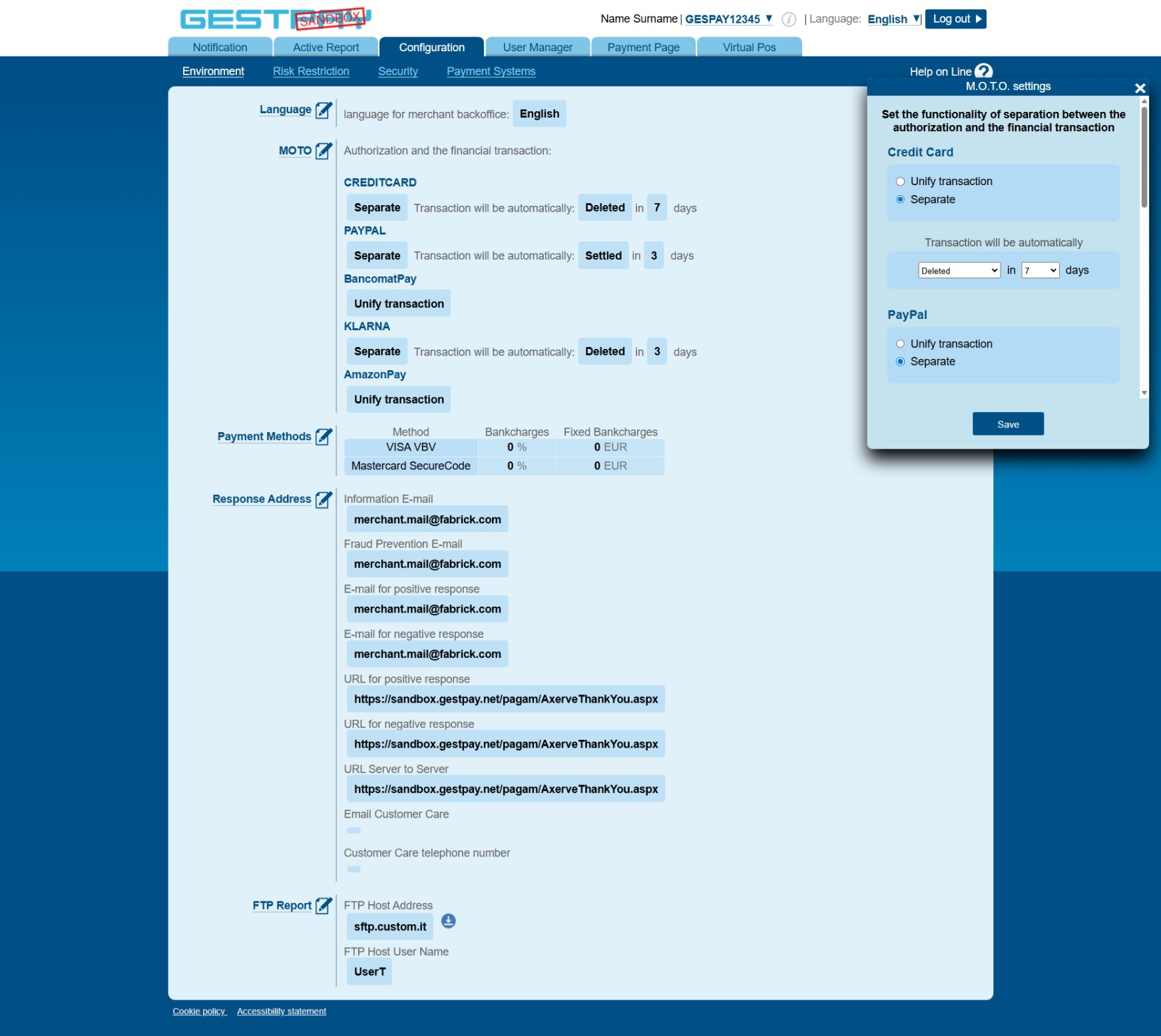
For ShopLogins configured with Separated Capture, you need to define an automatic action to execute after the authorization:
- Capture
- Cancel
The maximum number of days depends on the payment method; you can set a value between 1 and 25 days. Between the authorization and the time set for the automatic action, you can capture or cancel the transaction via API or Dashboard.
| Configuration | transactionResult | transactionState | transactionErrorCode | Action required |
|---|---|---|---|---|
| Separated Capture | APPROVED | AUT | 0 | Capture or Cancel |
| Unified Capture | APPROVED | MOV | 0 | None |
Related pages:
Support
Fabrick
- Status page: https://status.fabrick.com/
- Support: https://landing.fabrick.com/fabrick-dashboard-support