White Label: AIS
This section describes the complete flow for obtaining a user's account information, balances, and transactions through PSD2 aggregation.
High-level flow
This section shows the high-level flow for
API flow
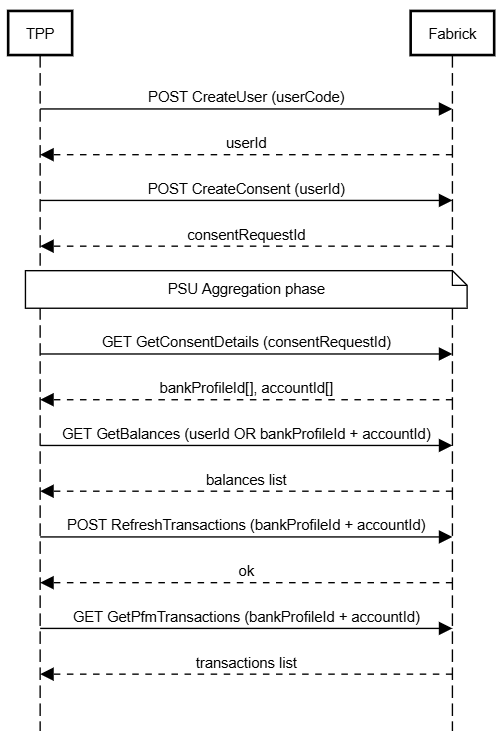
To achieve a minimal functional flow it is sufficient to invoke the following APIs in order:
- POST CreateUser
- POST CreateConsent
- GET GetConsentDetails
- GET GetBalances (refresh = true)
- POST RefreshTransactions + GET GetPfmTransactions
Below is the diagram showing the entire flow with the essential parameters:
Aggregated accounts management dashboard
In addition to the APIs described in the previous section, it is recommended to expose a web dashboard to end customers to simplify management, without requiring custom integrations for the most common operations.
Key concept: aggregation vs. IBAN
A PSD2 consent is tied to a set of banking credentials, not to a single account. With the same credentials a user can have multiple IBANs, and can have multiple distinct consents on the same bank using different credentials (e.g. a personal account and a business account on Intesa Sanpaolo).
It is therefore recommended to organize the dashboard by aggregation (consent), not by individual IBAN:
- the main list shows the active, expiring, or revoked aggregations, each identified by bank + alias chosen by the user (e.g. "Intesa Sanpaolo — personal account");
- selecting an aggregation, the detail view shows one or more IBANs, resulting from the same
GetBalances/GetPfmTransactionscall.
Example UI based on the number of IBANs:
| Case | Behavior |
|---|---|
| 1 IBAN | Goes directly to the balance/transactions detail view, without intermediate screens |
| 2+ IBAN | Tabs appear above the detail view to switch between IBANs, without changing screen |
This avoids an extra click in the most common case (a single IBAN per aggregation) and still keeps everything under control when the consent covers multiple accounts.
Page structure
- Aggregation list (left column) — list of all the user's active consents, with bank, alias, number of IBANs included, and consent status (active / expiring / revoked). At the top of the list, the Add aggregation button starts the onboarding of a new consent, since the action produces a new row in the list itself.
- Aggregation detail (right column) — balance and transactions of the selected IBAN (or the first one if there's only one), with tabs to switch between IBANs if the aggregation includes more than one.
- Quick actions — at the top of the detail view, three functions related to the lifecycle of the selected consent:
| Action | Effect | Underlying API |
|---|---|---|
| Renew consent | Extends the validity of an expiring/expired consent | CreateConsent (Param for RenewConsent) |
| Revoke consent | Stops the aggregation while leaving the history visible | DeleteConsent |
| Remove aggregation | Deletes the account and associated data from the platform | DeleteConsent + DeleteBankProfile |
The three actions always operate at the aggregation (consent) level, not at the single IBAN level: revocation and renewal apply to the entire set of credentials, not to a specific account.
Reference mockup
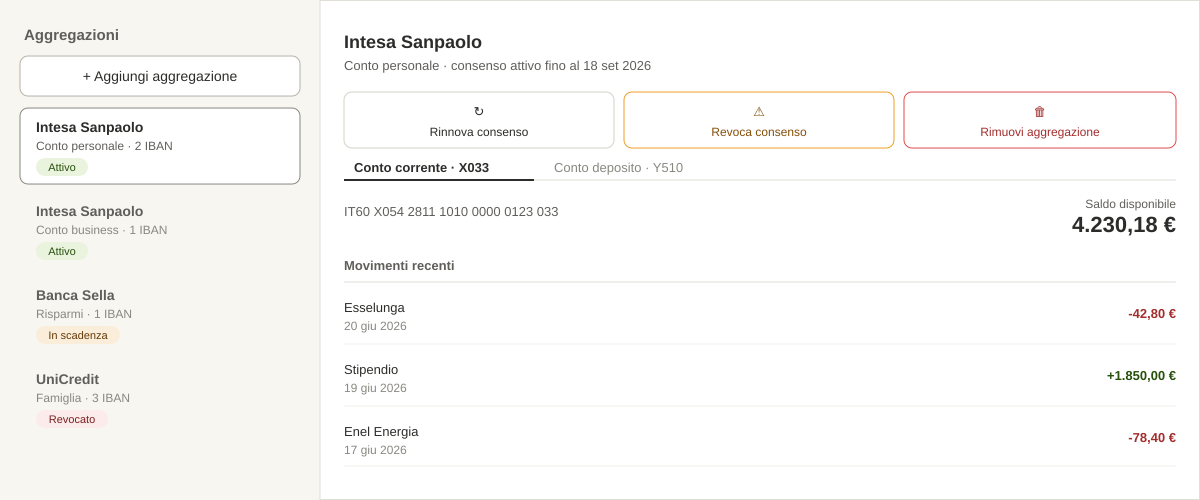
This structure maps 1:1 to the high-level flow in section 1: the aggregation list represents the set of active CreateConsent calls, the detail view shows the output of GetBalances / GetPfmTransactions for each IBAN, and the actions cover the entire lifecycle of the PSD2 consent (creation, renewal, revocation, deletion).
API details
User management
Each PSU corresponds to a user on the Fabrick side. Specifically, to a unique pair userCode - userId, the first being a string chosen by the TPP, while the second is the unique id that represents
Creating a user
To create a new user we will use the POST CreateUser API. This endpoint takes the userCode (surrogate key) as input and returns the userId, useful for all the next steps. Here is an example request
POST {{domain}}/active-engine/v4.0/conf/users

{
  "userCode": "NewFabrickUser"
}
in response we get
{
  "status": "OK",
  "payload": {
    "userId": "900223467",
    "tppUid": "123456",
    "userCode": "NewFabrickUser",
    "createdDatetime": "2026-06-24T09:01:44.971+0000",
    "lastUpdatedDatetime": "2026-06-24T09:01:44.971+0000",
    "userCustomCodes": [
      "NewFabrickUser"
    ],
    "isDeleted": false
  }
}
where:
- userId: indicates the unique identifier of the user on the Fabrick side
- tppUid: indicates the unique id of the TPP, can be ignored for integration purposes
- createdDatetime: indicates the creation date in ISO 8601 format
- lastUpdatedDatetime: indicates the date of the last update, if any, of the object, in ISO 8601 format. Can be ignored
- userCustomCodes: to be ignored
- isDeleted: to be ignored
Getting the details of a user
Given a userId it is possible to retrieve the user's details, using the GET GetUserDetails endpoint:
GET {{domain}}/active-engine/v4.0/conf/users
obtaining:
{
  "status": "OK",
  "payload": {
    "userId": "900223467",
    "tppUid": "123456",
    "userCode": "NewFabrickUser",
    "createdDatetime": "2026-06-24T09:01:44.971+0000",
    "lastUpdatedDatetime": "2026-06-24T09:01:44.971+0000",
    "userCustomCodes": [
      "NewFabrickUser"
    ],
    "isDeleted": false
  }
}
User search
To obtain the complete list of all users or to search for a specific one via the userCode, the POST SearchUsers API will be used instead:
POST {{domain}}/active-engine/v4.0/conf/users/search

{
   "userCode": "NewFabrickUser"
}
in this case the response will return the user having "NewFabrickUser" as userCode:
{
  "status": "OK",
  "payload": {
    "list": [
      {
        "userId": "900223467",
        "tppUid": "123456",
        "userCode": "NewFabrickUser",
        "createdDatetime": "2026-06-24T09:01:44.971+0000",
        "lastUpdatedDatetime": "2026-06-24T09:01:44.971+0000",
        "userCustomCodes": [
          "NewFabrickUser"
        ],
        "isDeleted": false
      }
    ]
  }
}
an empty list will be returned if there is no match.
Leaving the body without filters in the request will instead return the entire list of all users currently active.
Deleting a user
At any time it is always possible to delete an existing user via DEL DeleteUser:
{{domain}}/active-engine/v4.0/conf/users/{{userId}}
obtaining in response only the outcome of the operation as shown in the example below:
{
  "status": "OK"
}
It is possible to create a new user with the same userCode at a later time; the returned userId will instead be different from the previous one.
bankProfiles management
The bankProfile object is a Fabrick object used to simplify the management of the aggregation flow. Very simply, it is the association between the user (userId) and the bank selected for the aggregation (bankId). In fact, every bank exposed by Fabrick is uniquely identified by an integer, called precisely bankId. It is possible to consult the complete list of exposed banks, with all details, via the POST SearchBanks endpoint.
Going into more detail, the bankProfile object groups the following characteristics of each aggregation:
- userId
- bankId: the identifier of the bank being aggregated or about to be aggregated
- serviceCode: if present, the particular service of the above bank. In fact, some banks require the selection of a particular service before proceeding with the creation of the consent, for example RETAIL or BUSINESS.
- environment: the environment in which the account to be aggregated resides; in the pre-production environment Fabrick in fact allows testing both on mock accounts (SANDBOX) and on real accounts (LIVE)
- alias: an optional alias that the TPP may decide to include for the bankProfile.
This whole part, together with the more complex creation of the consent, is entirely managed on the Fabrick UI, which is why we will not go into further detail here.
bankProfiles search
Even though the bankProfile is transparent to the TPP at creation time, it is important to understand its meaning because it is fundamental for the subsequent management of aggregations.
For a specific user (userId) it is possible to retrieve all their bankProfiles, which therefore correspond to the customer's active aggregations:
POST {{domain}}/active-engine/v4.0/conf/users/{{userId}}/bank-profiles/search
obtaining in response the list of all active bankProfiles:
{
  "status": "OK",
  "payload": {
    "list": [
      {
        "userId": "900223192",
        "bankId": "8",
        "tppUid": "123456",
        "createdDatetime": "2026-06-22T08:42:29.859+0000",
        "lastUpdatedDatetime": "2026-06-22T08:44:47.210+0000",
        "environment": "SANDBOX",
        "consentStatus": "VALID",
        "consentDetails": {
          "consentId": "9afaec5a-7ee0-4f7f-a42b-ccaacb9729ef",
          "userId": "900223192",
          "tppUid": "150116",
          "status": "VALID",
          "frequencyPerDay": "4",
          "recurring": true,
          "createdDatetime": "2026-06-22T08:42:34.540+0000",
          "lastUpdatedDatetime": "2026-06-22T08:44:51.752+0000",
          "access": {
            "allPsd2": "allAccounts"
          },
          "bankConsentId": "194980",
          "aggregationStatus": "READY",
          "authorizationType": "EMBEDDED",
          "bankProfileId": "369313",
          "startDatetime": "2026-06-22T08:42:34.540+0000",
          "endDatetime": "2026-12-18T23:00:00.000+0000"
        },
        "bankProfileId": "369313",
        "activeConsentId": "9afaec5a-7ee0-4f7f-a42b-ccaacb9729ef",
        "isDeleted": false
      }
    ]
  }
}
Each bankProfile is uniquely identified by a bankProfileId.
In the case of consents already associated and/or active, it is important to note the following parameters:
- consentStatus: indicates the status of the consent (see details in the dedicated section)
- consentDetails: all the details of the associated consent
- activeConsentId: the id of the latest active consent
For all consent details, see the dedicated section.
Getting the details of a bankProfile
In this case too, it is possible to obtain the specific element through its own bankProfileId:
GET {{domain}}/active-engine/v4.0/conf/users/{{userId}}/bank-profiles/{{bankProfileId}}
below is an example response:
{
  "status": "OK",
  "payload": {
    "userId": "900223192",
    "bankId": "8",
    "tppUid": "123456",
    "createdDatetime": "2026-06-22T08:42:29.859+0000",
    "lastUpdatedDatetime": "2026-06-22T15:30:26.303+0000",
    "environment": "SANDBOX",
    "consentStatus": "EXPIRED",
    "consentDetails": {
      "consentId": "9afaec5a-7ee0-4f7f-a42b-ccaacb9729ef",
      "userId": "900223192",
      "tppUid": "150116",
      "status": "EXPIRED",
      "frequencyPerDay": "4",
      "recurring": true,
      "createdDatetime": "2026-06-22T08:42:34.540+0000",
      "lastUpdatedDatetime": "2026-06-22T15:30:26.276+0000",
      "access": {
        "allPsd2": "allAccounts"
      },
      "bankConsentId": "194980",
      "aggregationStatus": "READY",
      "authorizationType": "EMBEDDED",
      "bankProfileId": "369313",
      "startDatetime": "2026-06-22T08:42:34.540+0000",
      "endDatetime": "2026-12-18T23:00:00.000+0000"
    },
    "bankProfileId": "369313",
    "activeConsentId": "9afaec5a-7ee0-4f7f-a42b-ccaacb9729ef",
    "isDeleted": false
  }
}
Deleting a bankProfile
It is always possible to delete a bankProfile at any time:
DEL {{domain}}/active-engine/v4.0/conf/users/{{userId}}/bank-profiles/{{bankProfileId}}
it will always be possible to create new ones; obviously they will have a different bankProfileId It is important to note that the bankProfile is the object that keeps the history between the user and the bank in question; by keeping the same bankProfile it will always be possible to retrieve all the related information, for example the entire history of transactions saved in the Fabrick database for that specific aggregation (bankProfile). Conversely, deleting it and creating a new one is equivalent to aggregating that bank for the first time.
Deletion is not a reversible operation.
It is therefore essential to fully understand the difference between deleting a bankProfile and revoking a consent, in order to create a user interface that is as clear as possible for the end user.
Consent management
The consent creation phase is handled entirely on the Fabrick page; this makes transparent all the complexity hidden behind the different varieties of flows that depend on the choices of the various gateways.
The TPP will simply need to start an aggregation workflow without worrying about the type of consent, the mode of interaction with the bank, or the SCA method adopted. All these choices depend on the individual bank, following the PSD2 standards.
Creating and renewing a consent
As mentioned, the TPP will invoke the POST CreateConsent API to start the aggregation workflow; here is an example:
POST {{domain}}/win/v4.0/wl-aisp/access/consent-request

{
  "userId": 1234,
  "completionRedirectUrls": {
    "onSuccess": "https://example.com/success",
    "onFailure": "https://example.com/failure"
  }
}
This request includes the minimum and mandatory fields; in response you will get:
{
  "status": "OK",
  "payload": {
    "consentRequestId": "e8a9f044-21fe-42ed-843e-eda83f287d24",
    "status": "CREATED_LINK",
    "createdDatetime": "2026-06-24T11:48:49.621+0000",
    "initiationRedirectUrl": "https://fabrick.com/.../.../e8...d24?jwtToken=..."
  }
}
where:
- consentRequestId: indicates the unique id of the aggregation workflow
- payload.status: indicates the status of the workflow
- createdDatetime: indicates the creation timestamp of the workflow
- initiationRedirectUrl: contains the URL value to which the PSU (the user) must be redirected in order to proceed with the aggregation of the desired current accounts.
As can be seen, the URL indicated by initiationRedirectUrl points to a Fabrick page, specifically to the Fabrick UX that allows the PSU to proceed with the aggregation process. The page is customizable by the TPP; for details see the dedicated section.
The previous example showed the simplest possible request; it is however possible to add some optional parameters to slightly vary certain behaviors or to meet different needs on the part of the TPP.
Below is a complete example:
POST {{domain}}/win/v4.0/wl-aisp/access/consent-request

{
  "completionRedirectUrls": {
    "onSuccess": "https://www.fabrick.com",
    "onFailure": "https://www.google.it"
  },
  "bankCountryCodes": [
    "IT"
  ],
  "consentOneDay": false,
  "historical": {
    "isEnabled": true,
    "numOFMonths": 24,
    "oneShot": true
  },
  "liteAggregation": false,
  "iban": "IT18L0200811770000019486580",
  "userId": 123456
}
where:
- userId: indicates the userId described in the previous sections
- bankProfileId: unique identifier of the bankProfile in Fabrick.
- iban: IBAN of the account to be aggregated.
- consentOneDay: if
truethe consent expires immediately after the aggregation, iffalseit is valid for 180 days. - historical: object related to transaction history.
- isEnabled: enables the request for history.
- numOfMonths: number of months for which to retrieve transactions.
- oneShot: enables one-shot behavior for a single authorization.
- bankCountryCodes: filter by bank nationality (ISO 3166-1 alpha-2).
- completionRedirectUrls: redirect URLs at the end of the flow, both in case of success and in case of abandonment or error by the PSU.
- liteAggregation: if true, balance and transaction retrieval requests will not be automatically executed at the end of the workflow; it will then be up to the TPP to request the update to obtain the data.
Regarding liteAggregation, it is worth remembering that in order to have an update of balances and/or transactions, the PSU must be present; otherwise the data will be automatically updated by Fabrick 4 times a day (see times in the Account Details section).
Details about history
According to the PSD2 standard, every ASPSP (bank) must always return the list of transactions for a period of 90 days. Optionally, with a specific request, they can return a longer period. The time period therefore varies for each bank, and the type of request can also differ. For example, setting 24 months in the request will request all transactions from the last 24 months from the bank; if the bank only exposes 12 (by its own choice), then only what is available will be retrieved, i.e. 12 months. To date, no detailed message is returned via API regarding the maximum availability of each bank; unfortunately this information is not exposed via API by the banks.
Details about recurring and non-recurring consent
A consent can be recurring or non-recurring; in the first case the consent will be valid for multiple data access requests (balances and transactions) and its duration can be set up to a maximum of 180 days. In Fabrick's case it is automatically set to 180 days, i.e. the maximum available. In the case of a non-recurring consent, only a single data access will be possible, after which it will no longer be valid. Some banks require this second type of consent to request history. For this reason, for these banks, if one wanted to retrieve the history while also maintaining a recurring consent, it would be necessary to create two different consents. Obviously all of this is always handled on the Fabrick UX, but it is important for the TPP to be aware of it in order to support its PSU.
Having clarified these two aspects, let's look at some examples of consent requests. In the following example, a recurring consent will be requested and a 12-month history will be retrieved if the selected bank allows it. The PSU will therefore be guided into making one or two consents depending on the selected bank and the specifics mentioned above.
POST {{domain}}/win/v4.0/wl-aisp/access/consent-request


{
  "userId": "900206427",
  "historical": {
    "isEnabled": true,
    "numOFMonths": 12
  },
  "bankCountryCodes": [
    "IT"
  ],
  "completionRedirectUrls": {
    "onSuccess": "https://example.com/success",
    "onFailure": "https://example.com/failure"
  }
}
Another example could be a history-only request; in this case the PSU will always make only a single consent.
POST {{domain}}/win/v4.0/wl-aisp/access/consent-request


{
  "userId": "900206427",
  "consentOneDay": true,
  "historical": {
    "isEnabled": true,
    "numOFMonths": 12,
    "oneShot": true
  },
  "bankCountryCodes": [
    "IT"
  ],
  "completionRedirectUrls": {
    "onSuccess": "https://example.com/success",
    "onFailure": "https://example.com/failure"
  }
}
Getting the details at the end of aggregation
Once the aggregation is complete, the PSU will be redirected to the pages indicated in the completionRedirectUrls object. At this point the TPP must invoke the GET getConsentDetails API to retrieve all the details needed to subsequently request balance and transaction information:
GET {{domain}}/win/v4.0/wl-aisp/access/consent-request/{{consentRequestId}}
obtaining in response the list of aggregations performed:
{
  "status": "OK",
  "payload": {
    "status": "VALID",
    "createdDatetime": "2026-06-24T10:18:46.228+0000",
    "consentId": "5697f27d-bef2-4c2a-90a4-137028522a3c",
    "accounts": [
      {
        "accountId": "412377",
        "userId": "900223192",
        "bankProfileId": "369551",
        "bankId": "8",
        "tppUid": "123456",
        "reference": "147629",
        "synchronizationStatus": {
          "transactions": {
            "lastSynchronizedDatetime": "2026-06-24T10:19:53.722+0000",
            "isSynchronized": true,
            "hasActiveConsent": true,
            "wasInLastConsent": true
          },
          "balances": {
            "lastSynchronizedDatetime": "2026-06-24T10:19:55.706+0000",
            "isSynchronized": true,
            "hasActiveConsent": true,
            "wasInLastConsent": true
          },
          "wasAvailable": true
        },
        "name": "Mauro Rossi",
        "valueType": "IBAN",
        "value": "IT35V3615900000000000000011",
        "currency": "USD",
        "retrievedDatetime": "2026-06-24T10:19:44.714+0000",
        "lastUpdatedDatetime": "2026-06-24T10:19:50.179+0000",
        "subsidiaryValues": [],
        "ownerType": "OWNER",
        "consentStatus": "VALID",
        "consentEndDatetime": "2026-12-20T23:00:00.000+0000",
        "isDeleted": false,
        "isMassiveSync": false
      },
      {
        "accountId": "412378",
        "userId": "900223192",
        "bankProfileId": "369551",
        "bankId": "8",
        "tppUid": "123456",
        "reference": "147630",
        "synchronizationStatus": {
          "transactions": {
            "lastSynchronizedDatetime": "2026-06-24T10:19:56.531+0000",
            "isSynchronized": true,
            "hasActiveConsent": true,
            "wasInLastConsent": true
          },
          "balances": {
            "lastSynchronizedDatetime": "2026-06-24T10:19:57.278+0000",
            "isSynchronized": true,
            "hasActiveConsent": true,
            "wasInLastConsent": true
          },
          "wasAvailable": true
        },
        "name": "Mauro Rossi",
        "valueType": "IBAN",
        "value": "IT18W3615900000000000000001",
        "currency": "EUR",
        "retrievedDatetime": "2026-06-24T10:19:44.734+0000",
        "lastUpdatedDatetime": "2026-06-24T10:19:50.345+0000",
        "subsidiaryValues": [],
        "ownerType": "OWNER",
        "consentStatus": "VALID",
        "consentEndDatetime": "2026-12-20T23:00:00.000+0000",
        "isDeleted": false,
        "isMassiveSync": false
      }
    ],
    "userId": "900223192",
    "bankProfileId": "369551"
  }
}
consentId is the unique id of the consent, while consentRequestId is the unique id of the Fabrick workflow used to manage the consent creation flow.
For the details of the individual parameters, see the Account Details section. It is important to highlight the list of bankProfileId and that of accountId, the parameters used for the subsequent APIs as indicated in the high-level flow in the first section.
Deleting a consent
As indicated in the high-level flow, the PSU must have the ability to cancel their consent with respect to the TPP. For this reason the DEL DeleteConsent API is exposed:
https://{{domain}}/api/fabrick/active-engine/v4.0/auth/bank-profiles/{{bankProfileId}}/consents/{{consentId}}
in response you will get the details of the consent in question:
{
  "status": "OK",
  "payload": {
    "list": [
      {
        "consentType": "ALL_PSD2",
        "permissions": [
          "ACCOUNTS"
        ],
        "consentId": "613d509d-13bf-4f1a-9e1d-95c7d805b8a8",
        "aggregationStatus": "READY",
        "createdDateTime": "2026-06-29T15:48:51.443+0000",
        "expirationDateTime": "2026-12-25T23:00:00.000+0000",
        "consentStatus": "VALID",
        "authenticationFlow": "EMBEDDED",
        "bankConsentId": "195206",
        "isRecurring": true
      }
    ]
  }
}
Getting account information
Once the consent has been created and its valid status verified, you can proceed to read the information of the aggregated accounts associated with the consent.
Accounts list
To get the list of accounts, you can use the GET getAccounts API:
GET {{domain}}/active-engine/v4.0/access/bank-profiles/{{bankProfileId}}/accounts
in response you will get the list of accounts as shown in the example:
{
  "status": "OK",
  "payload": {
    "list": [
      {
        "accountId": "414235",
        "userId": "900226869",
        "bankProfileId": "373807",
        "bankId": "8",
        "tppUid": "123456",
        "reference": "147769",
        "synchronizationStatus": {
          "transactions": {
            "lastSynchronizedDatetime": "2026-06-29T15:52:05.981+0000",
            "isSynchronized": true,
            "hasActiveConsent": true,
            "wasInLastConsent": true
          },
          "balances": {
            "lastSynchronizedDatetime": "2026-06-29T15:52:08.171+0000",
            "isSynchronized": true,
            "hasActiveConsent": true,
            "wasInLastConsent": true
          },
          "wasAvailable": true
        },
        "name": "Mauro Rossi",
        "valueType": "IBAN",
        "value": "IT35V3615900000000000000011",
        "currency": "USD",
        "retrievedDatetime": "2026-06-29T15:51:53.855+0000",
        "lastUpdatedDatetime": "2026-06-29T15:52:00.108+0000",
        "subsidiaryValues": [],
        "ownerType": "OWNER",
        "consentStatus": "VALID",
        "consentEndDatetime": "2026-12-25T23:00:00.000+0000",
        "isDeleted": false,
        "isMassiveSync": false
      },
      {
        "accountId": "414236",
        "userId": "900226869",
        "bankProfileId": "373807",
        "bankId": "8",
        "tppUid": "150116",
        "reference": "147770",
        "synchronizationStatus": {
          "transactions": {
            "lastSynchronizedDatetime": "2026-06-29T15:52:10.939+0000",
            "isSynchronized": true,
            "hasActiveConsent": true,
            "wasInLastConsent": true
          },
          "balances": {
            "lastSynchronizedDatetime": "2026-06-29T15:52:11.024+0000",
            "isSynchronized": true,
            "hasActiveConsent": true,
            "wasInLastConsent": true
          },
          "wasAvailable": true
        },
        "name": "Mauro Rossi",
        "valueType": "IBAN",
        "value": "IT18W3615900000000000000001",
        "currency": "EUR",
        "retrievedDatetime": "2026-06-29T15:51:53.883+0000",
        "lastUpdatedDatetime": "2026-06-29T15:52:00.102+0000",
        "subsidiaryValues": [],
        "ownerType": "OWNER",
        "consentStatus": "VALID",
        "consentEndDatetime": "2026-12-25T23:00:00.000+0000",
        "isDeleted": false,
        "isMassiveSync": false
      }
    ]
  }
}
it is also possible to invoke the POST SearchAccounts API, which allows filtering by bank:
POST {{domain}}/active-engine/v4.0/access/users/{{userId}}/accounts/search

{
    "bankIds": [8]
}
If needed, it is always possible to retrieve the details of a single account via its accountId by invoking the GET GetAccountDetails API
GET {{domain}}/active-engine/v4.0/access/bank-profiles/{{bankProfileId}}/accounts/{{accountId}}
in response you will get a single element:
{
  "status": "OK",
  "payload": {
    "accountId": "414235",
    "userId": "900226869",
    "bankProfileId": "373807",
    "bankId": "8",
    ...
    "name": "Mauro Rossi",
    "valueType": "IBAN",
    "value": "IT35V3615900000000000000011",
    "currency": "USD"
  }
}
Foreword on real-time updates
Below are described the APIs for retrieving account information related to balances and the transaction list. It is important to consider the two request modes:
- attended
- unattended
In the context of the Payment Services Directive (PSD2), the terms attended and unattended indicate whether the user (PSU) is actively interacting with a terminal or an application.
Unattended mode: when an automated script, a background task, or a system process retrieves the data without the user actively using the app. Banks generally limit the number of data retrievals to 4 times every 24 hours.
Attended mode: when the user is actively interacting with the app on screen (for example, viewing the list of accounts) and requests more up-to-date data in real time. Under PSD2, there are no limitations on data retrieval in attended mode; in this case it is necessary to pass the user's active IP address in the requests, which will be shared with the final bank.
As for unattended updates, Fabrick will manage the 4 daily interactions so that the TPP always has up-to-date data without having to worry about developing a scheduler. The times are indicated in the Account Details section.
As for attended updates instead, Fabrick handles balances and transactions in two different ways:
-
balances: the boolean parameter refresh indicates the type of request
-
transactions: an explicit API requests the real-time update of the transaction list asynchronously.
The following sections describe the details.
Balances details
To retrieve balance information, the GET GetAccountBalances API must be invoked:
GET {{domain}}/active-engine/v4.0/access/bank-profiles/{{bankProfileId}}/accounts/{{accountId}}/balances?refresh=true
note the refresh query param:
-
if omitted or false, the request will be considered unattended and the information will be retrieved from Fabrick's DBs. In the case of a first aggregation, it may therefore return an empty list while awaiting the first useful update with the final bank
-
if true, the call will be considered attended, and the information will be retrieved directly from the bank in real time. Remember that in this case the user's presence is mandatory, so it will also be necessary to include the specific header populated with the PSU's IP address, as shown in the example:
X-PSU-IP-Address: 1.2.3.4
in any mode, the response will always return the same model shown below:
{
  "status": "OK",
  "payload": {
    "list": [
      {
        "userId": "900226869",
        "bankId": "8",
        "tppUid": "123456",
        "accountId": "414235",
        "amount": {
          "value": 458.15,
          "currency": "USD"
        },
        "amountInEuro": {
          "value": 393.80,
          "currency": "EUR"
        },
        "exchangeRate": 1.1634,
        "type": "OPENING_BOOKED",
        "referenceDate": "2026-06-29T00:00:00.000+00:00",
        "retrievedDatetime": "2026-06-29T16:20:50.906+0000",
        "balanceType": "BOOKED",
        "balanceTimePeriod": "OPENING",
        "balancePriority": 5,
        "bankProfileId": "373807",
        "isCreditLimitIncluded": false
      },
      {
        "userId": "900226869",
        "bankId": "8",
        "tppUid": "123456",
        "accountId": "414235",
        "amount": {
          "value": 748.15,
          "currency": "USD"
        },
        "amountInEuro": {
          "value": 643.07,
          "currency": "EUR"
        },
        "exchangeRate": 1.1634,
        "type": "INTERIM_AVAILABLE",
        "referenceDate": "2026-06-29T00:00:00.000+00:00",
        "retrievedDatetime": "2026-06-29T16:20:50.906+0000",
        "balanceType": "AVAILABLE",
        "balanceTimePeriod": "INTERIM",
        "balancePriority": 1,
        "bankProfileId": "373807",
        "isCreditLimitIncluded": false,
        "lastChangeDatetime": "2018-10-29T10:22:00.123+0000"
      }
    ]
  }
}
It is also possible to retrieve all balances aggregated per user rather than per specific account. In this case it is not possible to use the refresh parameter:
GET {{domain}}/active-engine/v4.0/access/users/{{userId}}/balances
all details are described in the dedicated Balances Details section.
Transactions list
To retrieve information related to the transaction list, the GET GetPfmTransactions API must be invoked:
GET {{domainPfm}}/api/fabrick/pfm/psd2/{{tenant}}/v4.0/movements/transactions?{{bankProfileId}}={{accountId}}
The PFM domain is different, as can be seen; below is an example of a pre-production domain, assuming Fabrick as the tenant:
https://pre.fabrick.com/api/fabrick/pfm/psd2/fabrick/v4.0/movements/transactions?{{bankProfileId}}={{accountId}}
PFM is a Fabrick product that adds further information and details to each individual transaction retrieved from the bank. For all details, refer to the PFM Details section.
As mentioned earlier, unlike balances, in the case of attended requests it will be necessary to invoke the update request API, POST RefreshTransactions, before the aforementioned API:
POST {{domain}}/active-engine/v4.0/access/bank-profiles/{{bankProfileId}}/accounts/{{accountId}}/transactions

{}
Under PSD2 regulations, every bank is required to return the list of transactions for the last 90 days. Optionally, it is possible to request a longer time period. Fabrick will retrieve the maximum between the desired value and the value allowed by the bank. Unfortunately this information is not known via API, so it is not possible to verify certain conditions, for example:
-
TPP requests 24 months
-
Bank returns 12 months
it will not be possible to verify whether 12 months is the maximum limit allowed by the bank or whether the specific account only contains transactions from the last year.
Below is an example of a history request:
POST /api/fabrick/active-engine/v4.0/access/bank-profiles/{{bankProfileId}}/transactions

{
  "numberOfMonths": {{numberOfMonths}}
}
The ability to receive a callback once the update phase has finished will be introduced shortly. This is very useful especially in the case of a history request, since depending on the amount of transactions and the time period requested, it could take even 2/3/4 minutes. The callback will be sent by Fabrick to the TPP at the endpoint indicated in the request body, as shown in the following example:
POST {{domain}}/active-engine/v4.0/access/bank-profiles/{{bankProfileId}}/accounts/{{accountId}}/transactions

{
  "callbackUrl": "https://test-fabrick-callback"
}
As of today, unfortunately, a polling phase or waiting a few seconds will be necessary.
Banks list
Through the POST SearchBanks API it is possible to retrieve the complete list of banks exposed by Fabrick, including those still in progress for the various European states.
As mentioned, it is not necessary to implement it because it is part of the aggregation managed on the Fabrick page, but it is of course available for any use:
POST {{domain}}/active-engine/v4.0/access/banks/search
{}