White Label: PIS
This section describes the complete flow for making payments via the PSD2 channel using Fabrick's Active Engine product.
High-level flow
This section shows the high-level flow for
API Flow
To achieve a minimal functional flow, it is sufficient to invoke the following APIs in order:
- POST CreatePayment
- Receiving S2S notification with payment status
- GET GetPaymentDetails
Below is the diagram showing the entire flow with the essential parameters:
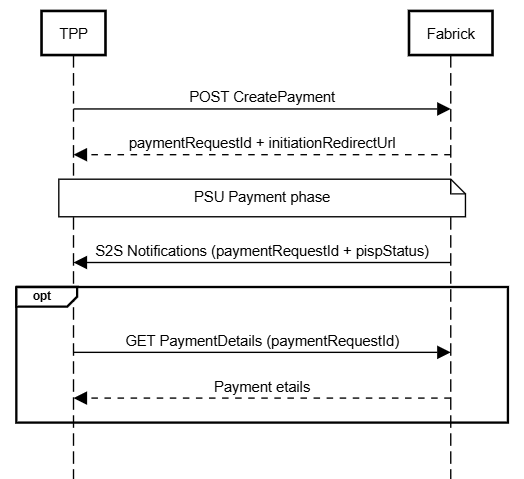
Payment management
The payment initialization phase is handled entirely on the Fabrick page; this makes transparent all the complexity arising from the various types of flows that depend on the choices of the different gateways.
The TPP will simply need to start a payment workflow without worrying about the mode of interaction with the bank or the SCA method adopted. These are all choices that depend on the individual bank, in accordance with PSD2 standards.
Initializing a payment
As mentioned, the TPP will invoke the POST CreatePayment API to start the payment workflow; below is an example:
POST {{domain}}/win/v4.0/wl-pisp/initiate/payment-request
{
  "completionRedirectUrls": {
    "onSuccess": "https://www.google.it/",
    "onFailure": "https://it.yahoo.com/?p=us"
  },
  "debtor": {
    "userCode": "User123"
  },
  "creditor": {
    "account": {
      "value": "IT96G0503456841900000000001",
      "valueType": "IBAN",
      "currency": "EUR"
    },
    "name": "Paolo Rossi"
  },
  "description": "Payment for invoice",
  "targetAmount": 10,
  "targetCurrency": "EUR",
  "paymentProduct": "instant_sepa_credit_transfers"
}
This request includes the minimum required fields; the response will be:
{
  "status": "OK",
  "payload": {
    "paymentRequestId": "c739b314-d419-4a58-b9ca-6ac3391b67ca",
    "status": "CREATED_LINK",
    "createdDatetime": "2026-07-07T12:52:26.016+0000",
    "initiationRedirectUrl": "https://fabrick.com/.../c739b...ca?jwtToken=ey..."
  }
}
The paymentRequestId indicates the unique id of the payment workflow.
As can be seen, the URL indicated by initiationRedirectUrl points to a Fabrick page, specifically to the Fabrick UX that allows the PSU to proceed with the payment process. The page can be customized by the TPP; for details, refer to the dedicated section.
In the previous example, the simplest possible request was shown; it is however possible to add some optional parameters to slightly vary certain behaviors or to meet different needs on the part of the TPP.
Below is a complete example:
POST {{domain}}/win/v4.0/wl-pisp/initiate/payment-request
{
  "completionRedirectUrls": {
    "onSuccess": "https://www.google.it/",
    "onFailure": "https://it.yahoo.com/?p=us"
  },
  "debtor": {
    "userId": 0,
    "userCode": "USER123",
    "bankId": 5,
    "account": {
      "value": "IT77O0848283352871412938123",
      "valueType": "IBAN",
      "currency": "EUR"
    }
  },
  "creditor": {
    "account": {
      "value": "IT96G0503456841900000000001",
      "valueType": "IBAN",
      "currency": "EUR"
    },
    "name": "Marco Candiani",
    "address": {
      "street": "Borgo man",
      "city": "Milan",
      "buildingNumber": "10",
      "countryCode": "IT",
      "postalCode": "20125"
    }
  },
  "description": "Payment for invoice",
  "paymentCode": "PAY123",
  "targetAmount": 10,
  "targetCurrency": "EUR",
  "paymentProduct": "sepa_credit_transfers",
  "supportedPaymentProduct": [
    "sepa_credit_transfers",
    "instant_sepa_credit_transfers"
  ]
}
For details on the individual parameters, refer to the Payment Details section. In the Payment Details section more parameters are described than for this product, i.e. WhiteLabel, since the latter has been simplified and streamlined for more user-friendly and immediate use.
Payment outcome
Once the payment process is complete, the PSU will be redirected to the pages indicated in the completionRedirectUrls object.
Regardless of the URL to which the PSU is redirected, it is necessary to check the pispStatus. The callbacks within the completionRedirectUrls object (onSuccess and onFailure) refer exclusively to the UI and not to the actual outcome of the payment. They are therefore two distinct and independent indicators.
At this point the TPP will receive from Fabrick an S2S notification with the outcome of the payment or, optionally, all the intermediate statuses. For details on notifications, refer to the dedicated section S2S Notifications.
At any time it is always possible to invoke the GET getPaymentDetails API to retrieve all the details of the relevant payment.
GET {{domain}}/win/v4.0/wl-pisp/initiate/payment-request/{{paymentRequestId}}
{
  "status": "OK",
  "payload": {
    "paymentRequestId": "5d1c6b43-15c0-44fe-8f61-721a35ace216",
    "status": "EXECUTED_CREDITOR",
    "createdDatetime": "2026-07-07T13:09:04.062+0000",
    "completedDatetime": "2026-07-07T13:10:46.943+0000",
    "stepCode": "PISP5",
    "paymentCode": "PAY123",
    "bankPaymentId": "1a72ff2b-8acc-4ece-be7b-a95db1948ed0",
    "creditor": {
      "name": "Paolo Rossi",
      "account": {
        "value": "IT96G0503456841900000000001",
        "valueType": "IBAN",
        "currency": "EUR"
      }
    },
    "debtor": {
      "userId": 0,
      "userCode": "USER123",
      "bankId": 5,
      "account": {
        "value": "IT1234567891011121314151617",
        "valueType": "IBAN",
        "currency": "EUR"
      }
    },
    "bankPaymentCreatedDatetime": "2026-07-07T13:09:01.034+0000",
    "updatedDatetime": "2026-07-07T13:10:46.953+0000",
    "targetAmount": 10,
    "targetCurrency": "EUR",
    "paymentProduct": "sepa-credit-transfers",
    "description": "Payment for invoice",
    "scaCompleted": true
  }
}
Payment search
To search for one or more payments, you can use the POST SearchPayments API as shown below:
POST {{domain}}/active-engine/v4.0/initiate/payments/search
{}
Bank list
Using the POST SearchBanks API you can retrieve the complete list of banks exposed by Fabrick, including those still being worked on for the various European countries.
As mentioned, it is not necessary to implement it because it is part of the aggregation handled on the Fabrick page, but it is of course available for any use:
POST {{domain}}/active-engine/v4.0/initiate/banks/search
{}