Payment Details
This section is dedicated to both TPP (Fabrick ActiveEngine product) and FPP (Fabrick Pass product). For this reason, the creation of the payment flow is omitted as it is different and therefore described in the relative document; likewise the path of the HTTP requests which will appear generic.
On the other hand, the flow and concepts illustrated are exactly the same for both products.
Payment types supported
The types of payment, defined as payment-product, are as follows:
- SEPA_CREDIT_TRANSFERS
- INSTANT_SEPA_CREDIT_TRANSFERS
- TARGET_2_PAYMENTS
- CROSS_BORDER_CREDIT_TRANSFERS
When the request is created, the constants can be used with both "-" and "_" and also in lowercase format (eg: sepa-credit-transfers).
SEPA Credit Transfer
It is the tool for making payments in euros between customers holding current accounts at institutions located in SEPA countries (Single Euro Payments Area) With SEPA Credit Transfer you can make Euro transfers within the SEPA Area.
SEPA Instant Credit Transfer
SCT Inst is an instant bank transfer solution (Instant Payments - IP) which enables the transfer of funds between account holders of the SEPA area within 10 operational seconds.
Services based on the SCT Inst scheme are available 24 hours a day, 365 days a year.
National or SEPA instant transfers are only possible when the banks involved have joined the same scheme (or circuit) as instant payments.
As is known, however, adherence to the scheme is optional because banks have to verify application and infrastructural adequacy and organizational contracts and safeguards.
At the moment there are only two circuits:
Obviously, a bank can also join both circuits.
TARGET 2
The TARGET 2 system (Trans-European Automated Real-Time Gross Settlement Express Transfer System) is an interbank settlement circuit that allows participants to carry out, in real time, money transfers in conditions of safety, reliability and efficiency.
The system use a single shared platform (SSP) created and managed by the Bank of Italy, the Deutsche Bundesbank and the Banque de France for the benefit of European financial systems, which, on an operational and legal level, make reference to the respective central banks, on the basis of harmonized standards.
Today TARGET2 is the main European platform for the real-time settlement of large-value payments.
Cross Border
Cross Border Payment is a term that refers to transactions involving individuals, companies, banks or settlement institutions operating in at least two different countries. It also includes the transfer arranged between branches of the same bank located in different countries. Since 1 January 1999, bank transfers in euros with counterpart at EU banks have benefited from the direct and immediate access channel to settlement through TARGET.
Not all banks support all types of product, the information about it is indicated, for each ASPSP, within the supportedPayments object discussed above.
Payment details
After making a payment, it is always possible to view the outcome, or the intermediate status, with the GET Payment Details endpoint. The request is different between FPP and TPP, see the specific document for details. Both for TPP and FPP it is possible to add the boolean refresh as query string, se set to true it will allow you to retrieve updated data in real time by requesting them directly from the bank. Otherwise, refresh equal to false or not present, the data will be recovered according to the latest information received from Fabrick's systems.
This is an example of response:
{

    "payment": {
        "paymentId": "12345",
        "bankPaymentId": "12345678-1234-1234-1234-123456781234",
        "createdDatetime": "2022-07-11T09:37:43.793+0000",
        "targetAmount": 35000.27,
        "targetCurrency": "EUR",
        "paymentProduct": "SEPA-CREDIT-TRANSFERS",
        "status": "PENDING",
        "pispStatus": "AUTHENTICATED",
        "bankStatus": "PDNG",
        "scaStatus": "scaMethodSelected",
        "statusHistory": [{
            "retrievedDatetime": "2022-07-11T09:37:43.806+0000",
            "status": "PENDING",
            "bankStatus": "PDNG"
        }],
        "pispStatusHistory": [{
            "retrievedDatetime": "2022-07-11T09:37:46.734+0000",
            "pispStatus": "AUTHENTICATED"
        }, {
            "retrievedDatetime": "2022-07-11T09:37:43.806+0000",
            "pispStatus": "CREATED"
        }],
        "paymentCode": "payment_code",
        "description": "description test - id",
        "scaCompleted": false,
        "authorizationType": "EMBEDDED",
        "hasBeenReceivedByBank": true,
        "psuErrorMessages": [
        {
          "code": "string",
          "description": "string",
          "messageDatetime": "2023-09-04T09:55:37.535Z"
        }
      ],
        "creditor": {
            "account": {
                "accountId": 0,
                "currency": "string",
                "value": "string",
                "valueType": "string"
            }
        },
        "debtor": {
            "account": {
                "accountId": 0,
                "currency": "string",
                "value": "string",
                "valueType": "string"
            },
            "bankId": 0,
            "bankProfileId": 0,
            "userId": 0
        }
    }
}
-
paymentId: iindicates the unique ID assigned to the payment by Fabrick
-
bankPaymentId: indicates the unique ID assigned to the payment by the final bank
-
paymentCode: optional parameter indicates the code chosen by the TPP / FPP when creating the payment itself. Max length 70 char.
-
description: indicate the reason for the payment. To date, most banks limit the string to 140 characters as indicated by the PSD2 regulation. The unique id chosen by the TPP / FPP can be added to allow subsequent reconciliation; in this case it is recommended to insert it at the beginning of the description to avoid it being truncated.
-
authorizationType: indicates the type of flow exposed by the bank
-
createdDatetime: indicates the creation date of the payment request on Fabrick
-
targetAmount: indicates the payment amount
-
targetCurrency: indicates the currency of the payment
-
paymentProduct: indicates the type of payment: SEPA-CREDIT-TRANSFERS | INSTANT-SEPA-CREDIT-TRANSFERS
-
status, bankStatus and pispStatus: see following sections
-
scaStatus: indicates the sca status.
-
RECEIVED: An authorization or cancellation-authorization resource has been created successfully.
-
PSU_IDENTIFIED: The PSU related to the authorization or cancellation-authorization resource has been identified.
-
PSU_AUTHENTICATED: The PSU related to the authorization or cancellation-authorization resource has been identified and authenticated e.g. by a password or by an access token.
-
SCA_METHOD_SELECTED: The PSU/TPP has selected the related SCA routine. If the SCA method is chosen implicitly since only one SCA method is available, then this is the first status to be reported instead of "received".
-
STARTED: The addressed SCA routine has been started.
-
FINALIZED: The SCA routine has been finalized successfully
-
FAILED: The SCA routine failed
-
EXEMPTED: SCA was exempted for the related transaction, the related authorization is successful
-
-
scaCompleted: indicates when a user has completed the SCA phase and finished the payment flow
-
statusHistory and pispStatusHistory: it's possible to view all the intermediate statuses of the payment. The objects are updated via polling by Fabrick to the bank, so there is a chance that a quick change of state is not be intercepted.
-
hasBeenReceivedByBank indicates that the payment was actually created by the debtor's ASPSP.
-
psuErrorMessages is a parameter that is only valued in the event that there is an error on the bank side and the latter provides further details. The element is a vector to have the ability to handle any multiple errors within the same flow. To date it is always composed of zero elements (the bank has not provided details) or at most one. The object contains the error code and a possible description. This error is handled directly by the Fabrick front-end, so it can only be used by the FPP for logging and/or analysis purposes. It is not necessary to manage the UX on the PSU side, also because the messages could be in a different language and/or not easy to interpret.
-
creditor: creditor information
-
debtor: debtor information. If the PSU uses the IBAN selection payment method directly from the bank's redirect page (i.e. without entering the IBAN on the TPP part), then this information may not be returned, so it will not be possible to know the debit IBAN, for example.
- value: indicates the account number
- valueType: indicates the type of the account, it can be the IBAN, MASKED_PAN or WALLET (MASKED_PAN is allowed only fot TPP to date). In case of WALLET the parameter value could be an email (for example Paypal) or an ID (for example Revolut).
The parameter bankStatus
The different possible states (bankStatus) vary according to the steps made during the payment process, for example the format check, the SCA check, the availability of funds and so on. If the payment request has been correctly invoked, the status will immediately show RCVD, i.e. that the payment request has been sent and received by the person in charge of executing it. It will then change state to indicate the various phases. The final states are only 3:
- RJCT: the payment was unsuccessful;
- ACSC: the payment was successful;
- ACCC: the instant payment was successful.
Depending on the ASPSP, the date and time of the payment and other variables, the final status could also take some time. The intermediate states are:
-
ACTC: authentication and syntactic correctness;
-
ACWC: ASPSP has informed the PISP that it has made changes (eg on the date);
-
ACCP: the control on the "financial risk profile" of the PSU was checked and gave a positive result;
-
ACFC: the PSU availability check was checked and gave a positive result.
The parameter status [deprecated]
Fabrick mapped the normative values into simpler and more explanatory values to facilitate the creation of the user interface. The new values are returned via the status parameter which can assume one of the following constants:
- RECEIVED: a request for payment was sent to the bank but was not authorized;
- PENDING: the bank has taken over the payment;
- EXECUTED: the payment was successful;
- REJECTED: the payment was unsuccessful;
- CANCELLED: the PSU voluntarily terminated the payment process (e.g., by clicking the “Cancel” button in the Fabrick UI) or canceled the payment from the bank's page.
If after one hour from creation and / or authentication the authorization phase by the PSU has not been completed, then the status parameter will be forced to Rejected as the user no longer has the possibility to authorize it .
The parameter pispStatus
To simplify payment management and have a greater level of detail, Fabrick has created a new payment status mapping which will replace the previous one:
- CREATED: payment has been created by PSU
- RECEIVED: payment has been received by debtor bank
- AUTHENTICATED: payment PSU authentication process (SCA) was started: the PSU logged on with user and password
- ONGOING: the PSU completed the SCA process but the requestedexecutiondate has not been reached yet. For example Payment was asked for a future date, it needs to wait until the requested execution date to be processed - INITIALIZED: the PSU completed the SCA process and the requestedexecutiondate (se present) has been reached. It means that debtor bank has approved the payment initialization
- CANCELLED: the PSU voluntarily terminated the payment process (e.g., by clicking the “Cancel” button in the Fabrick UI) or canceled the payment from the bank's page.
- EXPIRED: payment expired because abandoned by PSU. it's been over an hour passed since the SCA started and it was never completed (status RECEIVED or AUTHENTICATED).
- REJECTED: payment has been rejected by debtor bank
- REQUIRED_ACTION: payment flow status needs to be checked and maybe fixed. Payment does not become final and requires some additional action (it's been more than 5 working days from the payment has been initialized)
- EXECUTED_DEBTOR: payment has been executed by the debtor bank
- EXECUTED_CREDITOR: payment has been received by the creditor bank. Creditor bank confirmed about the payment execution. This status is possible only in two cases: for instant payments since the circuit works in handshake so (with exceptions) the fact that it is executed means that it has also been received and for payments (even se they are not instant) between banks of the Fabrick gateway, for example Sella to Sella.
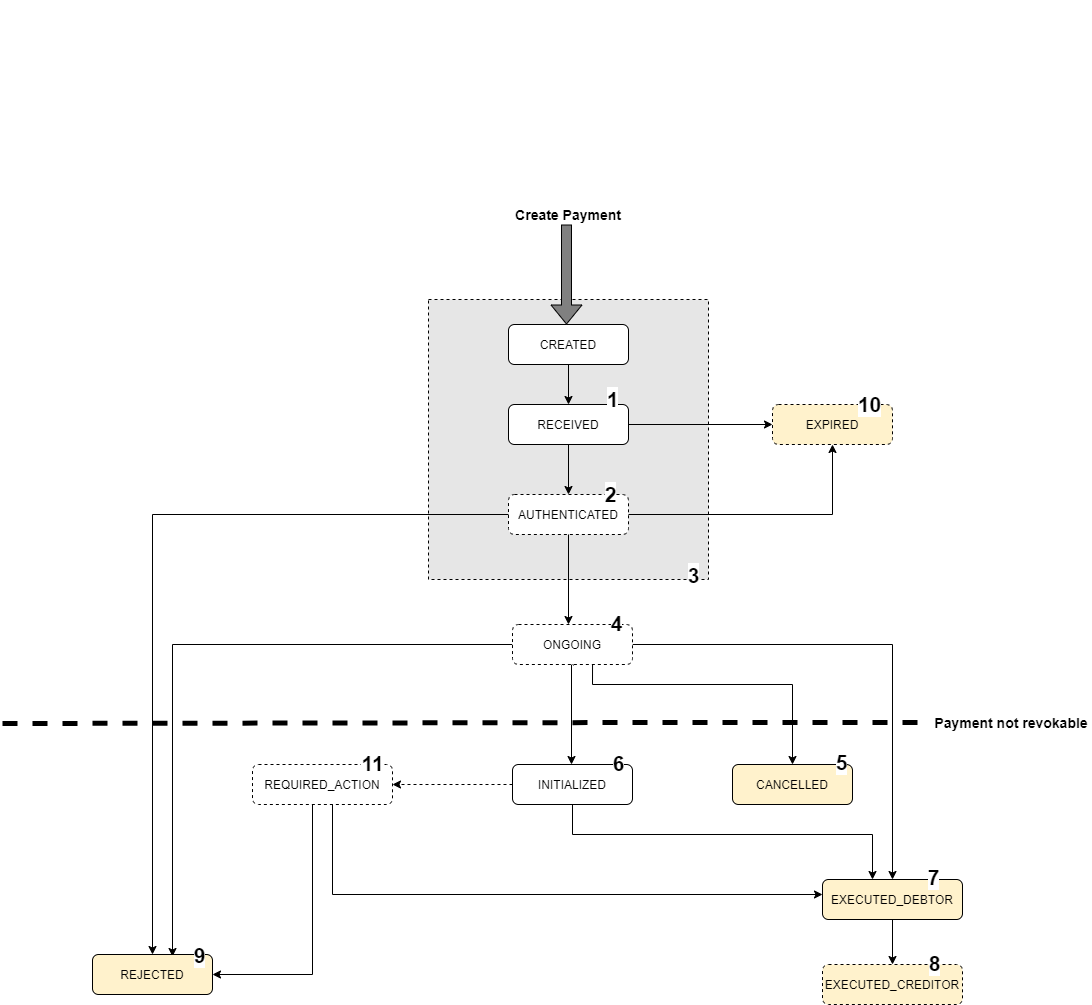
In this diagram the yellow status are considered final. Furthermore, as can be seen from the diagram, once the payment reaches one of the states below the dotted line, it can no longer be revoked. For example, a payment on a future date could be revoked, in which case the status would become CANCELLED
If after one hour from creation and / or authentication the authorization phase by the PSU has not been completed, then the pispStatus parameter will be forced to Expired as the user no longer has the possibility to authorize it. Further details are summarized in the following table.
This is to be understood as the maximum period of time that can remain in that pispStatus. For example, after 1 hour from the creation of the payment to the bank (RECEIVED), se the user does not take any steps, the payment will be set in EXPIRED. Only half an hour instead se the user has performed the authentication process (but not authorization). In other cases the pispStatus parameter will move to the next pispStatus according to the previous diagram. The pispStatus arrives in INITIALIZED immediately, as mentioned, the table shows the maximum time interval, the worst case.
| pispStatus | final/pending | TIME TO FINAL - SEPA | TIME TO FINAL - INSTANT |
|---|---|---|---|
| AUTHENTICATED | PENDING | 1/2 hour | 1/2 hour |
| RECEIVED | PENDING | 1 hour | 1 hour |
| EXECUTED_DEBTOR | FINAL | ||
| INITIALIZED | PENDING | 6 Days (BPM 10 Days) | 1 hour |
| REJECTED | FINAL | ||
| EXPIRED | FINAL | ||
| ONGOING | PENDING | 6 Days (BPM 10 Days) | 1 hour |
| EXECUTED_CREDITOR | FINAL | ||
| CREATED | PENDING | seconds | seconds |
| CANCELLED | FINAL | ||
| REQUIRED_ACTION | PENDING | Days (require manual action) | Days (require manual action) |
Status reason
In addition to the states indicated above, Fabrick has created a mapping in order to add further detail in case of errors on the part of the bank during the request to create a payment.
Obviously, given the number of banks managed, the following table should be considered as additional information and therefore it is not guaranteed that it will always be present.
| Code | Message | Description | | ----------- | ----------------------------------------------- | -------------------------------------------------------------------------------------------------------------------------- | | FBK_RCE | REJECTED_CREATION_ERROR | Payment has been rejected because the creation call got a response error | | FBK_RCE_FUF | REJECTED_CREATION_ERROR_FOR_UNKNOWN_FORMAT | Payment has been rejected because the creation call got a response error in an unknown error format | | FBK_RSF | REJECTED_SCA_FAILED | Payment has been rejected because the SCA process failed | | FBK_EFR | EXPIRED_FROM_RECEIVED | Payment expired because the user did not start the SCA process | | FBK_EFA | EXPIRED_FROM_AUTHENTICATED | Payment expired because the user did not finish the SCA process | | FBK_RAP | REQUIRED_ACTION_PENDING | Payment requires action because has not been moved in a final status for days | | FBK_RAE | REQUIRED_ACTION_ERROR | Payment requires action because there is an error that requires attention | | FBK_RAE_BSF | REQUIRED_ACTION_EXECUTED_BUT_SCA_FAILED | Payment requires action because sca failed but status is executed | | FBK_RAE_MDI | REQUIRED_ACTION_EXECUTED_MISSING_DEBTOR_IBAN | Payment requires action because the status is executed but we did not get the debtor iban value (mandatory for AML checks) | | FBK_RA_SUR | REQUIRED_ACTION_SCASTATUS_UNKNOWN_RECEIVED | Payment requires action because the scaStatus have been UNKNOWN for a long time with status RECEIVED | | FBK_RA_SUA | REQUIRED_ACTION_SCASTATUS_UNKNOWN_AUTHENTICATED | Payment requires action because the scaStatus have been UNKNOWN for a long time with status AUTHENTICATED | | FBK_RA_SUI | REQUIRED_ACTION_SCASTATUS_UNKNOWN_INITIALIZED | Payment requires action because the scaStatus have been UNKNOWN for a long time with status INITIALIZED | | FBK_RA_SUO | REQUIRED_ACTION_SCASTATUS_UNKNOWN_ONGOING | Payment requires action because the scaStatus have been UNKNOWN for a long time with status ONGOING | | FBK_001 | PsuDocumentsInvalid | One or more documents identifying the PSU are not valid | | FBK_002 | PsuTokenInvalid | The PSU does not have any token support | | FBK_003 | PsuCredentialsNotValid | Some Psu credential is not valid | | AC01 | IncorrectAccountNumber | Format of the account number specified is not correct | | AC02 | InvalidDebtorAccountNumber | Debtor account number invalid or missing. | | AC03 | InvalidCreditorAccountNumber | Wrong IBAN in SCT | | AC04 | ClosedAccountNumber | Account number specified has been closed on the bank of account's books | | AC06 | BlockedAccount | Account specified is blocked prohibiting posting of transactions against it. | | AC10 | InvalidDebtorAccountCurrency | Debtor account currency is invalid or missing | | AC11 | InvalidCreditorAccountCurrency | Creditor account currency is invalid or missing | | AC13 | InvalidDebtorAccountType | Debtor account type is missing or invalid | | AM01 | ZeroAmount | Specified message amount is equal to zero | | AM02 | NotAllowedAmount | Specific transaction/message amount is greater than allowed maximum | | AM04 | InsufficientFunds | Amount of funds available to cover specified message amount is insufficient. | | AM06 | TooLowAmount | Specified transaction amount is less than agreed minimum. | | AM07 | BlockedAmount | Amount specified in message has been blocked by regulatory authorities. | | BE08 | BankError | Returned as a result of a bank error. | | CN01 | AuthorisationCancelled | Authorisation is cancelled. | | CUST | RequestedByCustomer | Cancellation requested by the Debtor | | DT01 | InvalidDate | Invalid date (eg wrong settlement date) | | DS14 | UserDoesNotExist | The user is unknown on the server | | DS28 | ReturnForTechnicalReason | Return following technical problems resulting in erroneous transaction. | | DS0H | NotAllowedAccount | Signer is not allowed to sign for this account | | FF03 | InvalidPaymentTypeInformation | Payment Type Information is missing or invalid. Generic usage se cannot specify Service Level or Local Instrument code | | FR01 | Fraud | Returned as a result of fraud. | | TK01 | TokenInvalid | Token is invalid. | | TKXP | TokenExpired | Token expired. | | UCRD | UnknownCreditor | Unknown Creditor. |
Search payments
Fabrick also offers the possibility to search for payments using every kind of filter thanks to the POST Search Payments endpoint::
POST /v4.0/initiate/payments/search
Input body for TPP (Active Engine)
{
  "bankPaymentId": "string",
  "bankStatus": [
    "string"
  ],
  "createdDatetime": {
    "from": "2023-10-12T12:53:16.785Z",
    "to": "2023-10-12T12:53:16.786Z"
  },
  "creditor": {
    "account": {
      "bankCode1": "string",
      "bankCode2": "string",
      "bankCode3": "string",
      "branchCode1": "string",
      "branchCode2": "string",
      "branchCode3": "string",
      "countryCode": "string",
      "currency": "string",
      "value": "string",
      "valueType": "string"
    },
    "bicCode": "string",
    "email": "string",
    "name": "string"
  },
  "debtor": {
    "account": {
      "bankCode1": "string",
      "bankCode2": "string",
      "bankCode3": "string",
      "branchCode1": "string",
      "branchCode2": "string",
      "branchCode3": "string",
      "countryCode": "string",
      "currency": "string",
      "value": "string",
      "valueType": "string"
    },
    "accountId": "string",
    "bankId": "string",
    "bankProfileId": "string",
    "email": "string",
    "userCode": "string",
    "userId": "string"
  },
  "description": "string",
  "paymentCode": "string",
  "paymentProduct": "string",
  "paymentService": "string",
  "requestedExecutionDatetime": {
    "from": "2023-10-12T12:53:16.786Z",
    "to": "2023-10-12T12:53:16.786Z"
  },
  "pispStatuses": ["string"],
  "status": [
    "string"
  ],
  "targetAmount": {
    "from": 0,
    "to": 0
  },
  "targetCurrency": "string"
}
Input body for FPP (Pass)
{
  "bankStatuses": [
    "string"
  ],
  "createdDatetime": {
    "from": "2023-10-12T12:39:32.763Z",
    "to": "2023-10-12T12:39:32.763Z"
  },
  "creditorAccountIds": [
    0
  ],
  "debtorAccountIds": [
    0
  ],
  "debtorCodes": [
    "string"
  ],
  "debtorIds": [
    0
  ],
  "description": "string",
  "executionDatetime": {
    "from": "2023-10-12T12:39:32.763Z",
    "to": "2023-10-12T12:39:32.763Z"
  },
  "paymentCodes": [
    "string"
  ],
  "paymentIds": [
    0
  ],
  "paymentProducts": [
    "string"
  ],
  "paymentRequestCodes": [
    "string"
  ],
  "requestedExecutionDatetime": {
    "from": "2023-10-12T12:39:32.763Z",
    "to": "2023-10-12T12:39:32.763Z"
  },,
  "pispStatuses": ["string"],
  "statuses": [
    "string"
  ],
  "targetAmount": {
    "from": 0,
    "to": 0
  },
  "targetCurrencies": [
    "string"
  ]
}
If the answer is positive, you will have the list of payments with all the relative information, otherwise an empty list:
{
    "errors": [],
    "payload": {
        "list": [
            {
                "bankPaymentId": "12345",
                "createdDatetime": "2020-03-04T15:43:27.550Z",
                "creditor": {
                    "account": {
                        "accountId": 123,
                        "cardId": 0,
                        "currency": "EUR",
                        "value": "ITXXXXXXXXXXXXXXXXXXXXXXXXXXX",
                        "valueType": "IBAN"
                    },
                    "address": {
                        "city": "Biella",
                        "postalCode": "13900",
                        "street": "Via Italia"
                    },
                    "bicCode": "XXXXXXXXXXX",
                    "mail": "paolo.rossi@mail.it",
                    "name": "Paolo Rossi"
                },
                "debtor": {
                    "account": {
                        "accountId": 0,
                        "cardId": 0,
                        "currency": "EUR",
                        "value": "ITXXXXXXXXXXXXXXXXXXXXXXXXXXX",
                        "valueType": "IBAN"
                    },
                    "bankId": 19,
                    "bankProfileId": 1,
                    "userId": 0
                },
                "description": "Test Payment",
                "executionDatetime": "2020-03-04T15:43:27.550Z",
                "fundsAvailable": true,
                "paymentCode": "123",
                "paymentId": 12345,
                "paymentProduct": "SEPA_CREDIT_TRANSFERS",
                "quotationDatetime": "2020-03-04T15:43:27.550Z",
                "requestedExecutionDatetime": "2020-03-04T15:43:27.550Z",
                "status": "ACCC",
                "targetAmount": 100,
                "targetCurrency": "EUR",
                "transactionCurrency": "EUR"
            }
        ],
        "pagination": {
            "limit": 0,
            "offset": 0,
            "pageCount": 0,
            "resultCount": 1
        }
    },
    "status": "OK"
}
Utilities APIs
Fabrick also exhibits validation services for individual payment data. In case of TPP this is useful to check parameters before initializing the payment creating a dynamic and pre-filled UI; the advantage is to prevent possible errors by users giving the possibility of immediately identifying the reason. In case of FPP this could be useful to create a custom UI since all the checks are already implemented on Fabrick UI.
Validate Debtor
The POST Validate Debtor returns the correct ASPSP related to the IBAN passed in input as indicated below:
POST /v4.0/initiate/utils/debtor/validate

{
  "debtorAccount": {
    "currency": "EUR",
    "value": "{{debtorAccount}}",
    "valueType": "IBAN"
  }
}
The endpoint will return the list of ASPSPs searched among which the user will decide which one to use. Usually this list will have a size equal to one as shown in the example:
{
    "status": "OK",
    "payload": {
        "banks": [
            {
                "bankId": "17",
                "gateway": "Fabrick",
                "createdDatetime": "2019-07-15T08:55:22.206+0000",
                "deleted": false,
                "businessName": "Banca Sella",
                "labelName": "Banca Sella",
                "address": {
                    "city": "Biella",
                    "country": "Italy",
                    "countryCode": "IT"
                },
                "fiscalCode": "BSE",
                "abiCode": "03268",
                "customerServices": [],
                "media": [],
                "bankCode": "03268",
                "bankConnector": "3",
                "bankPisConnector": "101",
                "uris": {
                    "sandbox": "https://sandbox-psdgw-sella.fabrick.com",
                    "live": "https://psdgw-sella.fabrick.com"
                },
                "aisLevel": 1,
                "pisLevel": 4,
                "scaFlows": [],
                "scaMethods": [],
                "supportedPayments": {
                    "single": {
                        "sepa": {
                          "standard": true,
                          "future": true,
                          "multiCurrency": false
                        },
                        "instant": {
                            "standard": true
                        }
                    }
                },
                "isSupported": false,
                "isOnline": false,
                "lastUpdatedDatetime": "2019-08-19T15:30:27.461+0000",
                "lastOnlineUpdatedDatetime": "2019-07-15T08:55:22.206+0000"
            }
        ]
    }
}
One of the most important parameters to proceed with the following steps is the supportedPayments object which indicates the details about the supported payment types.
Validate IBAN
The POST Validate IBAN service checks that the IBAN passed in input is correct and valid. For example, it could be used to show a validation check next to the "Creditor IBAN" and "Debtor IBAN" fields and allow the user to immediately correct the incorrect data.
POST /v4.0/initiate/utils/iban/validate

{
    "iban": "ITXXXXXXXXXXXXXXXXXXXXXXXXX"
}
Furthermore, all the information relating to the IBAN itself is returned:
{
    "status": "OK",
    "payload": {
        "elements": {
            "countryCode": "IT",
            "controlCode": "XX",
            "bankCode1": "XXXXX",
            "branchCode1": "XXXXX",
            "accountNumber": "XXXXXXXXXXXX",
            "check1": "C"
        },
        "isValid": true
    }
}
Validate Sct-Inst
As already described, joining the SEPA Instant Credit Transfer scheme is optional, for this reason Fabrick exhibits a service that allows you to know in advance the possibility of making the payment between the two ASPSPs. As shown below, the POST Validate Sct-Inst endpoint takes the creditorBankId, creditorAccountId, debtor account information and debtorBankId as input. In output it returns the confirmation that both banks have joined the same SCT-Inst scheme. With this endpoint, for negative result, the user can be notified when the data is entered that the payment will not be successful.
TPP case
POST /api/fabrick/active-engine/v4.0/initiate/utils/sct-inst/validate HTTP/1.1

{
  "creditorIban": "ITXXXXXXXXXXXXXXXXXXXXXXXXX",
  "debtorIban": "ITXXXXXXXXXXXXXXXXXXXXXXXXX"
}
FPP case
POST /api/fabrick/pass/v4.0/initiate/utils/sct-inst/validate
{
  "creditorAccountId": {{creditorAccountId}},
  "creditorBankId": "1",
  "debtorAccount": {
    "currency": "EUR",
    "value": "ITXXXXXXXXXXXXXXXXXXXXXXXXX",
    "valueType": "IBAN"
  },
  "debtorBankId": "{{bankId}}"
}
Below you can see an example of successful response. The response is the same for TPP and FPP.
{
    "status": "OK",
    "payload": {
        "isValid": true
    }
}
Validate Payment
Fabrick also offers the possibility to request a single and complete validation of the payment that is about to be made. This endpoint combines all the controls described in a single service, returning the information necessary to explicitly identify any incorrect data entered by the PSU.
Below is an example of POST Validate Payment.
TPP case
POST /api/fabrick/active-engine/v4.0/initiate/banks/19/payments/sepa-credit-transfers/validate HTTP/1.1

{
    "debtor": {
        "userCode": "gian",
        "account": {
            "value": "ITXXXXXXXXXXXXXXXXXXXXXXXXX",
            "valueType": "IBAN",
            "currency":"EUR"
        }
    },
    "creditor": {
        "name": "Mario Rossi",
        "account": {
            "value": "ITXXXXXXXXXXXXXXXXXXXXXXXXX",
            "valueType": "IBAN",
            "currency":"EUR"
        }
    },
    "description":"Esempio Validate Payment",
    "targetAmount": "50",
    "targetCurrency":"EUR"
}
FPP case
POST /api/fabrick/pass/v4.0/initiate/banks/{bankId}/payments/{paymentProduct}/validate
{
    "debtorAccount": {
        "currency": "EUR",
        "value": "IT50I0503456841900000000003",
        "valueType": "IBAN"
    },
    "creditorAccountId": 1,
    "debtorCode": "0000470002",
    "paymentCode": "SQFAR0000456",
    "description": "RICPISPSQFAR00004560000470002",
    "targetCurrency": "EUR",
    "targetAmount": 50.0
}
For both TPP and FPP the response returns the set of the checks and the relative results; thanks to this information, the PSU can be allowed to proceed or correct mistakes.
{
    "status": "OK",
    "payload": {
        "creditorIbanElements": {
            "countryCode": "IT",
            "controlCode": "XX",
            "bankCode1": "XXXXX",
            "branchCode1": "XXXXX",
            "accountNumber": "XXXXXXXXXXXX",
            "check1": "A"
        },
        "debtorIbanElements": {
            "countryCode": "XX",
            "controlCode": "XX",
            "bankCode1": "XXXXX",
            "branchCode1": "XXXXX",
            "accountNumber": "XXXXXXXXXXXX",
            "check1": "C"
        },
        "isRequestedExecutionDateAllowed": true,
        "isChargeBearerAllowed": true,
        "isPaymentProductAllowed": true,
        "isInstantAllowed": true,
        "isCreditorIbanValid": true,
        "isDebtorIbanValid": true
    }
}
Get Execution Dates
The transfers, once arranged, must be processed by the bank before being physically credited. The work consists of some checks and provisions that the institution carries out, such as verifying the identity of the person arranging the transfer or the correspondence between the IBAN code and the details of the person receiving the transfer. Each credit institution has a deadline for processing operations and bank transfers: this is the cut-off. If the transfer is arranged within the cut-off time, the transaction is also processed within the day; se the transfer is arranged after the cut-off time, the processing of the transfer is postponed to the next day. Thanks to the GET getExecutionDates endpoint, it is possible to identify the day of the operation. This service, given the creditorAccountId and debtorAccountValue (debtorIban), returns a list of available dates in which a payment can be made. You could then show a calendar in which only these dates are selectable, disabling all the others. Below is an example showing how to invoke the GET Execution Dates endpoint.
TPP case
GET /api/fabrick/active-engine/v4.0/initiate/utils/execution-dates?creditorIban=ITXXXXXXXXXXXXXXXXXXXXXXXXX&debtorIban=ITXXXXXXXXXXXXXXXXXXXXXXXXX&fromDate=2020-03-30 HTTP/1.1
FPP case
GET /api/fabrick/pass/v4.0/initiate/utils/execution-dates? creditorAccountId=XXXXX&debtorIban=ITXXXXXXXXXXXXXXXXXXXXXXXXX&fromDate=2020-11-19
Below you can see an example of response. The response is the same for TPP and FPP.
{
    "status": "OK",
    "payload": {
        "validExecutionDates": [
            "2021-01-13",
            "2021-01-14",
            "2021-01-15",
            "2021-01-18",
            "2021-01-19",
            "2021-01-20",
            "2021-01-21",
            "2021-01-22",
            "2021-01-25",
            "2021-01-26"
        ]
    }
}
Depending on the cut-off time of each bank and the internal management of future payments, it is possible the case in which the array does not contain any date, in this case it will not be possible to make the payment.
Guidelines
Evaluating the outcome of a payment
Once a payment has been initialized, it is absolutely necessary to understand the various phases in order to be able to make the choice that is most consistent with your needs based on the desired behavior.
We will assume that the payment in question has been authorized, because otherwise, of course, it will not have any evolution. To simplify the process as much as possible, we will divide the flow into 3 different states:
- Payment authorized: this information is available immediately after the payment authorization by the PSU; the advantage is therefore the immediacy of the information, on the other hand there is no certainty of the credit as no checks have yet been made by the debtor's bank (syntactic checks, funds control, ...)
- Payment executed: in this case it is necessary to wait for the payment to pass from the state "taken over by the bank" to the state executed, so you can be sure that all checks by the debtor's bank have been successfully completed. The transfer is then put on the circuit. The times are variable, but the same as those of a "standard" transfer, from a few minutes to a few days considering cut-off times and holidays.
- Payment credited: this is the last state, following a reconciliation it is certain that the payment has been credited, the disadvantage is therefore the longer wait compared to the first two cases which also depends on the accounting times of each individual bank.
While the three might initially appear similar, we have actually seen notable differences. Obviously, the level of risk also changes, in fact in the last case the TPP / FPP will have 100% certainty that the payment has been received, in the second case a slightly lower percentage (obviously level of tenths) and finally a higher level in the first case, albeit still minimal. Depending on your needs (lead times, product type, ...) the TPP / FPP will be able to decide which of the 3 states to rely on to consider the payment.
Obviously, in the case of instant payment, the aforementioned considerations are not valid as there is an immediate credit time 24/7.
Payment status
Once the payment flow has started, it is certainly important to know the outcome of the same, for this reason in this section we report some guidelines and advice that could be applied.
The recommended solution is to enable notifications so that Fabrick (v Notification S2S doc)
The second solution, to be preferably used only in case of real need, is to implement a polling system. In this case it will be sufficient to invoke in polling the GET getPaymentDetails API and read the pispStatus parameter. In addition, in case of polling it is important that it always comes into action, highlighting the fact that you do not rely on the redirect callback on your own domain (the url indicated in the request phase that allows you to redirect the PSU to your application once the payment authorization phase has been completed). This aspect is very important as the PSU could close the browser even before being redirected to the application, but at the same time having successfully concluded the authorization phase.
Only for FPP: see Payment Status VS Workflow status section in Fabrick in Fabrick Pass - Payment Initiation Inbound document.
The GET getPaymentDetails API, as can be seen from the documentation, allows you to request the status in real time directly from the bank via the refresh parameter; however, we recommend omitting this option for the following reasons:
- Fabrick has in turn implemented a scheduler for banks that allows him to have the data updated with an excellent approximation to real time (see document Schedulers)
- Less chance of error, as Fabrick, for the specific payment requested, will always return the last available value unlike the case with refresh in which the bank could return an error for any reason.
- Less important, but obviously the response time will be shorter.
You could consider using the refresh parameter se there is a refresh button on the application. In this case, as in the creation phase, it is necessary to enter the IP address of the PSU.
Returning now to the logic of the scheduler, below we indicate some suggestions both by referring to the variable status (deprecated) and to the variable pispStatus
Case with status (deprecated)
To verify the authorization of the payment, the scaCompleted parameter must be considered: it will be set to true in case of authorized payment by the PSU, false otherwise.
In case of polling, the polling phase can be considered completed as soon as the payment reaches a final status: status = EXECUTED | REJECTED | CANCELED
The Fabrick scheduler also continues to poll the bank according to the following algorithm until it finds a final status:
- every 30 seconds for the first 5 minutes
- every minute up to half an hour
- every 15 minutes up to the hour
- every 30 minutes up to 12 hours
- every hour up to 24h
- every 12 hours up to 7 days
- every day up to 30 days
- every 15 days up to 60 days
In any case, se after 1 hour from authentication, the payment has not yet been authorized, then the status will be put in REJECTED; in fact, the PSU will no longer have the possibility to proceed with the authorization (for Banca Sella after 15 minutes).
In the event that a payment remains in a non-final state for some time, for example more than 4/5 working days, it will always be possible to open a ticket with all the necessary details to allow Fabrick to report it to the final bank and ask for clarification.
Case with pispStatus
In this case the FPP / TPP will only be able to evaluate the pispStatus parameter having already all the necessary information from it without considering other parameters. In case of polling the polling logic is exactly the same of the case with status, but it can end as soon as pispStatus assumes a final value (v. The parameter pispStatus section).
Cancellation of a payment
According to the PSD2 law, a payment via PSD2 channel cannot be canceled once it has been executed. However, there are some exceptions, in particular:
- You can cancel a payment at a future date up to the time of the execution day. Unfortunately, se a payment is initiated during the cut-off time this could be considered, by some banks, as a payment at a future date as it will be taken in charge on the first working day.
- Some banks (eg Fineco) allow the cancellation of the payment, within a maximum limit of hours, se the customer confirms it is a possible fraud / scam (for example through a flag). In this case, the timing varies according to the execution date and the type of payment: approximately within 18 hours for ordinary SEPA transfers.