PSD2 Consent
Introduction
PSD2 enables banks and customers to benefit from third-party APIs to obtain a better experience for their financial activities, both for information operations (AISP) and for dispositive operations (PISP). However, this means that banks will have to share sensitive data — such as a customer's financial information — with third-party companies, while also ensuring that the customer's data and other information remain secure. The same applies to payment initiation.
Within the open banking domain, Account Servicing Payment Service Providers (ASPSPs) and Third-Party Providers (TPPs) are strictly guided by open banking-specific regulations and other guidelines, such as SCA (Strong Customer Authentication) and GDPR (General Data Protection Regulation).
For example, financial information should only be shared with the explicit consent of the user; without it, the service provider would be violating the GDPR, which was introduced in May 2018.
Consent Management
In the open banking context, consent management can be divided into three phases:
- The consent phase.
- The authentication phase.
- The authorization phase.
In the consent phase, the interface shows the user what information is requested and for what purposes. In the authentication phase, it is the bank's responsibility to take over and engage the user in authentication mechanisms to ensure the security of the customer's data — PSD2 mandates SCA for this purpose. In the authorization phase, the consumer is presented with the details of the requested consent on the bank-user interface and is asked to allow or deny the TPP's request to access the shown data.
The three phases just described can be summarized in the 6 steps shown in the following diagram:
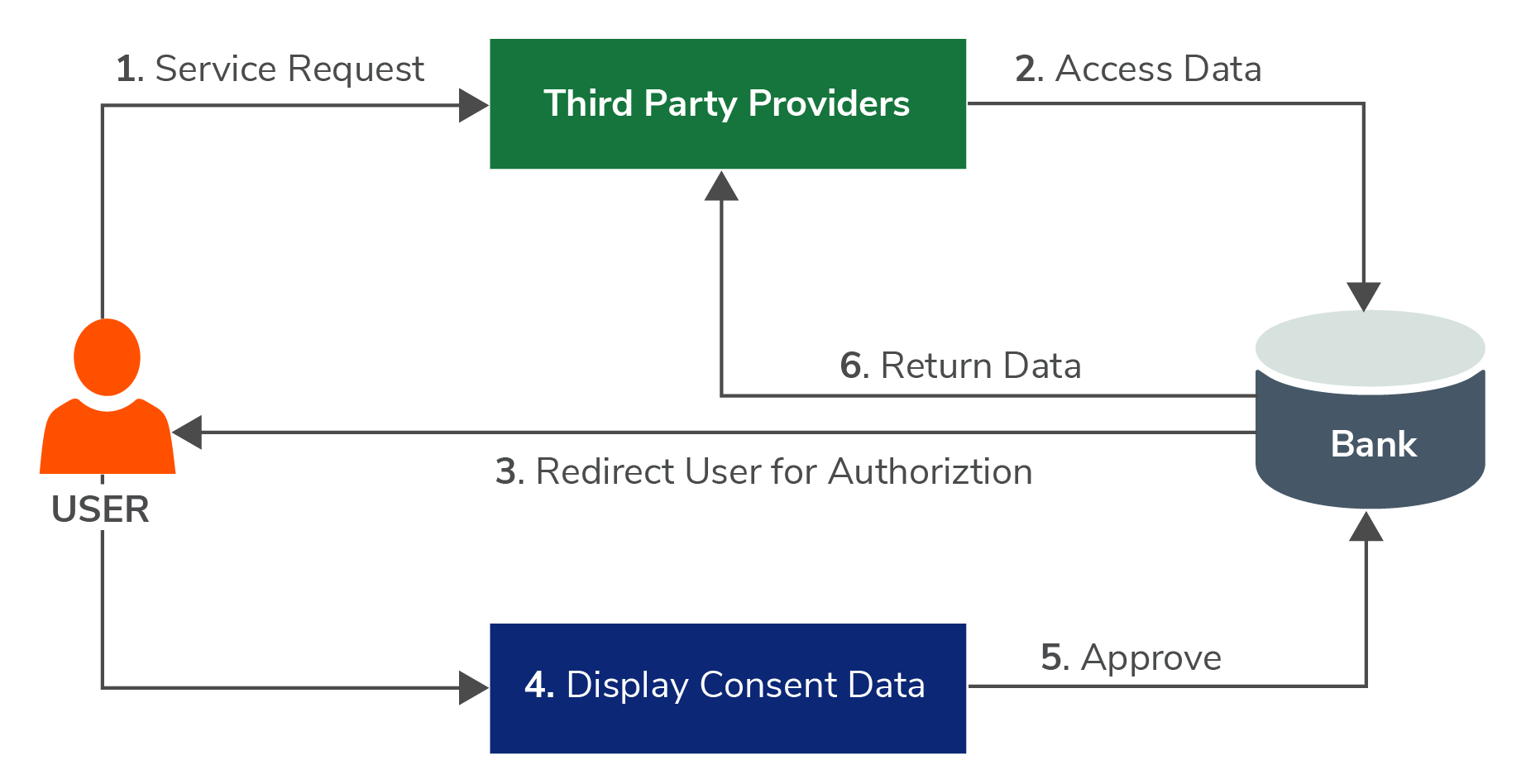
The user must be aware of the TPP to which they are granting consent and the number of days for which the consent will be valid; after this time interval, a renewal (i.e., a new consent) by the user will be required. The maximum number of days allowed is 180 days (previously only 90, increased starting from 25/07/2023).
According to EU GDPR Article 7, banks must not only ensure that data retrieved from users is secure, but must also provide users with the opportunity to change their minds and revoke consent.
An important point to keep in mind is the following:
For the triple TPP (certificate) – Bank – User (credentials for accessing internal banking), one and only one recurring consent can be valid at any time.
The term "recurring" is used here deliberately, because there is also a non-recurring consent that allows a single information request (e.g., the list of accounts), after which it becomes invalid. In general, consent is assumed to be recurring unless otherwise specified.
This means that creating a new consent with the same three actors will overwrite the previous one. This is an aspect to be taken into consideration both during testing and during the design phase. For example, if multiple testers are testing consents and accessing APIs, they must either use two different accounts or coordinate to use the same consent — otherwise, the last tester to create a consent will invalidate the one previously created by a colleague.
Another example is a TPP that wants to create multiple applications for its customers: it will need to implement an additional layer for the correct management of consents.
For Fabrick Pass, the TPP is always Fabrick (which holds the AIS / PIS license).
Consent Status
The possible values that a consent can assume are listed below:
- RECEIVED: the first phase — the consent has not yet been authorized by the PSU. For example, the TPP (or Fabrick in case of an FPP) has requested the bank's consent, but the user has not yet completed the SCA phase.
- VALID: the consent is active and valid.
- TERMINATED_BY_TPP: the TPP (or the PSU in the case of an FPP via Fabrick) has canceled the consent via API (DEL DeleteConsent).
- REVOKED_BY_PSU: the PSU has withdrawn the consent via their internet banking.
- EXPIRED: the consent has expired.
- REPLACED: the consent was renewed before expiration. If you encounter this value, there will certainly be a second consent with the same properties but a different status (e.g., VALID).
- REJECTED: the consent data were rejected, e.g., because no successful authorization took place.
Given the various ways in which a consent can be invalidated, it is possible to encounter a consent with a status other than VALID even if the expiry date is in the future.
Strong Customer Authentication
SCA applies to both information operations (AISP) and dispositive operations (PISP). It requires strong authentication using at least two of the following three elements:
- Knowledge: something the user knows, such as a password, PIN, passphrase, or security question.
- Possession: something the user owns and can use, typically a device such as a smartphone, a portable device, or a bank token.
- Inherence: something physical that uniquely identifies the user, such as a fingerprint or facial biometric features.
Regarding payments, PSD2 provides that certain types of transactions can be exempted from the two-factor SCA process. In particular, the following categories may be exempt:
- Low-value transactions: transactions below €30 that, when accumulated over a 24-hour period, do not exceed €100, or that do not exceed a series of five exempt transactions.
- Low-risk transactions: operations analyzed by payment service providers where the fraud rate remains below the regulatory thresholds for card payments, thus excluding the need for SCA.
- Recurring payments with a fixed amount: for example, subscriptions. In these cases, strong authentication is only required for the first transaction; all subsequent renewals are treated as automatic operations and do not require SCA, unless the amount or delivery method changes.
- Payments to trusted beneficiaries: strong authentication is required for the first payment to a merchant identified as a trusted beneficiary. Subsequent payments to the same beneficiary can be made without SCA.
Strong Customer Authentication Flows — UI
Introduction
The different types of SCA flows are described in this document. As specified in the PSD2 standard, each bank may support one or more of the following methods:
- redirect
- decoupled
- embedded
The TPP must adapt accordingly and implement the method defined by the ASPSP.
The TPP will need to develop the flows regardless of whether it chooses the basic solution or the simplified solution via workflow. Please refer to the technical documentation for details.
For FPPs, no development will be necessary, as the user will be redirected to Fabrick pages which already handle all possible cases.
Standard Flows
Redirect
Redirect is one of the most widely used and easiest to implement SCA approaches. When the Payment Service User (PSU) starts the interaction with the TPP, they are redirected to a web interface of the ASPSP for authentication. This means PSUs are redirected to their bank's website to authenticate themselves by entering their credentials. A key advantage of the redirect approach is that no additional user data is shared with the TPP.
Decoupled
The decoupled SCA approach is similar to the redirect approach, but authentication is carried out through an independent application or device provided by the ASPSP (e.g., a mobile banking app). The PSU authenticates through a method that is separate from the main interaction flow. This model enables a number of innovative solutions and has the added benefit of allowing the PSU to use their mobile phone to authenticate. The TPP must implement a polling mechanism to detect the operation status as soon as the PSU authorizes it.
Embedded
In an embedded SCA approach, the process is fully handled by the TPP on behalf of the PSU. The user shares their credentials with the TPP, which authenticates in the background and manages the interaction with the ASPSP directly. The service provider must be registered and licensed to perform this action, and is not permitted to store any credentials shared by the PSU. To increase security, the PSU may be required to complete an additional SCA step, such as entering a one-time password, to reduce fraud risk.
Variations of Standard Flows
The three flows described above represent the basic cases. However, some ASPSPs may request additional information or implement a hybrid of two of the three approaches. Some examples are shown below.
Examples
This section illustrates the PSU user experience for each possible SCA flow:
- redirect: the user is immediately redirected to a bank page to complete authentication. The user experience is similar to that of their internet banking.
- redirect with precondition psu-id: after providing Fabrick with the ID used to log into their bank, the user is redirected to a bank page to complete authentication.
- redirect with precondition IBAN: after providing Fabrick with the IBAN of their bank account, the user is redirected to a bank page to complete authentication.
- redirect with precondition psu-id and IBAN: after providing both the user ID and IBAN to Fabrick, the user is redirected to a bank page to complete authentication.
- decoupled: the user authenticates on their bank's app while Fabrick waits for the authentication to be completed, providing any additional information required by the process.
- embedded: the user enters their authentication data (username, password, tokens, etc.) directly on the Fabrick page, which autonomously validates the data with the bank, potentially requesting it in multiple steps.
The following authentication methods apply equally to the account aggregation phase.
Authentication with Redirect
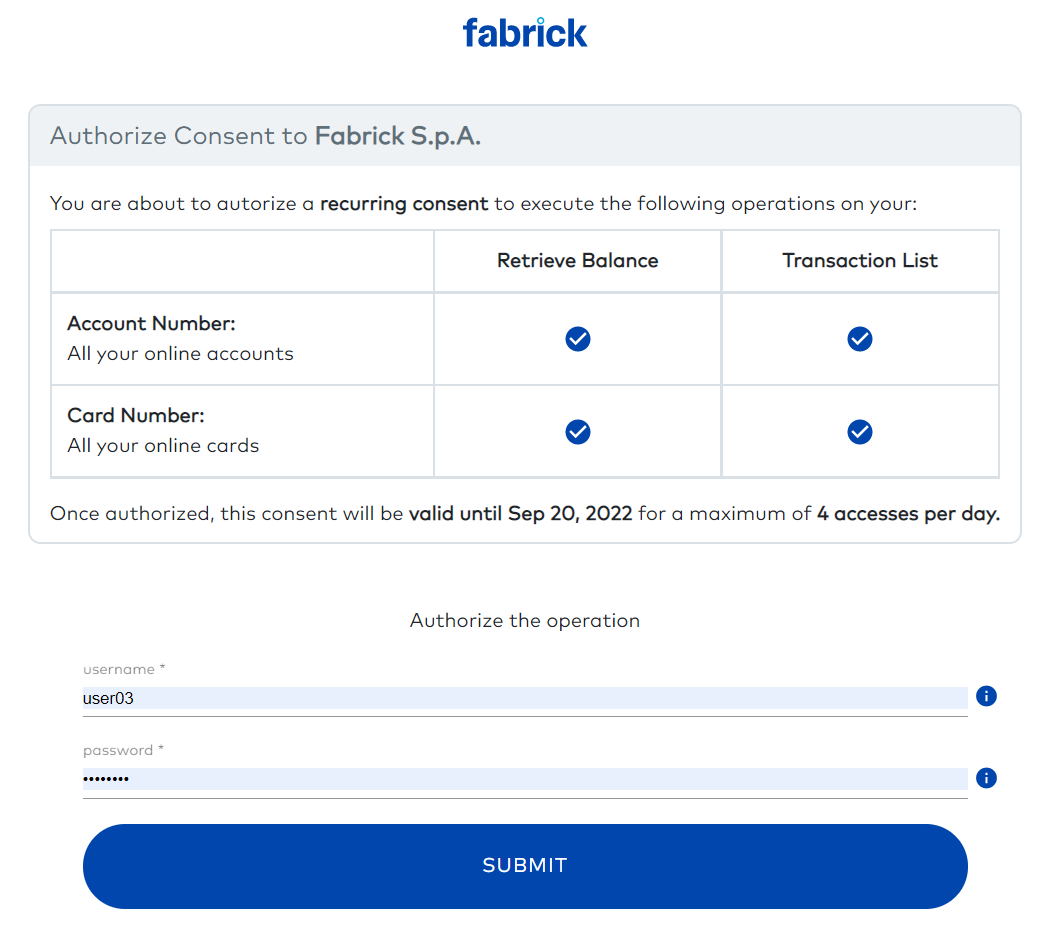
In the example above, the user has been redirected to the page of a mock bank, "Fabrick."
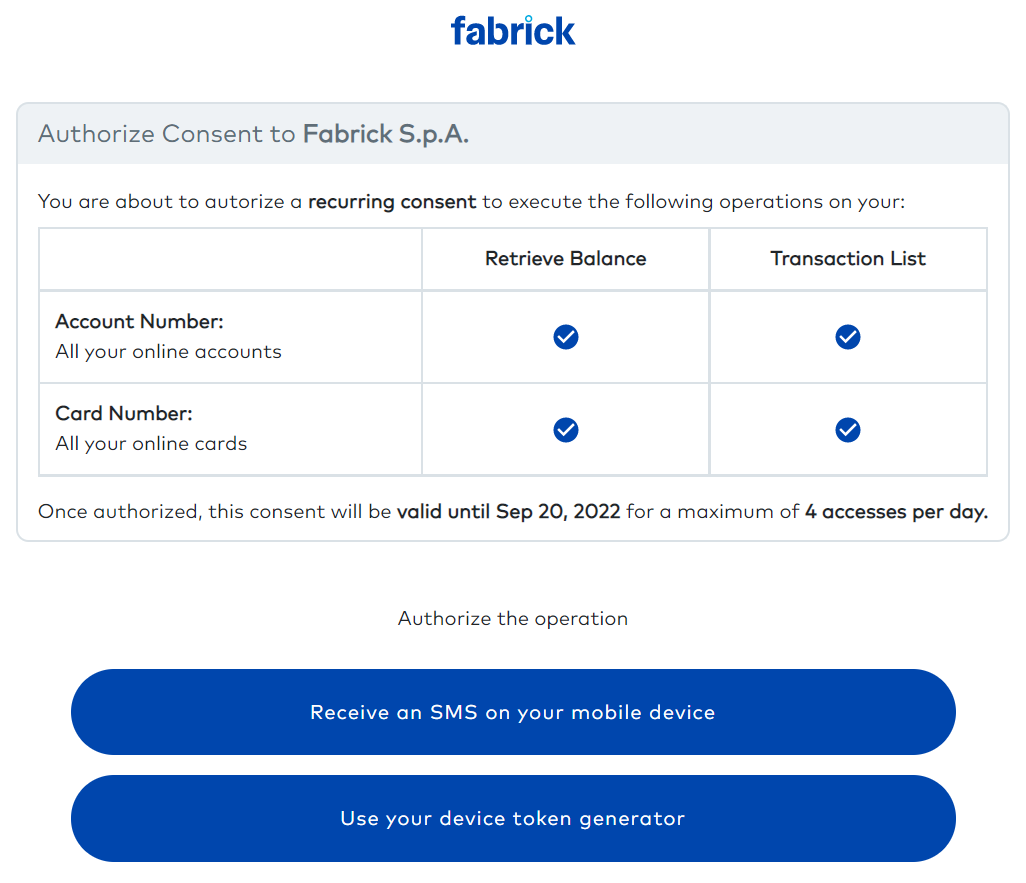
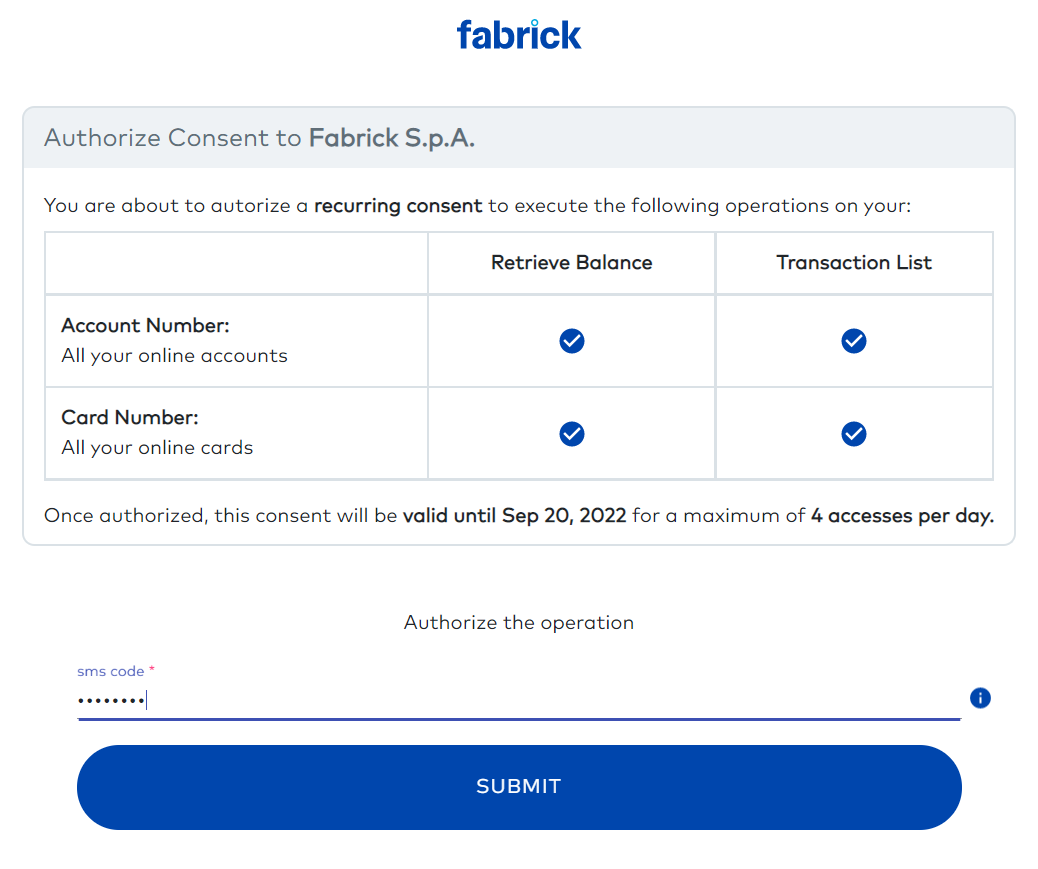
For example, by selecting the first option (receive an SMS), the following page will be shown:
Authentication with Redirect — Precondition: psu-id
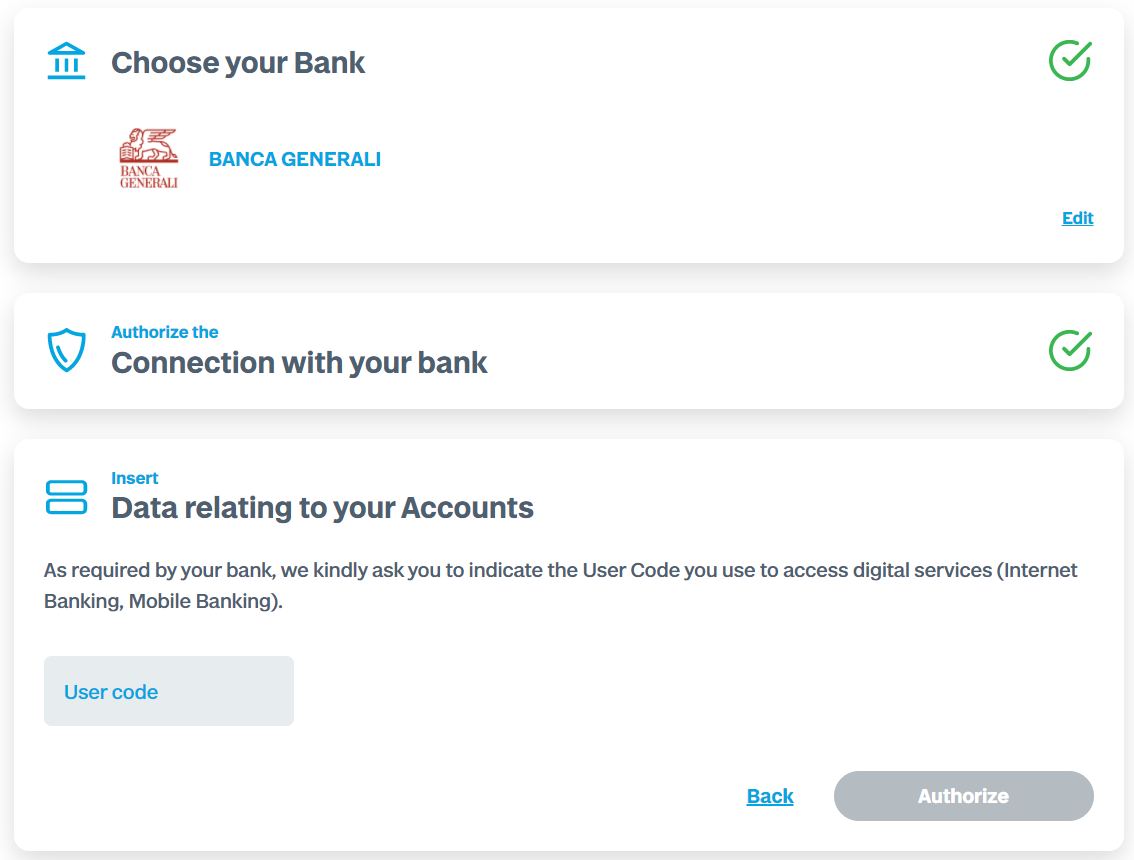
Before being redirected to their bank, the user is asked for the user code / ID used to access their banking services.
After entering the user code / ID and clicking Authorize, the user is redirected to the authentication pages of their bank.
Authentication with Redirect — Precondition: IBAN
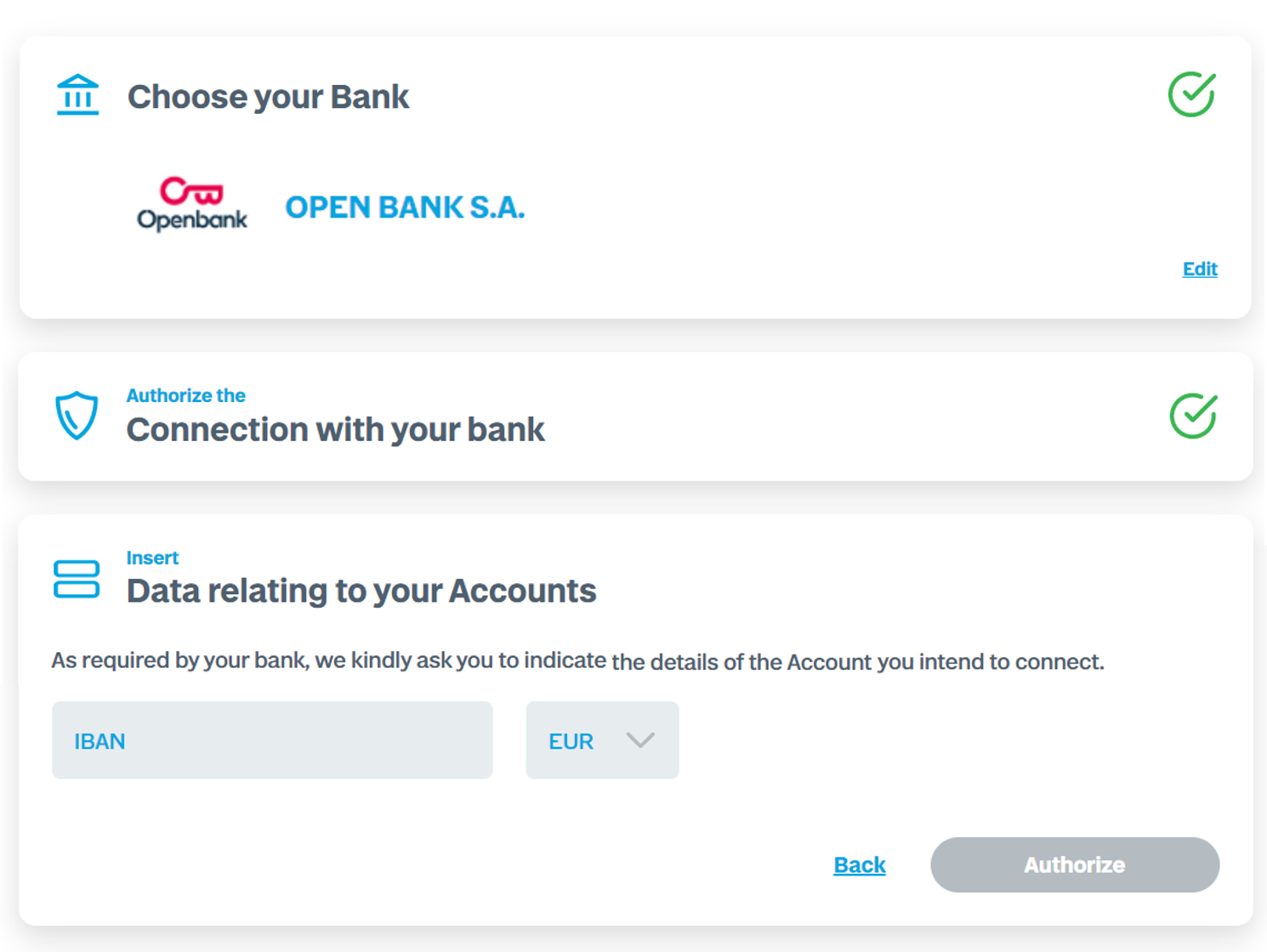
Before being redirected to their bank, the user is asked for the IBAN of the account with which they will verify their identity.
After entering the IBAN and clicking Authorize, the user is redirected to the authentication pages of their bank.
Authentication with Redirect — Precondition: psu-id and IBAN
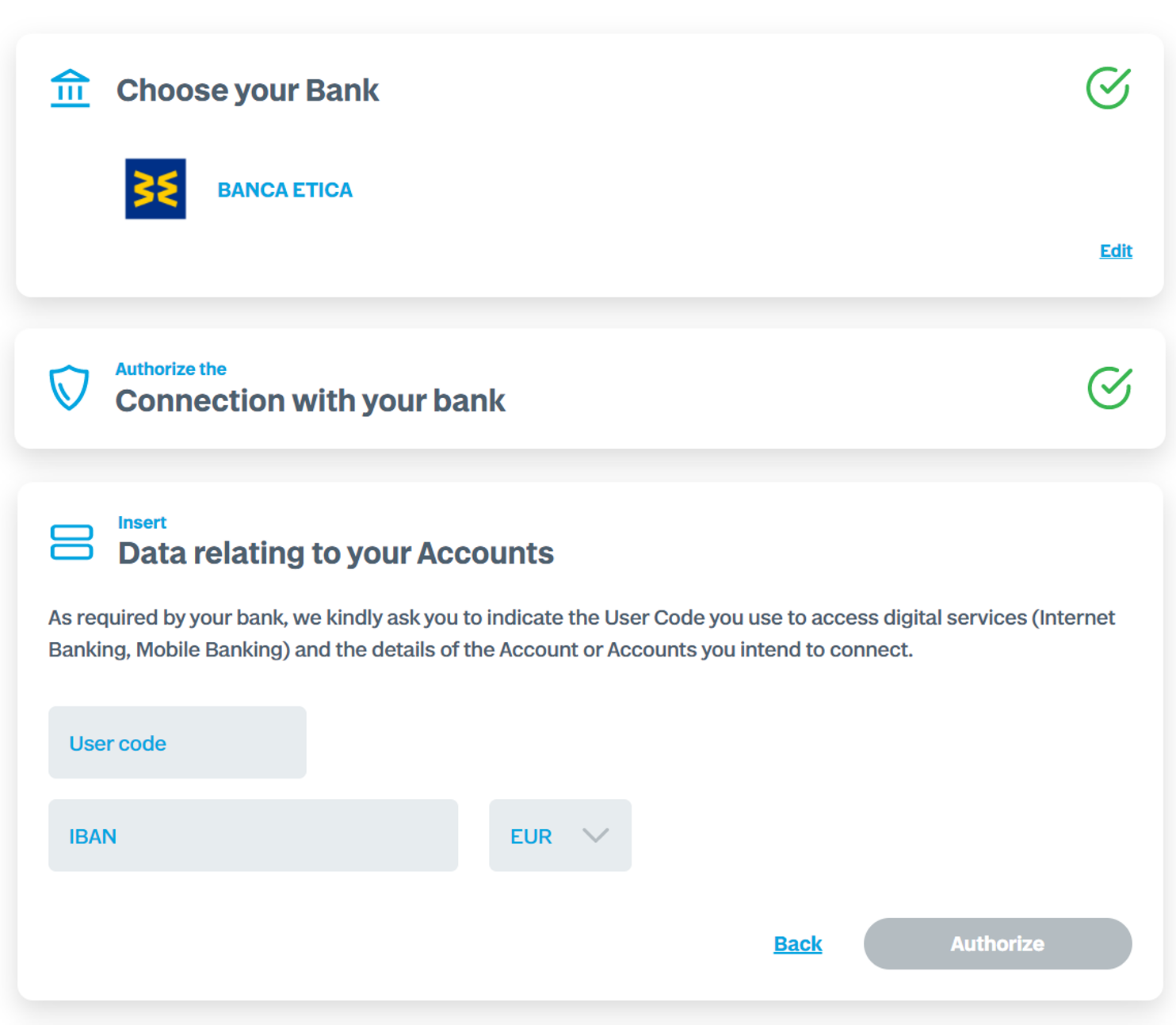
Before being redirected to their bank, the user is asked for both the user code used to access their banking services and the IBAN of the account with which they will verify their identity.
After entering both the IBAN and the user code / ID and clicking Authorize, the user is redirected to the authentication pages of their bank.
Authentication with Decoupled
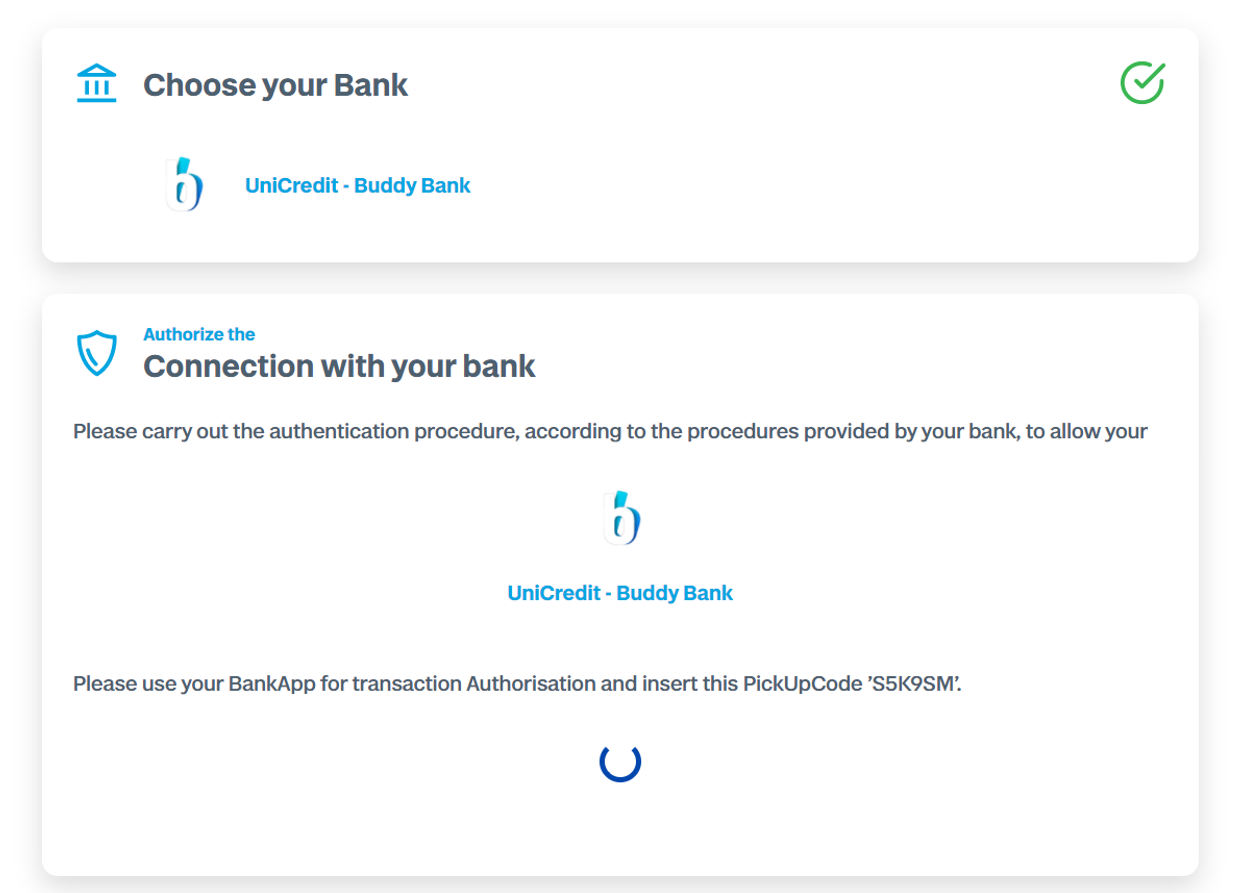
For decoupled authentication, the user authenticates on their bank's app while Fabrick waits for the process to be completed, displaying any additional information required.
Authentication with Embedded
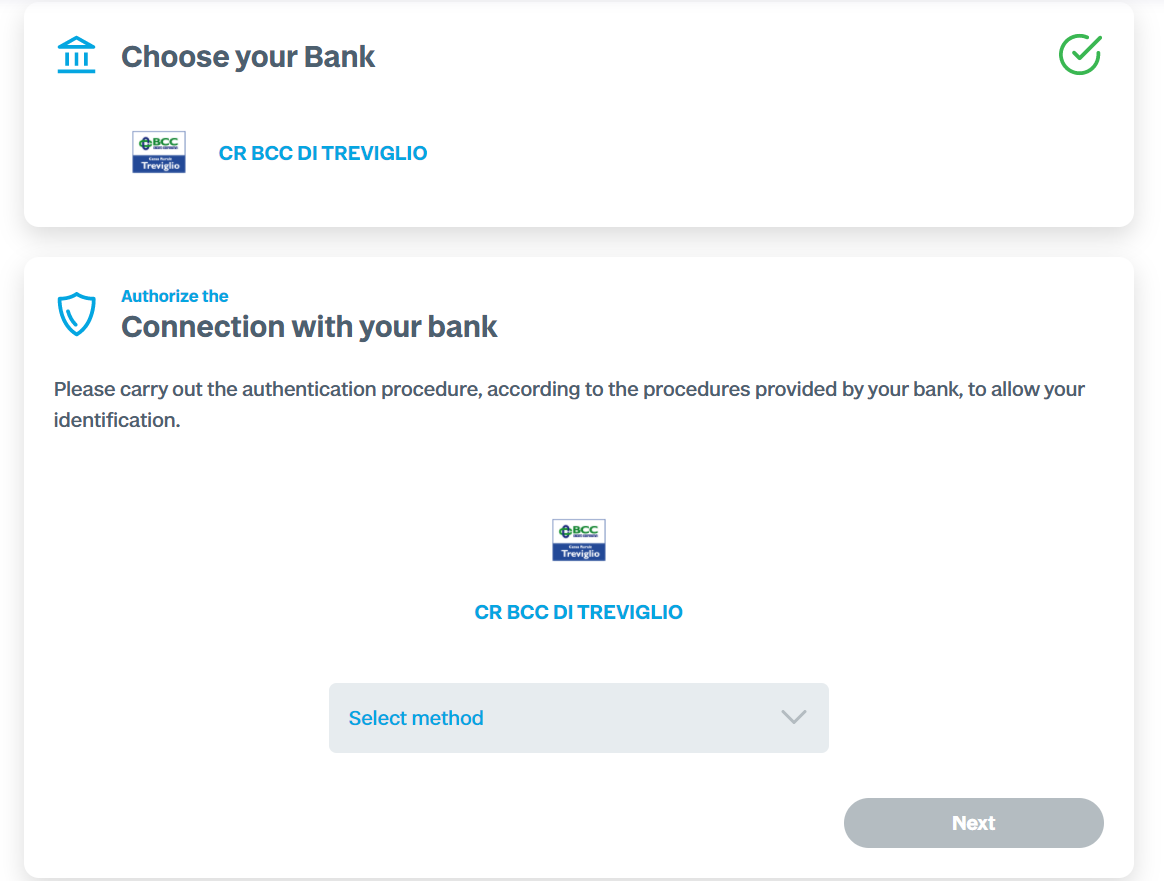
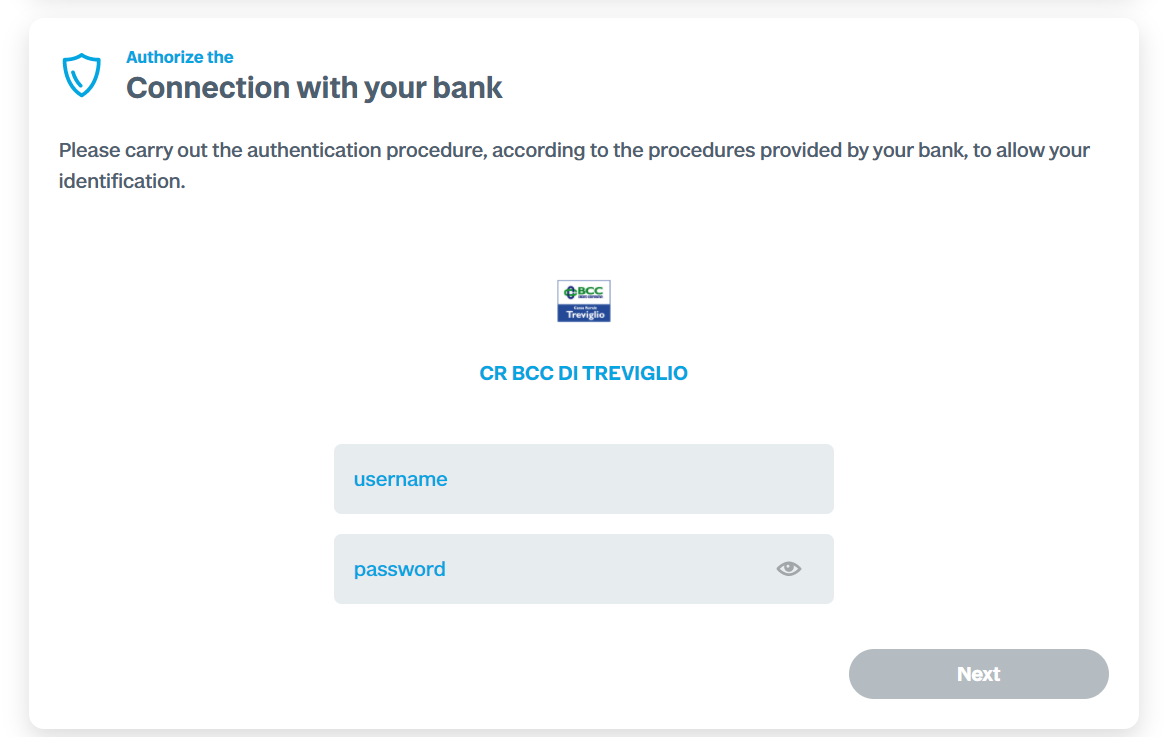
In embedded authentication, all data needed to authenticate the user with the bank is entered directly on the Fabrick page, which autonomously validates the data with the bank — potentially requesting it across multiple steps.