PFM
Introduction
The Personal Financial Manager (PFM) today is the hub of digital banking. Fabrick's PFM product is an independent project that provides the Retail Customer with a "personal trainer" with personalized tips and advice for managing their financial situation and budget in order to better manage their money and find a good financial balance .
PFM is mainly dedicated to retail (consumer) accounts, in case of business accounts it is possible to request an in-depth meeting on the project called BFM (Business Financial Manager).
The project is very broad and describing all its features and potential is out of scope of this guide, in which we will focus only on a single service: GET GetPfmTransactions. This service returns the list of PSU transaction exactly like the services relating to the transactions described up to now, but also enriches, in real time (Near real-time), every single transaction with a series of additional information.
For both TPP and FPP the response obtained following a request for PFM transactions is exactly the same and is described below. The request APIs instead vary slightly and you can refer to the related documentation for implementation details, in any case this is the path:
.../movements/transactions
An update is available in which all fields are in English. It is possible to choose one or the other model by simply inserting en in the path as shown below:
.../movements/en/transactions
To date, Pass products still only have the italian version. It will be updated soon
A response example is shown below:
{
    "errors": [],
    "status": "OK",
    "payload": {
        "list": [{
            "id": 4237,
            "bankId": "5",
            "bankProfileId": "2964",
            "accountId": 10105,
            "userId": "1",
            "tppUid": "123456",
            "isTemporary": false
            "propBankTransactionCode": null,
            "tipoOperazione": "alt",
            "importo": 1.0,
            "stato": "ESEGUITO",
            "tipo": "income",
            "causaleStructured": null,
            "causale": "VOSTRADISPOSIZIONEBONIFICOURG./ISTANTANEO",
            "remittanceDescriptions": []
            "remittanceAdditionalInfo": []
            "bankReference": "123"
            "data": 1621893600000,
            "valueDate": 1621893600000,
            "createdDate": 1623140347621,
            "accounted": true,
            "recurrent": false,
            "categoria": "entertainment",
            "sottoCategoria": "sportEvents",
            "cro": null,
            "nomeBeneficiario": null,
            "merchant": "aMerchant",
            "merchantCity": "Milano",
            "mcc": "1234",
            "numeroContoAddebito": null,
            "numeroContoAccredito": null,
            "reference": null,
            "entryReference": null,
            "divisa": "EUR",
            "eseguitoDa": null,
            "ibanBeneficiario": null,
            "saldo": 3020803002.84,
            "saldoDisponibile": 3020803002.84,
            "isBookingDateForged": false,
            "normalizedMerchant": null
        }, {
            "id": 4238,
            ...
        }]
    }
}
According to the PSD2 regulation the only mandatory fields are amount, reason and date. All the fields described below will therefore be filled in only if the final bank returns that particular information. Some information is returned directly, while others are enhanced thanks to an analysis work by Fabrick on the complete bank reason (obviously more complete than the reason entered by the customer).
All unvalued parameters will not appear in the response and will therefore be considered null.
As regards the categoria, sottoCategoria and tipoOperazione parameters, refer to next tables.
Some details about the output:
- saldo: indicates the account balance updated to Fabrick's latest request to the bank. It's based on the currency of the account, for example if the account currency is in EUR saldo will be in EUR and if the account currency is USD the saldo will be in USD currency. It is recommended to use the most complete service dedicated to get the balances information (see doc Balances details)
- importo: indicates the amount of the transaction
- currency: the currency of the account
In the event that it is a currency transaction, the following additional parameters will be available:
- importoDivisa
- tassoCambio
The value of the importo parameter will be calculated as importoDIvisa / tassoCambio.
In the answer you can find another paramater:
- tassoBce: for PSD2 you can ignore this parameter, it is useful only for native transactions and not for PSD2 transactions.
In the request you can specify the following query parameters to filter and / or sort the required resources:
- fromDate and toDate (will be deprecated, see "Searching by date" section): the time interval within which the transactions are to be displayed; They refer to the data parameter; they have to be in epochTime in ms.
- fromCreatedDate and toCreatedDate (will be deprecated, see "Searching by date" section): the time interval within which the transactions are to be displayed; they refer to the createdDate parameter; they have to be in epochTime in ms.
- sortBy: it allows you to sort the transactions according to any parameter relating to the response model, the default value is createdDate. Use or ‘-’ for descending order (es. sortBy=-data)).
- future: flag that allows, if true, to show pending transactions (only for TPP and depends on the final banks if they are available);
- category: any valid category. Multiple values allowed;
- type: the transaction type, income or outcome;
- fromAmount: to obtain the list of transactions with an amount greater than or equal to the decimal indicated
- toAmount: to obtain the list of transactions with an amount less than or equal to the decimal indicated
- operationType: it is possible to filter by type of operation, see table below. Multiple values allowed.
The pfm manages pagination, for this reason it is also possible to add:
- limit: the number of transactions to be obtained. The default value is 20 and the max is 300
- offset: indicates the offset and refers to the transactions not to the page. The default value is 0.
In the response you will get a pagination object:
...
"pagination": {
    "pageCount": 0,
    "resultCount": 0,
    "offset": 0,
    "limit": 20
},
...
where offset and limit indicate the optional query parameters just described, pageCount and resultCount indicate the number of pages and elements respectively.
For example, if we have an account with 40 transactions and suppose to impose a limit of 20, we will make two different requests and evaluate the offset as follows to obtain the complete list:
/accounts/movements/transactions?accountId=123&offset=0&limit=20&sortBy=-data
/accounts/movements/transactions?accountId=123&offset=20&limit=20&sortBy=-data
Searching by date (available soon)
The API wiil let to filter for different type of date.
The fromDate and toDate indicate the range and dateFilter parameter indicates the type of date . This field can assume the following values:
- data = the booking datetime
- valueDate = the value datetime
- createdDate = the created datetime
- resyncDate = the resync datetime
- createdModifiedDate = resyncDate + createdDate
Data are indicated in epochTime in ms, both those in the request and those returned in the response. Although they are in milliseconds, all the dates returned by the banks only contain information relating to the day (not the time), for this reason they will all be valued at midnight.
For example:
/movements/transactions?dateFilter=createdModifiedDate&fromDate=xxxx&toDate=yyyy
If no filter is indicated then all the transactions will be returned.
Some transactions can have valueDate null: if you use this parameter as a filter, transactions with valueDate null will not be returned. It is advisable to use the booking date (data) which is always present.
Given the definition of resyncDate for most transactions this value will be null: if you use this parameter as a filter, transactions with resyncDate null will not be returned. The purpose of this filter is to only show transactions that have been added, modified and deleted at a later time so that TPP can correct its archive / db.
Raw data vs Labeled data
Below is an example that showcases the difference between raw data and those obtained through the service:
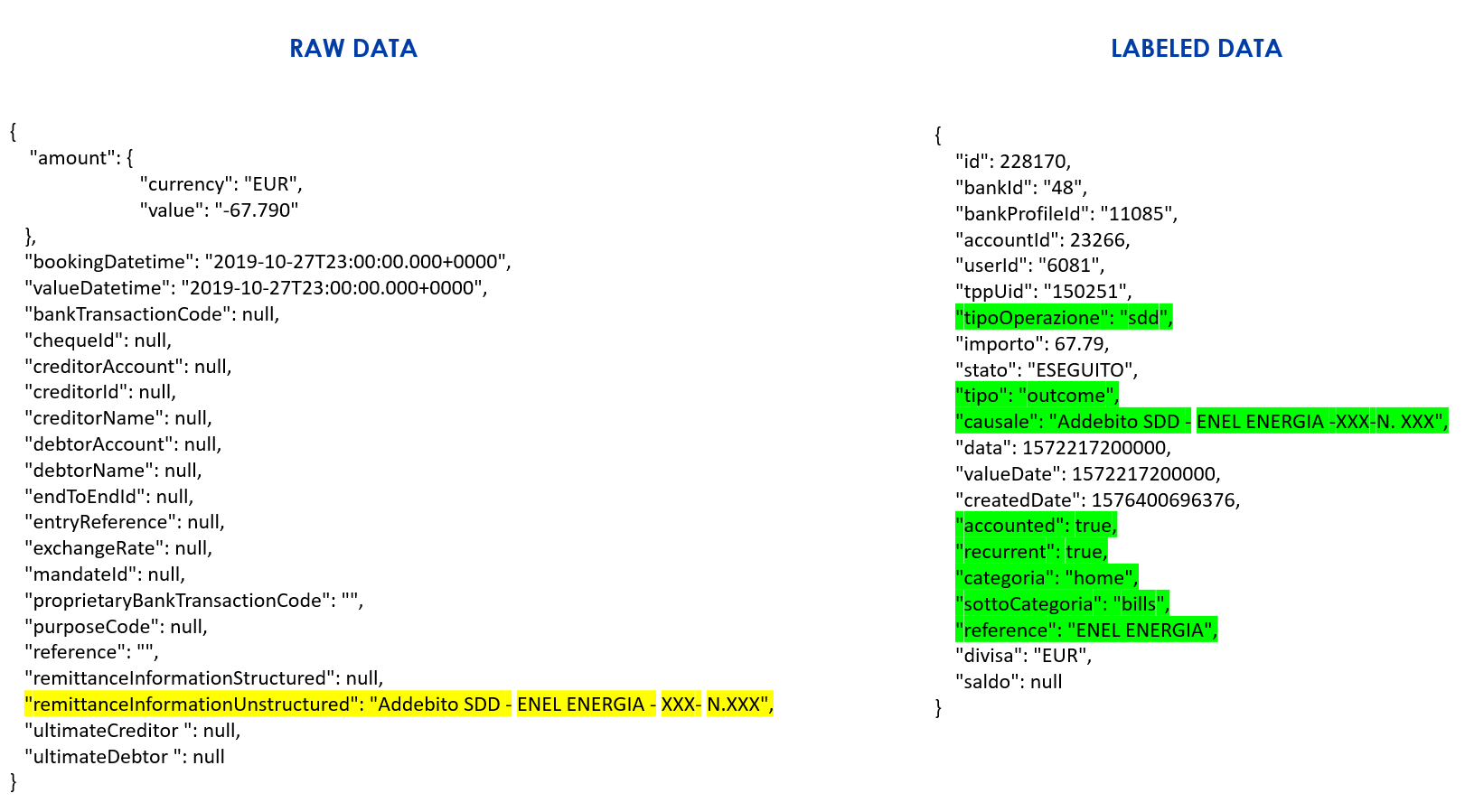
As mentioned the PFM is a much larger project, so the TPP will always be able to enrich its UI by integrating many other PFM features: for more information and explanations, refer to the dedicated documentation.
At the bottom of this page there are tables showing the list of all returned parameters and further details
Mapping between raw and labeled data (available soon)
To retrieve the list of movements, two different services are available:
- GET getTransaction (deprecated)
- GET getPFMTransactions (described in this document)
To reconcile the two movements you can rely on the reconciliationId parameter, a GUID created by Fabrick which will be inserted for each movement in response to the two aforementioned services.
In this way it will be possible to make the transition from the GET getTransaction service to the GET getPFMTransactions service before disposal.
Additional Data
As a value added option you can get some additional information. To date, the additional information are nomeBeneficiario and eseguitoDa.
If you are a TPP you can get it simply by adding the query param additionalData = true. Below is an example of a request:
GET /api/fabrick/.../transactions?...&additionalData=true
In the case of FPP no modification is necessary (no need to add the additionalData parameter), it will be already included,
Response parameters
| **Name ** | English name | Description | |
|---|---|---|---|
| accounted | accounted | If the transaction has been accounted. It indicates whether the transaction is booked or pending. Fabrick doesn't apply any logic, the value it based on the information provided by the bank: if that transaction is indicated as booked then accounted will be true. According to the BG specifications, the possibility of managing pending transactions is optional, therefore some banks could only provide the booked ones. | m |
| accountId | accountId | Account Id | m |
| bankId | bankId | Bank Id | m |
| bankProfileId | bankProfileId | Bank profile Id | m |
| bankReference | bankReference | The optional transaction id provided by the bank | o |
| categoria | category | The category of transaction (v. next table) | m |
| causale | description | remittanceInformationUnstructured - psd2. Contains the description of the transaction. It can contain a maximum of 140 characters | m |
| causaleStructured | descriptionStructured | remittanceInformationStructured - psd2. Contains structured transaction information. To date, banks do not use this field | o |
| createdDate | createdDate | Date when te record was written - This is the (system) date on which the record of the transaction was received in Fabrick by querying the bank. It is not bank value | m |
| cro | cro | Bank Internal Id | o |
| data | bookingDate | Insert date in Contabile system It is the value date of the transaction, communicated by the bank - Booking date (day on which the transaction was done by the user = accounting date) | m |
| divisa | currency | Currency | m |
| entryReference | entryReference | Entry reference as received in transactions. | o |
| eseguitoDa | executedBy | Name and surname of the debtor | o |
| ibanBeneficiario | beneficiaryIban | The beneficiary IBAN. | o |
| id | id | transactionid | m |
| importo | amount | Amount of the transaction | m |
| importoDivisa | originalAmount | Amount in original currency | o |
| isBookingDateForged | isBookingDateForged | Boolean field that describes if the booking date is altered on Agata to fill in. | m |
| isTemporary | isTemporary | [DEPRECATED: see resyncType] if true the id parameter is not yet definitive and it surely will change the value. Some others parameters could change as well (bankReference, description,..). If false all parameters will be final and will not change their value. Useful if the TPP/ FPP needs to archive transactions | o |
| mcc | mcc | Merchant classification code. This parameter is valued only if operationType is crd or pos | o |
| merchant | merchant | Merchant name | o |
| merchantCity | merchantCity | Merchant city | o |
| nomeBeneficiario | beneficiaryName | Beneficiary name. if the transfer is incoming it is therefore obviously recoverable (corresponds to the account holder itself), but if outgoing it is recovered from the information returned by the bank, it may therefore not be valued in all cases | o |
| normalizedMerchant | normalizedMerchant | normalized merchant name associated with the merchant of this transaction (example: merchant = Esselunga Biella => normalizedMerchant = Esselunga | o |
| numeroContoAccredito | creditAccountNumber | Credited account number. if the transfer is incoming it is therefore obviously recoverable (corresponds to the account number itself); if outgoing it is recovered from the information returned by the bank | o |
| numeroContoAddebito | debitAccountNumber | Debited account number. if the transfer is outgoing it is therefore obviously recoverable (corresponds to the account holder itself), but if incoming it is recovered from the information returned by the bank | o |
| propBankTransactionCode | propBankTransactionCode | Proprietary final bank transaction code | o |
| recurrent | recurrent | true if it is a recurring transaction | m |
| reference | reference | Transaction reference. Any additional details retrieved from the Fabrick classification system. It corresponds to the pattern found in the causal by the semantic analysis | o |
| remittanceAdditionalInfo | remittanceAdditionalInfo | It is an array containing additional information. For example, information entered by the user can be where the bank allows it. It generally consists of a single element | o |
| remittanceDescriptions | remittanceDescriptions | remittanceInformationUnstructuredArray - psd2. It is an array containing the description of the transaction. Each array element can contain a maximum of 140 characters. Es: [ "COMUNE DI BIELLA", "Data Regolamento: 23/12/22", "Coord.Ordinante: ITxx xxxx xxxx xxxx xxxx xxxx xxx", "Banca Ordinante: xxxxxx-xxx", "Cro: C0xxxxxxxxx", "Note: a note... - FATT. NR. xxxxxxx", "Id.Operazione: 12345", "(BP)" ] | o |
| resyncType | resyncType | type of the resync | m |
| resyncDate | resyncDate | date of the resync phase | o |
| saldo | balance | Balance updated to Fabrick's latest request | m |
| saldoDisponibile | balanceAvailable | Available balance updated to Fabrick's latest request | m |
| sottoCategoria | subCategory | The sub category of the transaction (v. next section) | m |
| stato | status | Status of the transaction (v file next section) | m |
| tassoCambio | exchangeRate | Exchange Rate | o |
| tipo | type | income or expense: it can assume the following values: 'income' and 'outcome' | m |
| tipoOperazione | operationType | Operation type (v. next table) | m |
| tppUid | tppUid | TPP ID | m |
| userId | userId | User Id | m |
| valueDate | valueDate | Operation Date or Currency - Date at which the transaction is effective (available date) | o |
causale vs remittanceDescriptions
The causale parameter can contain a maximum of 140 characters, for this reason the BG standard has added the remittanceDescriptions parameter, to allow to overcome this limit and prevent the TPP from obtaining a truncated description. Unfortunately, not all banks have implemented this evolution. In addition, the standard has left the banks free to interpret, for this reason it is not possible to establish a uniform rule. In other words, there could be different cases:
- causale and remittanceDescriptions contain exactly the same value
- causale contains the first part of the description, up to the 140th character, while remittanceDescriptions contains the entire description on several elements of the vector
- causale contains the first part of the description, up to the 140th character and remittanceDescriptions contains only the excess part, that is the truncated one.
- remittanceDescriptions could have ordered elements, that is an element for each type of information or maximize the element until reaching the limit of 140 characters and then continue on the second element
Below is an example.
{
    ...
    "causale": "GIROFONDI BANCHE ... Iban Beneficiario : IT... Data ordine: 14/0",
    "remittanceDescriptions": ["GIROFONDI BANCHE ...", "Iban Beneficiario : IT...", "Data ordine: 14/07/2022 Data reg. benef.: 14/07/2022", "CASSA AZIENDA", "FIL: 00282 N.DIST.: ..."]
    ...
}
Given the complexity, at the moment Fabrick does not carry out any mapping on these fields and returns them exactly as retrieved by the ASPSP.
Resync deepening
Sometimes banks return some transactions days after the bookingDate of the transaction itself, generally they are for example the commissions of a bank transfer or expenses related to the account perhaps close to the end of the quarter; usually we talk about 1 or 2 days.
For this reason Fabrick continues to get the transaction list with a booking date in the past, consequently some transactions could appear after the expected date.
To better manage this case, the two following parameters have been added:
-
resyncType
-
resyncDate
resyncType: indicates the status of the transaction. It can take the following values:
- CREATED_TEMPORARY: the transaction was just fetched from the bank, the transaction id can still change, so we suggest to avoid to archive it. This is the only state where the transaction id is still temporary (replace the deprecated boolean isTemporary).
- CREATED: the transaction is definitive, the id parameter will remain unique and invariable.
- INSERTED: a transaction added later, the id parameter will remain unique and invariable
- MODIFIED: a transaction description modified at a later time, the id won't be changed
- DELETED: a transaction deleted later (replace the old boolean isDeleted)
resyncType will be always present, this means that most of the parameters will be set to CREATED.
If the consent expires while some transactions are in the CREATED_TEMPORARY state, then it will not be possible to update the state to CREATED. The update from CREATED_TEMPORARY to CREATED will take place at the next consent renewal (obviously the transaction date must be included in the required post-consent time frame).
resyncDate: indicates the last datetime the transaction changed because of a second synchronization (resync). This means that this parameter will be valued only for the INSERTED, MODIFIED, DELETED states and it will be null for CREATED_TEMPORARY and CREATED states. Obviously in case of INSERTED it will be the same of createdDate.
Both parameters are available only in production environment
Categories and subcategories
Once the transactions have been recovered and saved on Fabrick's DBs, they are immediately available. But the categorization process starts in the same moment so it can take a few seconds. It is therefore possible to see a variation of this parameter initialized as alt (other)
| DIRECTION | CATEGORY | SUBCATEGORY |
|---|---|---|
| INGOING | giroEntrance | na |
| INGOING | inboundCashManagement | na |
| INGOING | subsistence | na |
| INGOING | giftAndDonations | na |
| INGOING | rentIncoming | na |
| INGOING | refunds | na |
| INGOING | bondsIncome | na |
| INGOING | medicalRefund | na |
| INGOING | work | na |
| INGOING | pension | na |
| INGOING | loan | na |
| INGOING | win | na |
| INGOING | insuranceIncome | na |
| INGOING | othersEntrance | na |
| INGOING | depositsEntrance | na |
| OUTGOING | tax | financialsCommission |
| OUTGOING | transfers | extcreditCard |
| OUTGOING | giro | giro |
| OUTGOING | deposits | deposits |
| OUTGOING | restaurants | bar |
| OUTGOING | restaurants | restaurantsPizza |
| OUTGOING | restaurants | takeAway |
| OUTGOING | restaurants | othersRestaurants |
| OUTGOING | entertainment | cinema |
| OUTGOING | entertainment | musicAndFilm |
| OUTGOING | entertainment | bet |
| OUTGOING | entertainment | books |
| OUTGOING | entertainment | papers |
| OUTGOING | entertainment | theater |
| OUTGOING | entertainment | museums |
| OUTGOING | entertainment | sportEvents |
| OUTGOING | entertainment | videogames |
| OUTGOING | entertainment | othersEntertainment |
| OUTGOING | health | relax |
| OUTGOING | health | drugs |
| OUTGOING | health | aid |
| OUTGOING | health | medical |
| OUTGOING | health | gym |
| OUTGOING | health | sport |
| OUTGOING | health | onlus |
| OUTGOING | health | othersHealth |
| OUTGOING | tax | fines |
| OUTGOING | tax | financialsFees |
| OUTGOING | tax | taxes |
| OUTGOING | tax | billsPay |
| OUTGOING | tax | businessConsultants |
| OUTGOING | tax | expenseReport |
| OUTGOING | tax | offices |
| OUTGOING | tax | lawyers |
| OUTGOING | tax | othersTax |
| OUTGOING | home | rent |
| OUTGOING | home | supermarket |
| OUTGOING | home | mortgages |
| OUTGOING | home | interior |
| OUTGOING | home | homeDevices |
| OUTGOING | home | maintenance |
| OUTGOING | home | condoFees |
| OUTGOING | home | bills |
| OUTGOING | home | subscriptions |
| OUTGOING | home | childHood |
| OUTGOING | home | careGiven |
| OUTGOING | home | laundry |
| OUTGOING | home | babySitter |
| OUTGOING | home | veterinary |
| OUTGOING | home | insurance |
| OUTGOING | home | internet |
| OUTGOING | home | othersHome |
| OUTGOING | transfers | creditCard |
| OUTGOING | transfers | investments |
| OUTGOING | transfers | cashManagement |
| OUTGOING | transfers | othersTransfer |
| OUTGOING | school | nursery |
| OUTGOING | school | courses |
| OUTGOING | school | teachingMaterials |
| OUTGOING | school | schoolEducation |
| OUTGOING | school | university |
| OUTGOING | school | othersSchool |
| OUTGOING | travel | carMaintenance |
| OUTGOING | travel | telepass |
| OUTGOING | travel | fuel |
| OUTGOING | travel | trains |
| OUTGOING | travel | fly |
| OUTGOING | travel | publicTransport |
| OUTGOING | travel | carRent |
| OUTGOING | travel | bus |
| OUTGOING | travel | taxy |
| OUTGOING | travel | hotel |
| OUTGOING | travel | holiday |
| OUTGOING | travel | carSharing |
| OUTGOING | travel | boats |
| OUTGOING | travel | othersTravel |
| OUTGOING | shopping | clothing |
| OUTGOING | shopping | accessories |
| OUTGOING | shopping | shoes |
| OUTGOING | shopping | jewelry |
| OUTGOING | shopping | electronics |
| OUTGOING | shopping | sportingGoods |
| OUTGOING | shopping | othersShopping |
| OUTGOING | others | clubAndOnlus |
| OUTGOING | others | professionals |
| OUTGOING | others | tobaccoAndAlcool |
| OUTGOING | others | maintenanceOthers |
| OUTGOING | others | maintenance |
| OUTGOING | others | funding |
| OUTGOING | others | atm |
| OUTGOING | others | give |
| OUTGOING | others | othersOthers |
Operation Type
You can get the updated list of values via API:
POST {{domain}}/access/transactions/operationType/search
{

}
is possible to filter for a specific value:
POST {{domain}}/access/transactions/operationType/search
{
  "operationType": "ver"
}
| tipoOperazione | Operation | Italian description |
|---|---|---|
| aec | Addebito e/c carta | Addebito e/c carta |
| aft | Anticipo fattura | Anticipo fattura |
| alt | other | Altri movimenti |
| amz | Amazon Gift Voucher Payment | Gift Amazon |
| ass | check | Assegno |
| atm | debit card atm | Prelievo da sportello ATM |
| baf | SCT fiscel reduction | Bonifico Agevolazione Fiscale |
| bap | SCT foreign countries | SEPA Credit Transfer - estero |
| bil | bills | Bollettini postali |
| blt | bills | Bollette |
| boa | car tax | Bollo auto |
| bog | generic SCT (deprecated) | SCT generico (deprecated) |
| boi | SCT instant | SEPA Credit Transfer Instant |
| bol | stamp tax | Imposta di bollo |
| bon | SCT italy | SEPA Credit Transfer in Italia |
| bop | periodical SCT | SEPA Credit Transfer ricorrente |
| can | lease | Canone |
| cas | Commissioni assegni | Commissioni assegni |
| cbi | C-bill | Pagamento bollettini postali |
| cbl | Commissioni bollettino | Commissioni bollettino |
| cbn | Commissioni bonifico | Commissioni bonifico |
| cca | Commissioni Carta | Commissioni Carta |
| ccr | credit card (deprecated) | Pagamento con cata di credito (deprecated) |
| cdd | Commissioni sdd | Commissioni sdd |
| cds | Commissioni distinta | Commissioni distinta |
| cfi | Commissioni fideiussioni/fido | Commissioni fideiussioni/fido |
| cid | Commissioni insoluto sdd | Commissioni insoluto sdd |
| cir | Commissioni insoluto riba | Commissioni insoluto riba |
| com | commission | Commissioni |
| cpl | Commissioni prelievo | Commissioni prelievo |
| cpo | Commissioni/canone POS | Commissioni/canone POS |
| crd | debit card ecommerce | Pagamento online |
| crg | Carte Generic | Carte Generic |
| cri | Commissioni su presentazioni ri.ba | Commissioni su presentazioni ri.ba |
| div | Dividendi e cedole | Dividendi e cedole |
| dst | Distinta | Distinta |
| f24 | F24 | Modello F24 utilizzato in Italia per il pagamento di gran parte delle imposte, delle tasse e dei contributi |
| fat | invoice | Pagamento fattura utenza |
| fin | Finanziamenti | Finanziamenti |
| gir | transfer entry | Giroconto |
| idd | Insoluti sdd | Insoluti sdd |
| ins | Insoluti effetti | Insoluti effetti |
| int | interests | Accredito Interessi |
| irb | Insoluti RIBA | Insoluti RIBA |
| lin | deposit | Conto deposito |
| lor | Discount revenue | Ricavo sconto lordo |
| mav | MAV | MAV: Pagamento mediante avviso tramite bollettino |
| net | revenues | Altri ricavi |
| p2p | bank transfer | Trasferimento bancario |
| par | Partita prenotata | Le partite prenotate sono delle voci in addebito che la banca rende indisponili in attesa di regolare le operazioni. Ad esempio gli assegni che versi sul tuo conto corrente sono indisponibili fino a quando l'istituto titolare dell'assegno comunica la copertura dello stesso. |
| pol | Polizze | Polizze |
| pos | debit card pos | Pagamento tramite POS |
| ppa | PagoPA | sistema dei pagamenti a favore delle pubbliche amministrazioni e dei gestori di pubblici servizi in Italia |
| pre | deprecated | |
| prs | Prestiti | Prestiti |
| rat | Card Recharge | Ricarica carta |
| rav | RAV | RAV: Ruoli Mediante Avviso) - utilizzato per pagare somme iscritte a ruolo (ovvero tasse, tributi, sanzioni amministrative, ecc. verso l'Agenzia delle Entrate, Inps, Comuni, Province e Regioni) |
| rcp | Card Recharge | Ricarica carta |
| rdc | Ricavo effetti al dopo incasso | Ricavo effetti al dopo incasso |
| rib | Riba | Riba (Ricevuta Bancaria) è uno strumento finanziario molto usato da imprese e professionisti che permette di agevolare i pagamenti tramite banca |
| ric | mobile recharge | Ricarica telefonica |
| rim | reversal | Rimborso da altri enti |
| rit | bank tax | Ritenuta su interessi |
| rtf | Rettifiche | Rettifiche |
| rvs | Reversal | Storno |
| sdd | Sepa Direct Debit | SDD, addebito diretto, o domiciliazione bancaria |
| spc | Spese comunicazioni | Spese comunicazioni |
| spe | expense | Spese |
| spo | Prelievo sportello | Prelievo sportello |
| ssb | Disposizione SBF stornate/insolute | Disposizione SBF stornate/insolute |
| sti | salary | Accredito stipendio/pensione |
| tas | taxes | Pagamento imposte |
| tit | stocks and bonds | Titoli e obbligazioni |
| utz | generic payments | Pagamenti generici |
| ver | payment / deposit | Versamento |
Stato - Status
| Tipo mov. | Tipo op. | stato | descrizione | default |
|---|---|---|---|---|
| Bonifico | lin , p2p , bon, boi , bap, baf ,gir | ATTESA_AUTOR | da eliminare in attesa di autorizzazione | |
| ATTESA_AUTOR_GRUPPO | NON IN USO - attesa di autorizazione gruppo | |||
| ATTESA_CONFERMA_DA_TESORERIA | ATTESA CONFERMA DA TESORERIA | |||
| ATTESA_CONF_RETE | in attesa di conferma da rete | |||
| ATTESA_DI_AUTORIZZAZIONE | in attesa di autorizzazione | |||
| ATTESA_DI_AUTORIZZA_GRUPPO | attesa di autorizzazione gruppo | |||
| ATTESA_TESOR | in attesa di conferma da tesoreria | |||
| AUTORIZZATO_T2S | AUTORIZZATO T2S | |||
| DA_AUTORIZZARE | da autorizzare | |||
| DA_AUTORIZZARE_GRUPPO | da autorizzare gruppo | |||
| DA_AUTORIZZARE_T2S | DA AUTORIZZARE T2S | |||
| DA_CONTABILIZZARE_FTF | Da contabilizzare ftf | |||
| DA_ESEGUIRE | da eseguire | |||
| DA_INVIARE_FTF | da inviare via FTF | |||
| DA_INVIARE_OUT_T2S | Messaggio da inviare in banca diretta senza ulteriore contabilizzazione | |||
| DA_INVIARE_OUT_T2S_DOPO_AUT | da inviare come banca diretta in attesa di autorizzazione | |||
| DA_PREPARARE | da preparare | |||
| INSERITO_RDC_T2S | Messaggio da inviare in banca diretta con contabilizzazione su A7 della banca ordinante | |||
| INSERITO_T2S | INSERITO T2S | |||
| INVIATO | inviato | |||
| ESAURITO | bonifico altro istituto >> ESAURITO >> bonifico riaccreditato all'ordinante perchè rifiutato | X | ||
| bonifico stesso istituto >> ESAURITO >> bonifico accreditato sul conto beneficiario | ||||
| bonifico in entrata >> ESAURITO >> bonifico accreditato sul conto beneficiario | ||||
| INVIO_DATA_FUTURA_SEBA | In attesa di maturazione regolamento per invio SEBA | |||
| INVIO_DATA_FUTURA_SEPA | In attesa di maturazione regolamento per invio SEPA | |||
| IN_ATTESA_AUT_CAMBIO_E_CSSE | IN_ATTESA_AUT_CAMBIO_E_CSSE | |||
| IN_ATTESA_DI_BIBO | stato intermedio per banca indiretta quando viene registrato il bibo nella banca mittente | |||
| IN_ATTESA_DI_INVIO | IN_ATTESA_DI_INVIO | |||
| IN_ATTESA_DI_INVIO_E_AUT | da inviare come banca indiretta in attesa di aut. da banca ordinante | |||
| IN_ATTESA_DI_INVIO_E_CSSE | IN_ATTESA_DI_INVIO_E_CSSE | |||
| IN_ATTESA_E_AUT | da inviare come banca indiretta in attesa di aut. da banca mittente | |||
| IN_ATTESA_E_AUT_E_CSSE | IN_ATTESA_E_AUT_E_CSSE | |||
| IN_ATTESA_E_CSSE | IN_ATTESA_E_CSSE | |||
| IN_ATTESA_INVIO_E_AUT_E_CSSE | IN_ATTESA_INVIO_E_AUT_E_CSSE | |||
| IN_ATTESA_PER_AUT_E_CAMBIO | IN_ATTESA_PER_AUT_E_CAMBIO | |||
| IN_ATTESA_PER_AUT_E_CSSE | IN_ATTESA_PER_AUT_E_CSSE | |||
| IN_ATTESA_PER_AUT_E_FISSAZIONE_CAMBIO | cambio a listino inserito in attesa di autorizzazione e di fissazione cambio | |||
| IN_ATTESA_PER_CAMBIO | IN_ATTESA_PER_CAMBIO | |||
| IN_ATTESA_PER_CAMBIO_E_CSSE | IN_ATTESA_PER_CAMBIO_E_CSSE | |||
| IN_ATTESA_PER_CSSE | IN_ATTESA_PER_CSSE | |||
| IN_ATTESA_PER_FISSAZIONE_CAMBIO | cambio a listino inserito in attesa di fissazione cambio | |||
| IN_ATT_PER_SMISTAMENTO | In attesa di smistamento | |||
| IN_ATT_PER_SMISTAMENTO_E_AUT | In attesa di smistamento e autorizzazione | |||
| IN_ATT_PER_SMISTAMENTO_E_CSSE | IN_ATT_PER_SMISTAMENTO_E_CSSE | |||
| IN_ATT_PER_SMIS_AUT_CSSE | IN_ATT_PER_SMIS_AUT_CSSE | |||
| IN_ESECUZIONE | in esecuzione | |||
| PRENOTATO 1 | Prenotato bonifico stesso istituto e bonifico altro istituto italia | |||
| PRENOTATO_LISTINO | prenotato per listino | |||
| PRENOTATO_STESSO_OUT 1 | Prenotazione compravendita divisa o bonifico stesso istituto in divisa | |||
| PRENOTATO_T2S 1 | Prenotato Bonifico altro istituto estero | |||
| Bonifico Ordini Permanenti | bop | ESAURITO | X | |
| Debit Card | crd, pos, atm | NEGAZIONE | Declined | |
| STORNO | Reversal or Cancelled | |||
| AUTORIZZAZIONE / PREAUTORIZZAZIONE | Authorized / PRE Authorized (is applicable for Fuel station cases) | |||
| Credit Card | ccr | ANNULLATO DA POS | ||
| CASH | ||||
| RETTIFICA | ||||
| SPESA | X | |||
| STORNO | ||||
| MAV/RAV | mav/rav | Pagato | P (actual service response) | X |
| Prenotato | I | |||
| Annullato | A | |||
| Stornato | N | |||
| Non Pagato / Errato | E | |||
| Sconfino | S | |||
| F24 | f24 | Pagata | X | |
| Prenotata | ||||
| InSospeso | ||||
| Annullata | ||||
| NonPagata | ||||
| CBILL | cbi | PAGATO | X | |
| CANCELLATO | ||||
| INSERITO | ||||
| PRENOTATO | ||||
| Pago PA | ppa | INSERITO | ||
| CANCELLATO | ||||
| PAGATO | X | |||
| PRENOTATO | ||||
| Bollettini | bil | INSERITO | ||
| PAGATO | X | |||
| CANCELLATO | ||||
| PRENOTATO | ||||
| STORNATO | ||||
| RiBa | rib | Pagato | X | |
| Prenotato | ||||
| Addebitato al cedente | ||||
| Partita prenotata | par | PRENOTATO | ||
| Ricarica cellulare | ric | PRENOTATO | ||
| ESEGUITO | X | |||
| Ricarica con carta | rat | ESEGUITO | X | |
| Sepa Direct Debit | sdd | ESEGUITO | X |
PFM Guidelines
This document describes the guidelines and some recommendations regarding the PFM service.
GET getPfmTransactions
The API in question is the following:
/api/fabrick/pfm/psd2/fabrick/v4.0/movements/transactions
If the FPP invokes the service without any parameters (as above), the default values will be applied, namely:
- dateFilter will be createdModifiedDate (created || resync)
- toDate will be equal to the current day
- fromDate will be equal to the current day - 1
The above request will therefore be equivalent to the following:
/api/fabrick/pfm/psd2/fabrick/v4.0/movements/transactions?dateFilter=createdModifiedDate&fromDate=[today-1]&toDate=[today]
Details regarding the input and output parameters are described in the specific PFM document.
When should the API be invoked?
Given the 4 automatic daily updates performed by Fabrick, we recommend invoking the API in succession after each of these 4 slots. As an additional safety margin, we also recommend allowing 1 hour after each Fabrick update, as there may be delays depending on the volume of data. The FPP could therefore invoke GET getPfmTransactions at the following slots:
- 09:30
- 12:30
- 15:30
- 18:30
It is possible to invoke the API at any time, but obviously within the three-hour gap between one slot and the next — or in the time window between evening and morning — the FPP will receive exactly the same output, since no updates will have occurred.
It is therefore recommended to implement a scheduler in order to optimise the number of daily requests.
If the FPP's goal is to archive data and it is not necessary to use the current day's data, the API could also be invoked just once a day.
How should the API be invoked?
As can be seen from the specification documentation, it is possible to filter by various parameters and also by different date types.
We recommend filtering by the createdModifiedDate date and setting a time interval of just one day, as shown in the following example:
/api/fabrick/pfm/psd2/fabrick/v4.0/movements/transactions?dateFilter=createdModifiedDate&fromDate=[today-1]&toDate=[today]
This optimises the volume of data returned in the response.
It is of course necessary for the consent to always be active, meaning the PSU must renew it before it expires. Otherwise, the FPP will need to be prepared to adjust the date and therefore the time range of the data request. For example, if the PSU renews their consent 20 days after its expiry, the FPP will need to request the list of movements for the past 20 days rather than just the last 24 hours.
Depending on the behaviour and booking processes of the various banks, it may happen that, for the same createdModifiedDate, the data parameter (booking date) differs — for example, by one or two days in the past.
If only createdDate were used as a filter, inserted movements would not be missed, but cancelled or modified movements would be.
Archiving: which parameter should be used?
This section contains a suggested guideline for all those FPP or TPP AISP companies that, in addition to recovering and viewing their customers' transactions, wish to archive them within their databases.
Unfortunately, the different behaviors of banks from the point of view of accounting and transactions management add a level of complexity that does not allow us to extract a general and effective rule.
Obviously for the FPP or TPP that creates an app retrieving the transactions from Fabrick only to view and/or show them to its customer, this does not cause any problem, as all the transactions are real.
The problem could arise se the FPP or TPP wanted to archive the transactions received in real time within their databases: it is obvious that today's transactions are neither total nor definitive. The main gap is certainly not being able to rely on a unique id for each transaction, in fact the referenceId which corresponds to the transaction id is not a mandatory parameter for the PSD2 regulation, in addition to the fact that it is not guaranteed to be unique. For this, and several other reasons, the FPP/TPP will have to be based on the resyncType parameter in response to the GET getPfmTransactions (see PFM doc).
If the FPP wishes to archive movements in their own database, we recommend using the id parameter as the basis. This parameter, defined by Fabrick, will always be definitive and unique, and can therefore be used as a primary key.
The only point to be aware of is to verify that the movement is not still in a temporary state, as in that case the id parameter may still change. To do so, it is necessary to evaluate the resyncType parameter and verify that it is different from CREATED_TEMPORARY.