Hosted Payment Page Orchestra - HPPO
The Hosted Payment Page Orchestra (HPPO) integration allows the merchant to request a payment using the Fabrick payment page, where the buyer can select one of the payment methods enabled for the shopLogin. Alternatively, it is possible to perform a direct redirect to a specific payment method (APM) or display the dedicated card data entry page, without going through the selection page.
This method allows for quick implementation with minimal impact on the merchant's infrastructure. Customization options are more limited compared to more advanced integrations, as the interface, authentication flows and redirects to other payment methods (APMs) are managed directly by Fabrick.
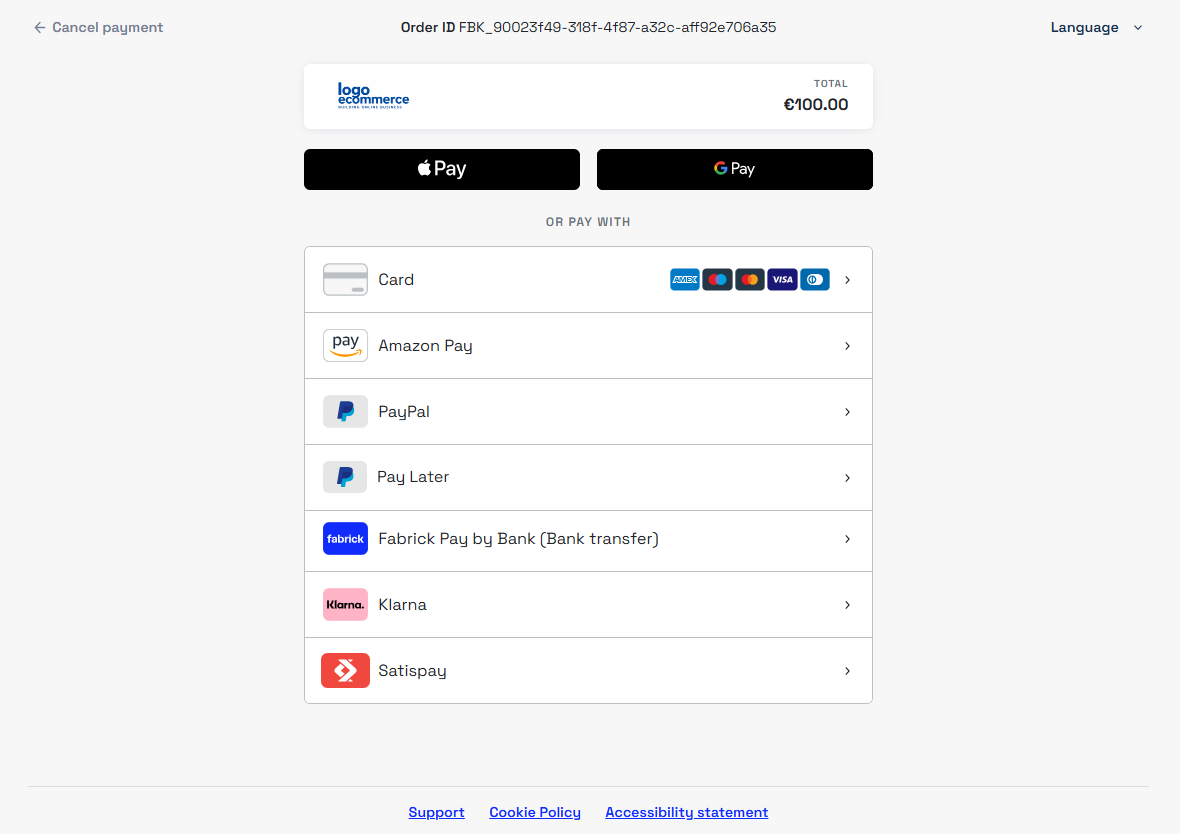
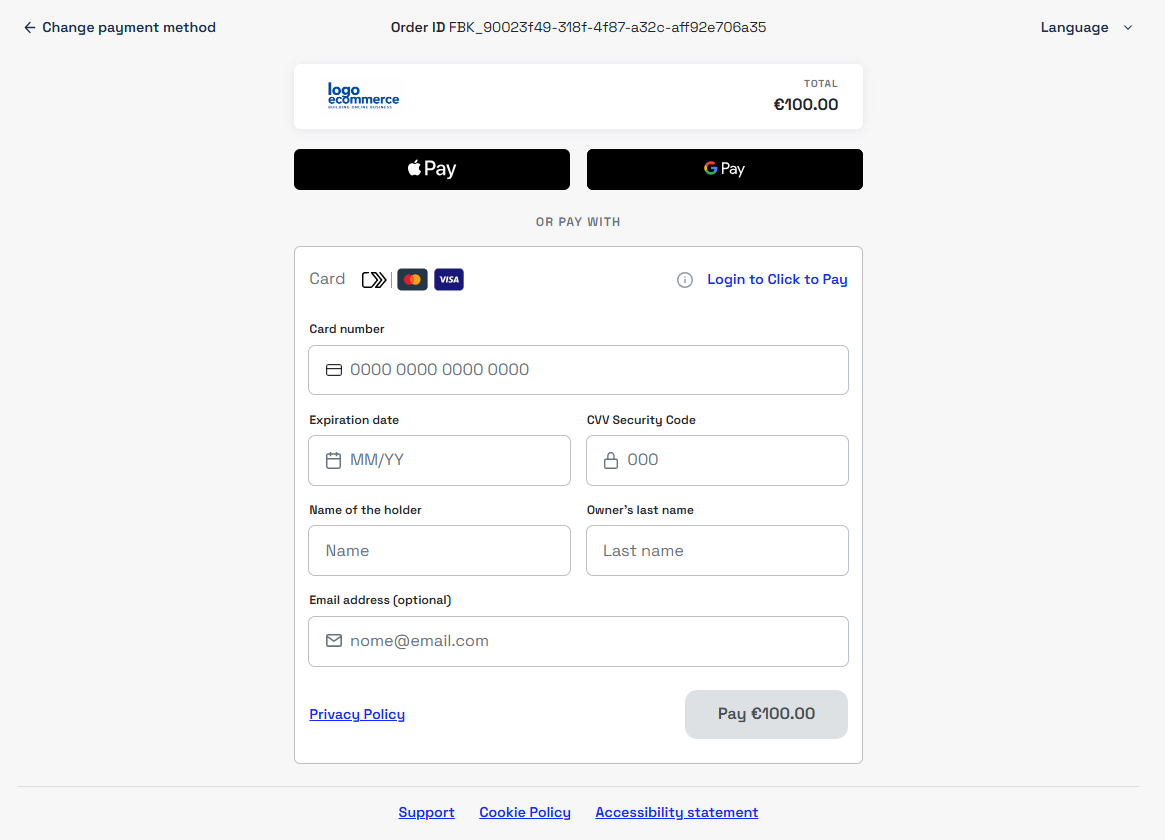
Below is the card application form
The HPPO integration is particularly suitable for merchants who need an immediate solution, without advanced customization or integration requirements.
Hosted Payment Page Orchestra is optimized for browser-based usage and does not guarantee compatibility with channels such as WebView or native applications.
For these scenarios, it is possible to perform an external redirect from the app to the payment link, allowing the customer to complete the payment outside the application context. Alternatively, the API Only integration offers greater control over authentication flows and payment method management.
Payment Initialization
To initialize a payment request, the payment/create call must be used server-side.
This method ensures a higher level of security in payload generation and API key management, avoiding the exposure of sensitive information in the front-end.
The payment/create call represents the foundation of the payment request and can be extended by integrating the services provided by Fabrick, such as:
- the fraud prevention service
- Tokenization features
- dedicated objects for individual payment methods
This flexibility allows the merchant to build a complete, customizable payment request aligned with their operational needs.
In the following sections we will go into detail about the use of the integration and the parameters to include in the call to customize the payment request.
Redirect to the payment page
To present the payment page, the buyer must be redirected to the link generated by Fabrick. The link for the payment request can be generated using the payment/create call by including the channelType object in the request, set to LINK. The system will return the payment URL inside the payload.userRedirect.href object, which can then be used for the redirect.
The returned link can be used to redirect the buyer, embedded in the frontend (for example via a button), or included in custom communications such as emails or other messaging channels.
Below is an example of a payment request:
Request
POST /api/v1/payment/create
Host (sandbox): sandbox.gestpay.net
Host (production): ecomms2s.sella.it
Authorization: apikey ****************
Content-Type: application/json
{
    "shopLogin": "GESPAY12345",
    "amount": "100",
    "currency": "EUR",
    "shopTransactionID": "FBK_OrderID",
    "paymentChannel": {
        "channelType": [
            "LINK"
        ]
    }
}
Response
{
    "error": {
        "code": "0",
        "description": "request correctly processed"
    },
    "payload": {
        "paymentToken": "f0419188-8a78-4918-913c-a491e4e78084",
        "paymentID": "1881129911957",
        "userRedirect": {
            "href": "https://sandbox-web.axerve.com/orchestra/checkout/pbl/a/GESPAY12345/b/1881129911957/c/f0419188-8a78-4918-913c-b491e4e78084"
        },
        "qrCode": null
    }
}
Direct redirect to the card data entry page or to a payment method (APM)
During request creation, if the shopLogin is enabled for multiple payment methods (APMs), the paymentType object can be used in the payment/create call to specify which methods to present on the page. If only one payment method is specified, the system will redirect the buyer directly to that service without going through the selection page.
If instead you want to redirect the buyer to the dedicated card data entry page provided by Fabrick without going through the method selection page, the CREDITCARD paymentType must be specified in the call. By specifying this object, wallet payment methods such as ApplePay, GooglePay and Click to Pay will also be shown if enabled.
If the paymentType object is not used in the call, all payment methods enabled for the shopLogin will be shown on the payment page according to the configurations set in the Gestpay backoffice, and the buyer will be able to choose which payment method to proceed with.
The possible values of paymentType are available in the payment type codes section, or alternatively the GET shop/paymentMethods endpoint can be used to check in real time the payment methods enabled for the shopLogin in use and filter the response by payload.paymentMethod.paymentType.
Below is an example request in which only one payment method (APM) is specified. In this case, the buyer will be redirected directly to the service page without going through the method selection page.
Request
POST /api/v1/payment/create
Host (sandbox): sandbox.gestpay.net
Host (production): ecomms2s.sella.it
Authorization: apikey ****************
Content-Type: application/json
{
  "shopLogin": "GESPAY12345",
  "amount": "100",
  "currency": "EUR",
  "shopTransactionID": "FBK_OrderID",
  "paymentType":["FABRICKPASS"],
  "paymentChannel":{
    "channelType":["LINK"]
  }
}
If instead multiple payment methods are specified, for example CREDITCARD and FABRICKPASS, the buyer will be redirected to the payment method selection page where they can choose how to proceed, limiting the choice to only those specified in the call.
Request
POST /api/v1/payment/create
Host (sandbox): sandbox.gestpay.net
Host (production): ecomms2s.sella.it
Authorization: apikey ****************
Content-Type: application/json
{
  "shopLogin": "GESPAY12345",
  "amount": "100",
  "currency": "EUR",
  "shopTransactionID": "FBK_OrderID",
  "paymentType":["CREDITCARD", "FABRICKPASS"],
  "paymentChannel":{
    "channelType":["LINK"]
  }
}
Order confirmation page and server-to-server notification
During request creation, the responseURLs object can be used to dynamically define the redirect URLs and the server-to-server notification URL, which the system will use at the end of the transaction, both in case of a successful and a failed outcome.
When the responseURLs object is included in the call, the system will use the URLs specified in the request for that transaction only, and will not use the URLs configured in the Gestpay backoffice. If the object is not present, the backoffice configurations will be used instead.
It is also possible to specify only some of the parameters. For example, if only the server-to-server notification URL or only one of the redirect URLs is set, the system will override only the specified values, continuing to use the other URLs configured in the Gestpay backoffice.
Below is an example request in which all redirect URLs and the server-to-server notification URL are defined.
Request
POST /api/v1/payment/create
Host (sandbox): sandbox.gestpay.net
Host (production): ecomms2s.sella.it
Authorization: apikey ****************
Content-Type: application/json
{
  "shopLogin": "GESPAY12345",
  "amount": "100",
  "currency": "EUR",
  "shopTransactionID": "FBK_OrderID",
  "paymentChannel": {
    "channelType": ["LINK"]
  },
  "responseURLs": {
    "buyerOK": "https://merchant-url-ok.com",
    "buyerKO": "https://merchant-url-ko.com",
    "serverNotificationURL": "https://merchant-url-s2s.com"
  }
}
Transaction Detail and Payment Notification
At the end of the payment, the buyer is redirected to the success or failure URL. At the same time, the system also sends a server-to-server (S2S) notification with the transaction outcome.
Example redirect URL and S2S notification:
https://merchant-url.com?a=GESPAY12345&Status=OK&paymentID=1360119538182&paymentToken=8a901523-67a5-4aca-bbd2-c7c412934289
The redirect URL and the S2S notification both contain the Status parameter, which allows you to immediately identify the payment status. The possible values are:
OK: payment completed successfullyKO: payment completed with a negative outcomeXX: payment in a suspended state, awaiting the final outcome.
The XX status is used only for certain alternative payment methods (APMs) and is returned when the outcome is asynchronous. In this scenario, Fabrick redirects the customer to the success URL, but the status is not yet final: a subsequent S2S notification will need to be awaited to communicate the final outcome (OK or KO).
- If you receive the XX status, do not proceed with shipping the goods or providing the service.
- Wait for the S2S notification that will communicate the final payment outcome.
To verify the outcome or the updated status of the transaction, the GET payment/detail endpoint can be used, passing the paymentID returned by the payment/create call or obtained from the redirect/S2S notification URL as a parameter.
The response contains the transactionResult parameter, which indicates the payment status. The possible values are:
AUTHENTICATED: payment authenticated (OK)APPROVED: payment approved (OK)DECLINED: payment declined (KO)PENDING: payment awaiting confirmation (XX)WAITING: payment in progress (XX)UNSUBMITTED: payment not yet started (XX)
Example call to check the transaction status via paymentID.
Request
GET api/v1/payment/detail/{paymentID}
Host (sandbox): sandbox.gestpay.net
Host (production): ecomms2s.sella.it
Authorization: apikey ****************
Content-Type: application/json
Response
{
    "error": {
        "code": "0",
        "description": "request correctly processed"
    },
    "payload": {
        "transactionType": "detail",
        "transactionResult": "APPROVED",
        "transactionState": "AUT",
        "transactionErrorCode": "0",
        "transactionErrorDescription": "Transazione correttamente effettuata",
        "bankTransactionID": "1825",
        "shopTransactionID": "FBK_OrderID",
        "shopTransactionID_2": "",
        "authorizationCode": "794183",
        "paymentID": "1610469726440",
        "currency": "EUR",
        "country": "ITALIA",
        "company": "VISA",
        "tdLevel": "FULL",
        "threeDS": {
            "authenticationResult": {
                "authenticationLevel": "2C",
                "authenticationStatus": "Y",
                "authStatusReason": "",
                "challengeResultTransStatus": "",
                "XID": "1dd3cf75-92a7-4487-abb5-b1f3cdd68f3b",
                "AV": "MTIzNDU2Nzu5MDA5ODc2NTQzMjE=",
                "ECI": "05",
                "AVAlgorithm": "",
                "threeDsVersion": "2.2.0"
            },
            "transDetails": {
                "authData": "",
                "authMethod": "02",
                "authTimeStamp": "202505131259",
                "acsID": "f688e45c-ff27-4ba6-a631-4b68df2dbf99"
            }
        },
        "events": [
            {
                "event": {
                    "eventtype": "AUT",
                    "eventamount": "0.00",
                    "eventdate": "13/05/25 13:01:52",
                    "eventARN": "",
                    "eventID": "",
                    "eventReferred": ""
                }
            }
        ],
        "buyer": {
            "name": "",
            "email": ""
        },
        "risk": {
            "riskResponseCode": "",
            "riskResponseDescription": ""
        },
        "customInfo": null,
        "alertCode": "",
        "alertDescription": "",
        "cvvPresent": "TRUE",
        "dcc": null,
        "maskedPAN": "",
        "paymentMethod": "VISA",
        "productType": "Credit",
        "token": "40G5LMXUQQ613101",
        "tokenExpiryMonth": "05",
        "tokenExpiryYear": "27",
        "tokenDetails": {
            "TokenValue": "40G5LMXUQQ613101",
            "TokenExpiryMonth": "05",
            "TokenExpiryYear": "27",
            "TokenProvider": "AXERVE",
            "CardDetails": {
                "CardSuffix": "3101",
                "CardExpiryMonth": "05",
                "CardExpiryYear": "27",
                "CardHolderName": null
            },
            "CardAssets": {
                "CardArt": {
                    "Type": null,
                    "MediaContents": null,
                    "Height": null,
                    "Width": null
                },
                "BrandLogo": {
                    "Type": null,
                    "MediaContents": null,
                    "Height": null,
                    "Width": null
                }
            }
        },
        "fraudPrevention": {
            "check": "FALSE",
            "state": "",
            "description": "",
            "order": ""
        },
        "automaticOperation": {
            "type": "CAN",
            "date": "07/06/25 00:00:00",
            "amount": "0.00"
        }
    }
}