MyBank
Why choose MyBank
MyBank is an Account-to-Account (A2A) payment method that lets buyers pay directly from their current account, through the online banking service of the bank where they hold the account.
The buyer selects their bank from a dedicated Fabrick interface and is redirected to their online banking, where they authorize the payment with the credentials they normally use, with no sign-up and no card required.
Services and features available through the Fabrick integration
The MyBank integration with Fabrick Payment Orchestra provides the following features:
- Payment from the current account: the buyer authorizes the payment directly in their online banking, without entering card details.
- Automatic activation: the method is enabled by default for all merchants with a Banca Sella Acquiring contract (see Activation request).
- Bank selection page: Fabrick handles the buyer's bank selection through a dedicated interface that complies with the MyBank guidelines.
- Method pre-selection: the merchant can send the buyer straight to bank selection, skipping the payment method selection page.
- Banca Sella intermediation: for transactions made through Italian banks, Banca Sella intermediates the financial flows and handles the credit to the merchant.
MyBank does not support refunds through Fabrick Payment Orchestra, either full or partial. Any amounts to be returned to the buyer must be handled by the merchant outside the platform.
Transaction statuses
Because of the nature of the method, MyBank has no authorization phase separate from the subsequent capture: the merchant cannot explicitly request the capture of a transaction.
When the payment succeeds, the transaction is set to Authorized. The move to Captured depends on the buyer's bank:
| Buyer's bank | Move to Captured |
|---|---|
| Italian | When Banca Sella books the amount to the merchant |
| Foreign | Immediate: the transaction is set directly to Captured |
For transactions made through foreign banks, the payment follows an Account-to-Account model, with the amount transferred directly from the buyer's bank to the merchant's bank. Fabrick has no visibility of when the credit is actually executed, so the Captured status does not certify that the amount has been credited.
MyBank on Fabrick Payment Orchestra: activation and integration types
Activation request
MyBank is enabled by default for all merchants who sign an Acquiring contract with Banca Sella: no activation request is needed.
MyBank is available only to merchants with a Banca Sella Acquiring contract. For information about the contract, contact your sales representative or support at the following link.
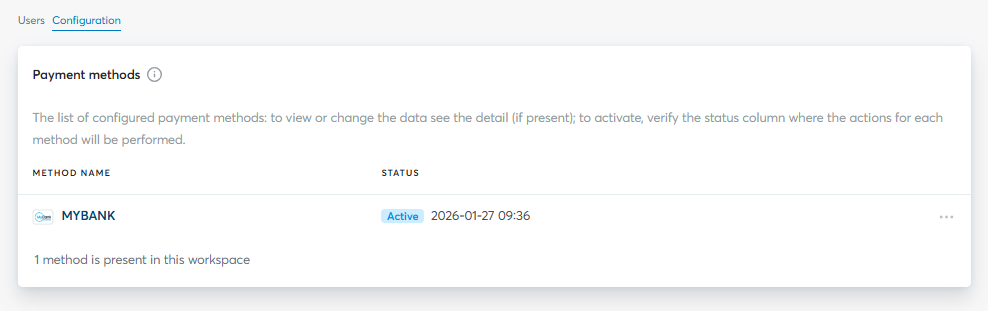
You can verify that the payment method is active in the Dashboard, under Workspace → Shops → [Select shop] → Settings
Integration types
Fabrick offers two integration types for MyBank:
-
Hosted integration
Supported integrations
✓Checkout Page✓Pay By Link✓Web Component✓LightboxMyBank is shown directly on the Fabrick payment page, with no development required on the merchant side. Fabrick handles the display of the method, the bank selection and the entire processing phase.
-
API integration
Supported integrations
✓API OnlyThe redirect to MyBank is handled directly through the API. You need to initialize the transaction with
payment/createand handle the buyer's redirect.
On the bank selection page, search for and select MYBANK SCP - TEST BANK: you will be redirected to a simulator managed by MyBank, which lets you simulate the different payment outcomes without making real payments.
The simulator replicates the production flow, where the buyer is redirected to their own bank's online banking.
Hosted integration
With the hosted integration, MyBank appears among the methods on the Fabrick payment page, with no additional development by the merchant.
The payment/create call is the one described in Creating the transaction and redirecting to MyBank, without the paymentType field: the page then shows all the methods enabled on the shopLogin.
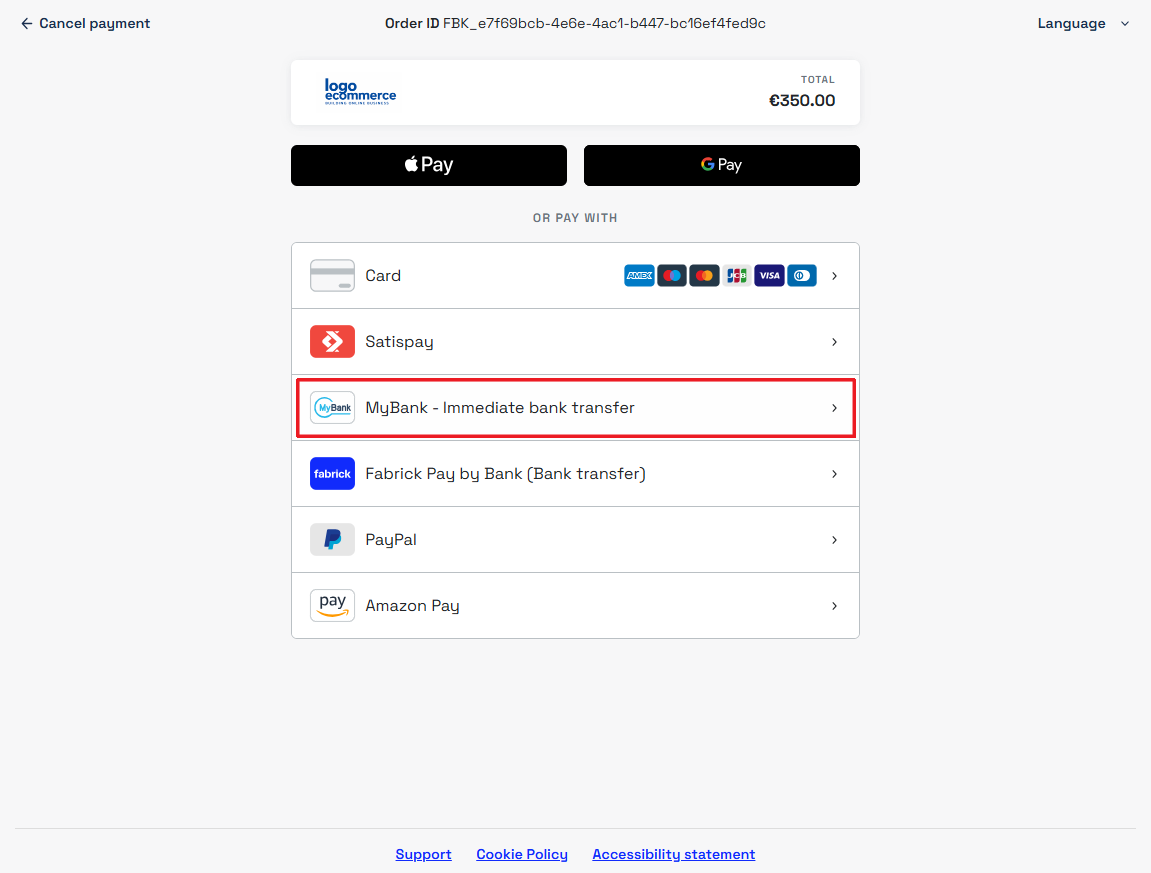
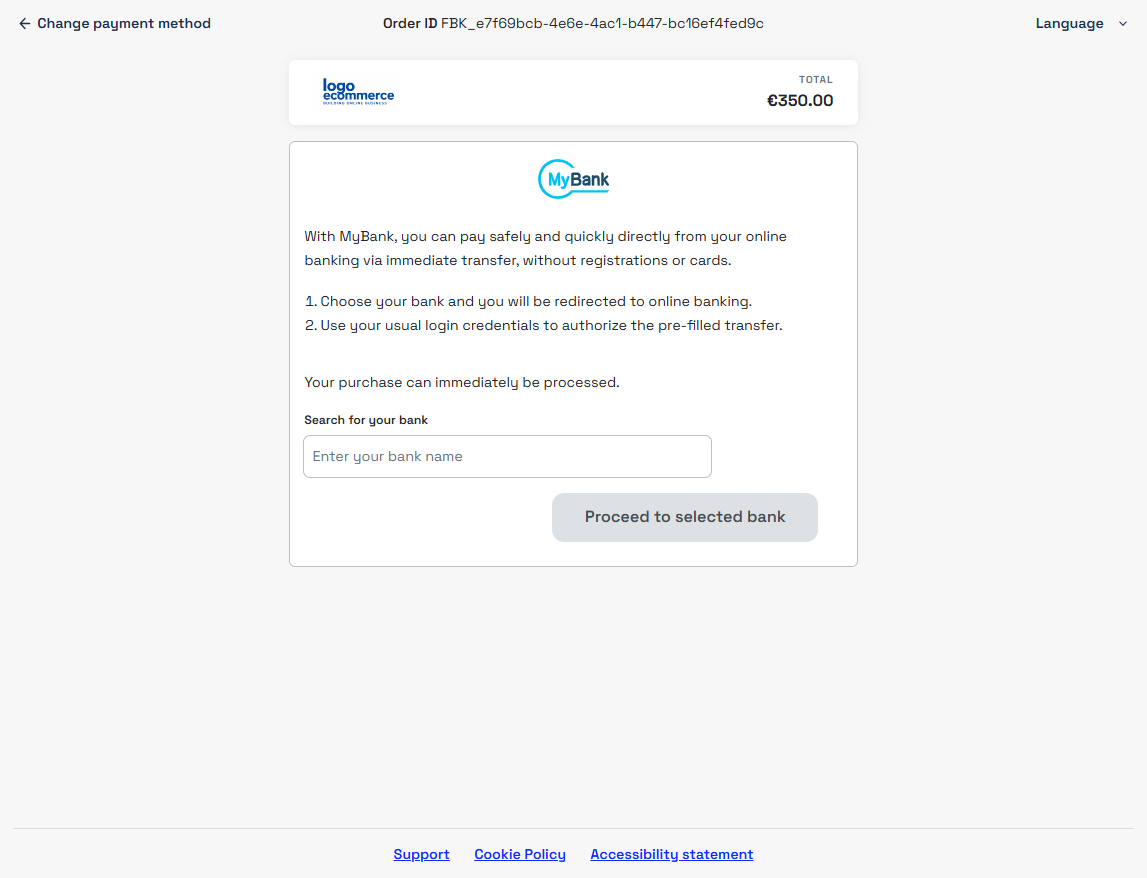
When the buyer chooses MyBank, Fabrick shows the bank selection page, a mandatory step in the flow. After choosing, the buyer is redirected to their online banking to authorize the payment.
API integration
To request a MyBank payment with the API integration, initialize the transaction through payment/create using the MYBANK tag in the paymentType field. The buyer is then sent directly to the Fabrick bank selection page, which is a mandatory step.
Creating the transaction and redirecting to MyBank
Request
POST /api/v1/payment/create
Host (sandbox): sandbox.gestpay.net
Host (production): ecomms2s.sella.it
Authorization: apikey ****************
Content-Type: application/json
{
    "shopLogin": "GESPAY12345",
    "amount": "10.00",
    "currency": "EUR",
    "shopTransactionID": "FBK_OrderID",
    "paymentType": ["MYBANK"], // Remove this line for the hosted integration
    "paymentChannel": { "channelType": ["LINK"] }
}
MyBank does not require any specific fields in the payment creation call: bank selection always takes place on the Fabrick page.
Support
Fabrick
- Status page: https://status.fabrick.com/
- Support: https://landing.fabrick.com/fabrick-dashboard-support
MyBank
- Official website: https://www.mybank.eu/