SEPA Direct Debit (SDD)
Why choose SEPA Direct Debit
SEPA Direct Debit (SDD) lets the merchant collect funds directly from the customer's bank account, based on a mandate with which the customer authorizes the debits. It does not require a payment card and is suited to automatic, predictable collections, for example:
- periodic subscriptions;
- utilities and recurring services;
- insurance services.
With Fabrick Payment Orchestra the mandate is signed online with an Advanced Electronic Signature (FEA), and debits are sent and monitored from a single integration point. The platform supports the SEPA Core scheme.
The SDD integration on Payment Orchestra is available to merchants who are Banca Sella customers. Banca Sella acts as the creditor's bank and routes debit requests to the SEPA scheme.
Services and features available through the Fabrick integration
- Digital mandate with FEA: the customer signs the mandate online with an advanced electronic signature via SMS OTP. The mandate is legally binding and is retained for 10 years.
- Mandate as a token: once the mandate is signed, a token identifying it is returned, to be used for all subsequent debits (see Creating the mandate).
- Recurring or one-off debits: one or more debits can be executed on an existing mandate, even without the customer being present (see Executing a debit).
- First debit at signing: the first debit can be executed together with the creation of the mandate, which remains available for subsequent debits.
- Automatic or scheduled debit date: the system calculates the first available date in line with SEPA timings, or the merchant specifies a date (see Managing the debit date).
- Centralized monitoring: outcomes, including rejects, returns and refunds, are visible in the Fabrick Dashboard.
How it works
Operational flow
| Phase | Description |
|---|---|
| Mandate creation | The customer (debtor) authorizes the merchant (creditor) to debit their account through a SEPA mandate signed online |
| Collection request | The merchant sends Payment Orchestra the debit request on the mandate |
| Bank execution | The debit is executed after 2 or 3 business days, depending on the submission time, or on the date specified by the merchant (see Timing) |
| Outcome management | All outcomes, including rejects, returns and refunds, are visible in the Fabrick Dashboard |
Operating model and usage constraints
SDD is a tokenization-based method: the mandate is the token and must be created before any debit can be executed. The integration always involves two separate phases:
- mandate creation (tokenization), explicitly specifying
SDDin thepaymentTypefield; - use of the token for one or more subsequent debits, recurring or one-off.
A first debit can be executed at the same time as the mandate is created, but the token still remains available for future use: there is no scenario in which the mandate is created and used up without being retained.
SDD is not shown on the Payment Orchestra payment method selection page: the buyer cannot choose it from a list of methods (for example card, PayPal or Klarna) and pay without first signing a mandate.
| Operation | Notes | |
|---|---|---|
| ✅ | Start an explicit SDD tokenization | SDD must be specified as paymentType in the call |
| ✅ | Obtain and store the mandate token | Retrievable with payment/detail after the mandate is created |
| ✅ | Execute recurring or future debits on an existing token | Typical flow: mandate signing, token retrieval, debits without the customer present |
| ✅ | Execute a first debit at the same time as the mandate is created | The token remains active for subsequent debits |
| ❌ | Offer SDD as a selectable method on a payment page | SDD cannot be used as an immediate payment without a mandate |
| ❌ | Debit a buyer who does not have an active mandate | Every debit requires a mandate; the mandate can be created beforehand |
| ❌ | Start a tokenization without specifying the method | SDD must always be specified as paymentType |
Mandate signing by the buyer
The mandate is signed entirely online, through a guided flow that ends with the mandate being signed with an Advanced Electronic Signature (FEA).
- Start of signing: the buyer is redirected to the mandate signing page through the link returned by Fabrick.
- Personal details: the buyer enters their personal details, such as first name, last name and Italian tax code (codice fiscale).
- Account details: the buyer enters the IBAN of the account to be debited. The system automatically checks that it is formally correct.
- Phone number: the buyer enters a valid mobile number, used to confirm the signature.
- Summary: the buyer checks the details entered, which are used to sign the SEPA Core mandate with Fabrick S.p.A.
- Document signing: the buyer reviews the documents and accepts the terms of the advanced electronic signature service and of the SDD mandate.
- Signature with SMS OTP: the buyer receives a security code (OTP) by SMS; entering it correctly completes the signing and constitutes an advanced electronic signature under applicable law.
- Confirmation: the buyer sees the signing confirmation page.
- Technical error: as an alternative to the confirmation, if a technical error occurs the buyer sees the operation interrupted page: the process stops and no mandate is issued.
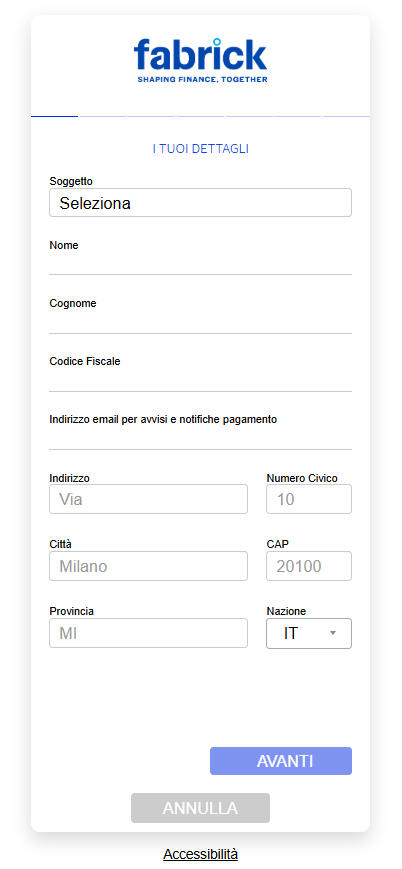
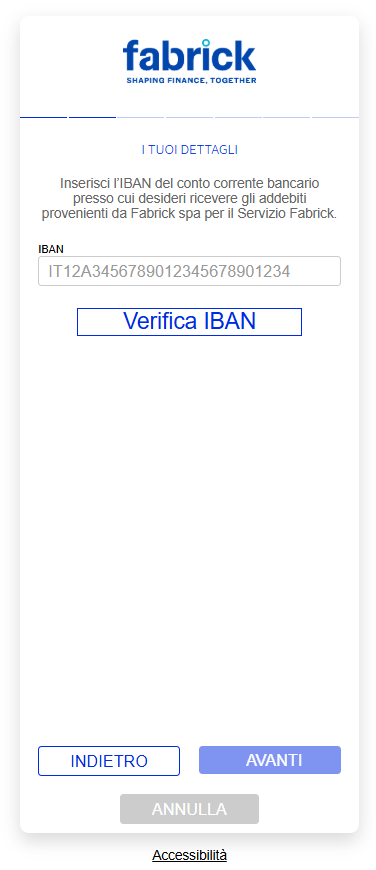
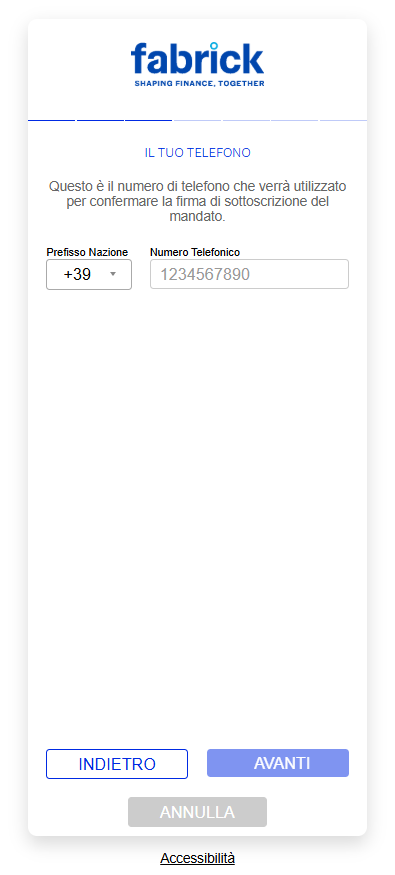
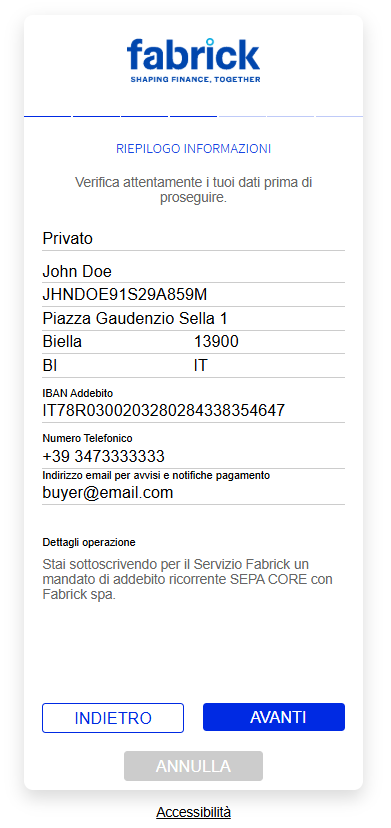
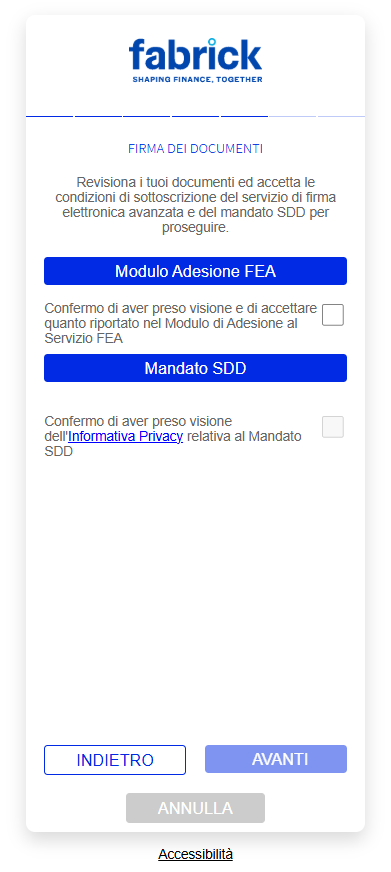
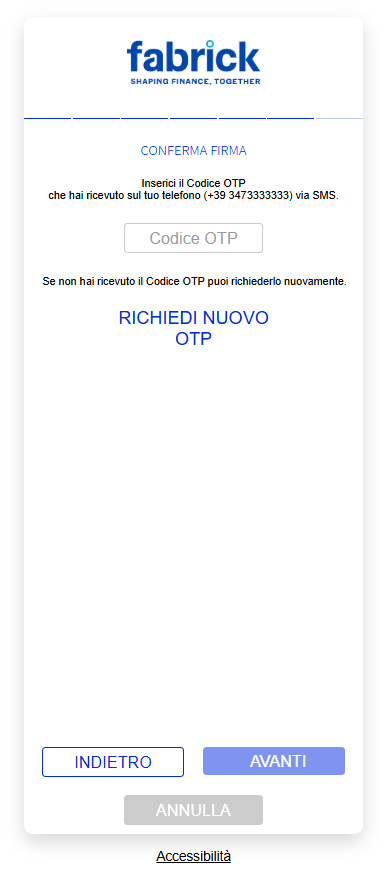
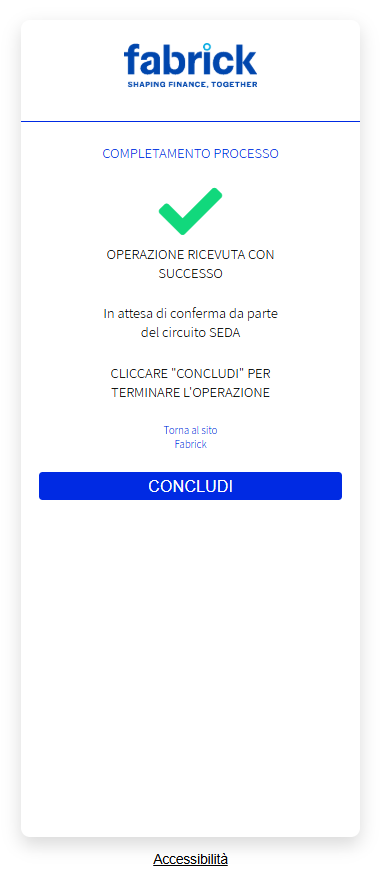
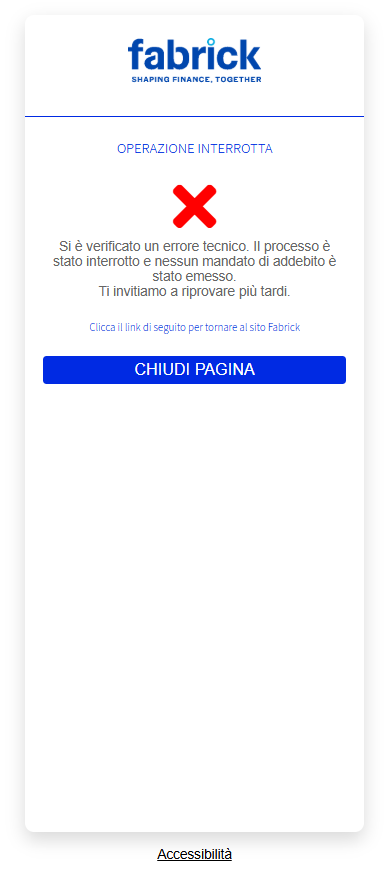
Once signing is complete, the digital mandate is registered on the platform and the system generates the token that identifies it, required to execute subsequent debits.
Timing and outcome management
SDD debits are executed according to the SEPA scheme timings, which depend on the time the request is submitted and on any debit date specified by the merchant. Times refer to the Europe/Rome time zone.
| Event | Description |
|---|---|
| Request submitted by 12:00 | The debit takes place on the first available day (T+2), two business days after submission |
| Request submitted after 12:00 | The debit takes place on the second available day (T+3), three business days after submission |
| Reject (technical KO) | By the debit date. The request is rejected before settlement and does not generate any movement of funds |
| Return window | Up to 6 business days from the debit date. The return is sent by the debtor's bank, for example due to insufficient funds or a closed account |
| Refund window | 8 weeks from the debit date for authorized debits (unconditional refund); 13 months for unauthorized debits |
Managing the debit date
Specifying the debit date is optional.
- Without a debit date (default behavior): the system automatically calculates the first date compatible with SEPA timings, T+2 business days if the request is submitted by 12:00, T+3 if submitted later. This is the simplest option when no specific scheduling is needed.
- With a debit date: the date specified in
executionDatemust be at least T+2 business days if the request is created by 12:00, and at least T+3 if created later.
If executionDate is earlier than the minimum allowed date, the request is not accepted. The merchant is responsible for specifying a date that meets the constraints, or can omit it and rely on the automatic calculation.
Negative outcome terminology
The lifecycle of an SDD debit includes three types of negative outcome, which differ in timing, origin and effect on funds.
| Type | Timing | Origin | Effect |
|---|---|---|---|
| Reject (technical KO) | Before settlement, by the debit date | Scheme, creditor's bank or debtor's bank (e.g. invalid mandate, formal error, unreachable IBAN) | The debit is not executed and does not generate any movement of funds |
| Return | After settlement, within 6 business days from the debit date | Debtor's bank (e.g. insufficient funds, closed account, revoked mandate) | The amount already credited is reversed |
| Refund | After settlement, within 8 weeks (authorized debit) or 13 months (unauthorized debit) | Debtor's request to their bank | The amount already credited is reversed |
For debits under the CORE scheme, excluding the CORE Finanziari and fixed-amount CORE (CORE a importo prefissato) variants, the debtor is entitled to a refund even for correctly executed transactions, if they request it from their bank within 8 weeks of the debit date. For unauthorized debits, for example without a valid mandate, the refund can be requested within 13 months.
SDD payment lifecycle
The lifecycle of an SDD payment describes the statuses a debit request goes through, from creation to collection or to a possible negative outcome.
Payment statuses
| Payment Orchestra status | Result | Fabrick Dashboard status | Description | Typical timing |
|---|---|---|---|---|
AUT | XX | Pending | Request created and taken in charge, waiting to be sent to the scheme | Day the request is submitted |
AUT | KO | Failed | Reject (technical KO) returned by the scheme before settlement, for example due to an invalid mandate or a formal error. It does not generate any movement of funds | Debit date |
MOV | OK | Captured | Positive outcome returned by the scheme: debit executed | Debit date |
STO | OK | Refunded | Return sent by the debtor's bank, or refund requested by the debtor | Within 6 business days from the debit date (return); within 8 weeks or 13 months (refund) |
Possible status flows
An SDD debit request can only follow these flows:
AUT XX→AUT KOAUT XX→MOV OKAUT XX→MOV OK→STO OK
The AUT KO status represents only a reject before settlement. The STO OK status, shown in the Fabrick Dashboard as Refunded, covers both returns and refunds requested by the debtor.
The Captured status (MOV OK) does not guarantee that the collection is irrevocable: the return window (6 business days from the debit date) and the refund window (8 weeks or 13 months) set by the scheme still apply.
Examples
- Without debit date
- With debit date
Debit request submitted on 7 July 2025 at 10:00, without a debit date: since it was submitted before 12:00, the debit takes place at T+2.
| Day | Payment Orchestra status | Fabrick Dashboard status | Description |
|---|---|---|---|
| 7 July, 10:00 | AUT XX | Pending | Request created |
| 9 July | MOV OK | Captured | Debit executed, amount credited to the merchant |
| 10–17 July | STO OK | Refunded | Possible return |
| Until 3 September | STO OK | Refunded | Possible refund requested by the debtor (8 weeks) |
Debit request submitted on 7 July 2025 at 10:00 with executionDate 14 July 2025: since it was submitted before 12:00, the minimum allowed date is 9 July (T+2), so 14 July is valid.
| Day | Payment Orchestra status | Fabrick Dashboard status | Description |
|---|---|---|---|
| 7 July, 10:00 | AUT XX | Pending | Request created with executionDate 14 July 2025 |
| 14 July | MOV OK | Captured | Debit executed on the requested date, amount credited to the merchant |
| 15–22 July | STO OK | Refunded | Possible return |
| Until 8 September | STO OK | Refunded | Possible refund requested by the debtor (8 weeks) |
Supported features and operational constraints
| Operation | Supported | Notes |
|---|---|---|
| Sending the debit request | ✅ | Through payment/submit |
| Capturing a pending transaction | ❌ | The outcome is returned by the scheme on the debit date and automatically moves the transaction to Captured (MOV OK) or Failed (AUT KO) |
| Cancelling a pending transaction | ❌ | A request already sent and in the Pending status (AUT XX) cannot be cancelled |
| Merchant-initiated refund | ❌ | The Refunded status (STO OK) is set automatically only following external events: a return within 6 business days, a refund requested by the debtor within 8 weeks, or a refund for an unauthorized transaction within 13 months |
- Longer collection times than instant payments.
- Returns or refunds are possible even after collection.
- Mandate management is the merchant's responsibility: the merchant must store the tokens and check that they are still valid.
SEPA Direct Debit on Fabrick Payment Orchestra: activation and integration types
Activation request
To start accepting SDD payments, you can request activation:
- By contacting your sales representative
- By contacting support at the following link
Once the required procedures are completed:
- Fabrick enables SEPA Direct Debit on the shop and informs the merchant.
- You can verify that the payment method is active in the Dashboard, under Workspace → Shops → [Select shop] → Settings
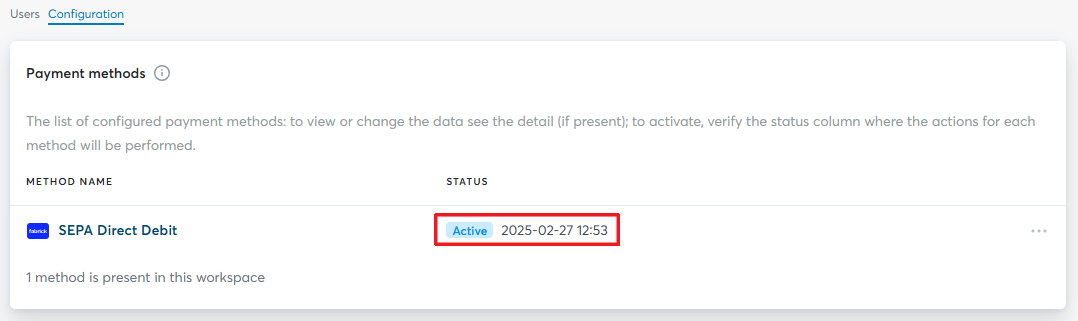
From now on, your e-commerce is ready to accept SEPA Direct Debit payments through Fabrick Payment Orchestra.
Integration types
The SDD integration consists of two phases, each with its own integration type:
-
Mandate creation
Supported integrations
✓Pay By Link✗Checkout Page (selection page)✗Web Component✗LightboxThe merchant initializes the mandate with
payment/createand redirects the buyer to the signing page through the link returned by Fabrick. The merchant chooses when and where to offer the mandate, for example during registration, in a reserved area or in a custom checkout.To set up the call, go to the creating the mandate section.
-
Debit execution
Supported integrations
✓API OnlyDebits on the mandate are executed via API with
payment/createandpayment/submit, without any interaction from the buyer.
On the mandate signing page you can enter any tax code and IBAN you like; for the IBAN you can also use IT78R0300203280284338354647.
The phone number, however, must be real: to complete the mandate signature you receive by SMS the OTP code to enter on the page.
API integration
Creating the mandate
Initialize the mandate with the payment/create call, specifying SDD in the paymentType field and requesting the signing link by setting paymentChannel.channelType to LINK.
| Field | Mandatory | Description |
|---|---|---|
amount | ✅ | 0 to create the mandate only; an amount greater than zero to also execute the first debit |
paymentType | ✅ | ["SDD"] |
paymentChannel.channelType | ✅ | ["LINK"], to obtain the link to the signing page |
SDDDescription | ❌ | Description shown to the buyer |
Request
POST /api/v1/payment/create
Host (sandbox): sandbox.gestpay.net
Host (production): ecomms2s.sella.it
Authorization: apikey ****************
Content-Type: application/json
{
    "shopLogin": "GESPAY12345",
    "amount": "0", // 0 to create the mandate only, > 0 to also execute the first debit
    "currency": "EUR",
    "shopTransactionID": "FBK_OrderID",
    "SDDDescription": "Subscription payment", // Optional: description shown to the buyer
    "paymentType": ["SDD"],
    "paymentChannel": { "channelType": ["LINK"] }
}
Response
{
    "error": {
        "code": "0",
        "description": "request correctly processed"
    },
    "payload": {
        "paymentToken": "07ba3f3a-885b-4bee-b77d-229486af9759",
        "paymentID": "11360710055816",
        "userRedirect": {
            "href": "https://sandbox-web.axerve.com/orchestra/checkout/a/ffbc98873e6745818a8efed28d48f282/b/bf10e15222a7dfa9631f9aba4698baf9141e74413d230b1ec4db0d58bedfce06f823e21e-c58c-4957-80aa-e72326bb4ed1hQexMf4OCqUQrE5RVuDnhD2gkPab7Wk4jakzYWiRDUsi89N-wrRmhGkxWvRwlaPtumuFfxPu47av0IfnfUoqbdTq3E4lSZsPVFswQnvu8VuJOfjOykVcSPvM6VROBPQvMuPoYCRa90lcQOuLvl8NnMHBaQN8"
        },
        "qrCode": null
    }
}
Redirect the buyer to the link in payload.userRedirect.href to sign the mandate.
Retrieving the mandate token
Once signing is complete, retrieve the mandate token with GET /payment/detail, in the payload.token field, and store it: it is required for all subsequent debits.
Request
GET /api/v1/payment/detail/{paymentID}
Host (sandbox): sandbox.gestpay.net
Host (production): ecomms2s.sella.it
Authorization: apikey ****************
Content-Type: application/json
Response
{
    "error": {
        "code": "0",
        "description": "request correctly processed"
    },
    "payload": {
        "transactionType": "detail",
        //...
        "paymentID": "1881129911957",
        "token": "{TOKEN}", // SDD mandate token
        //...
    }
}
Executing a debit on an existing mandate
A debit on an already registered mandate requires two consecutive calls: payment/create initializes the transaction and payment/submit sends the mandate token.
Before sending the request, check that:
- the token is still valid;
- the mandate has not been revoked;
- the IBAN associated with the mandate is active.
Step 1 — Creating the payment request
Request
POST /api/v1/payment/create
Host (sandbox): sandbox.gestpay.net
Host (production): ecomms2s.sella.it
Authorization: apikey ****************
Content-Type: application/json
{
    "shopLogin": "GESPAY12345",
    "amount": "10",
    "currency": "EUR",
    "shopTransactionID": "FBK_OrderID"
}
Step 2 — Sending the debit
Send the request to payment/submit:
PaymentTokenheader: set it to thepaymentTokenreceived in Step 1- Body: enter the mandate token in the
paymentTypeDetails.SDD.tokenfield
The body depends on whether you specify the debit date (see Managing the debit date).
- Without debit date
- With debit date
No debit date is specified: the system uses the first available date.
Request
POST /api/v1/payment/submit
Host (sandbox): sandbox.gestpay.net
Host (production): ecomms2s.sella.it
PaymentToken: f0419188-8a78-4918-913c-a491e4e78084
Content-Type: application/json
{
    "shopLogin": "GESPAY12345",
    "paymentType": "SDD",
    "paymentTypeDetails": {
        "SDD": {
            "token": "{TOKEN}" // SDD mandate token
        }
    }
}
The debit date is specified in the executionDate field, in YYYYMMDD format.
Request
POST /api/v1/payment/submit
Host (sandbox): sandbox.gestpay.net
Host (production): ecomms2s.sella.it
PaymentToken: f0419188-8a78-4918-913c-a491e4e78084
Content-Type: application/json
{
    "shopLogin": "GESPAY12345",
    "paymentType": "SDD",
    "paymentTypeDetails": {
        "SDD": {
            "token": "{TOKEN}", // SDD mandate token
            "executionDate": "{YYYYMMDD}" // Debit date
        }
    }
}
The request is taken in charge in the Pending status (AUT / XX) and the final outcome is returned by the scheme on the debit date (see Payment lifecycle).
FAQ
How long does it take to know whether a debit was successful?
Without a debit date, if there are no errors the payment reaches the Captured status after two or three business days, depending on the submission time. With executionDate, the debit is executed on the specified date, provided it is valid. In both cases, if no return occurs by the sixth business day from the debit date, the payment can be considered successful, without prejudice to the debtor's right to request a refund within 8 weeks, or 13 months for unauthorized debits.
What happens if the customer changes IBAN?
The existing mandate is no longer valid: a new mandate must be created with the new IBAN.
Can I execute a one-off debit?
Yes. Creating the mandate is always the first step, but it does not imply recurring use: once the token has been obtained, the merchant can send a single debit request. The merchant can then retire the mandate at application level, for example by not storing the token in its systems, or leave it active until the expiry set by the SEPA scheme.
What happens if I specify a debit date that is too close?
If executionDate does not meet the minimum constraint (T+2 if the request is created by 12:00, T+3 if created later), the request is rejected. You need to send it again with a valid date, or without a date to rely on the automatic calculation.
Can I cancel or refund a debit through Payment Orchestra?
No. A request already sent remains in the Pending status (AUT XX) until the debit date and cannot be cancelled. A refund cannot be initiated by the merchant either: the Refunded status (STO OK) is set only following a return or a refund requested by the debtor from their bank.
Support
Fabrick
- Status page: https://status.fabrick.com/
- Support: https://landing.fabrick.com/fabrick-dashboard-support