Klarna
Why choose Klarna
Klarna is a Swedish payment solution that allows merchants to offer their customers the option to pay now, later or in instalments, through a fast and recognisable checkout. The benefit for the merchant is immediate: the full transaction amount is collected straight away, regardless of the payment option chosen by the customer.
For further information see the official Klarna documentation
Services and features available through the Fabrick integration
Integrating Klarna with Fabrick Payment Orchestra gives you access to a complete ecosystem of features:
- Three payment options: Pay Now (immediate payment), Pay Later (deferred up to 30 days or split into 3-4 interest-free instalments), Financing (financing from 6 to 36 months).
- Immediate collection for the merchant: the full transaction amount is credited to the merchant within the agreed timeframe, regardless of the payment option chosen by the customer.
- Risk management: Klarna assumes the credit risk (consumer non-payment) and the fraud risk on approved transactions, within the limits set out in Klarna's policies. Disputes relating to the supply of goods and services remain the merchant's responsibility (see Dispute management).
- Recurring payments and tokenization: the Klarna payment method can be tokenized for subsequent charges, in On-demand or Subscriptions mode (see Tokenization and recurring payments).
- International coverage: active in more than 20 countries across Europe, the United States, Canada, Australia and New Zealand (learn more).
- Advanced transaction management: support for partial or multiple captures and refunds.
- Separated or unified authorization and financial confirmation: the capture can be unified with the authorization or requested at a later time (see Separated and unified capture).
- Multi-currency support: compatible with the currencies of the supported countries (learn more).
- Simplified reconciliation: payment management and reporting through the Fabrick Dashboard (learn more).
- On-Site Messaging: on request, activation of the service in the Klarna Merchant Portal to customise Klarna messaging on the merchant's website (learn more).
- Dispute management: disputes are handled through the Klarna Merchant Portal (learn more).
Klarna products available
Klarna offers three payment categories:
| Category | Product | Description |
|---|---|---|
| Pay Now | Bank Transfer | Immediate payment by bank transfer directly from the customer's online banking. |
| Pay by Card | Immediate payment by credit or debit card (available in supported markets). | |
| Pay Later | Pay in 30 days | The customer receives the product and completes the payment within 30 days. |
| Pay in Installments | The customer splits the amount into 3 or 4 interest-free instalments. | |
| Financing | Financing | Medium to long-term financing from 6 to 36 months for high-value purchases. |
Regardless of the option chosen by the customer, the merchant immediately receives the full transaction amount.
Geographic coverage and product availability
Klarna is active in more than 20 countries across Europe, the United States, Canada, Australia and New Zealand. The table below maps Klarna product availability by country, currency and payment option.
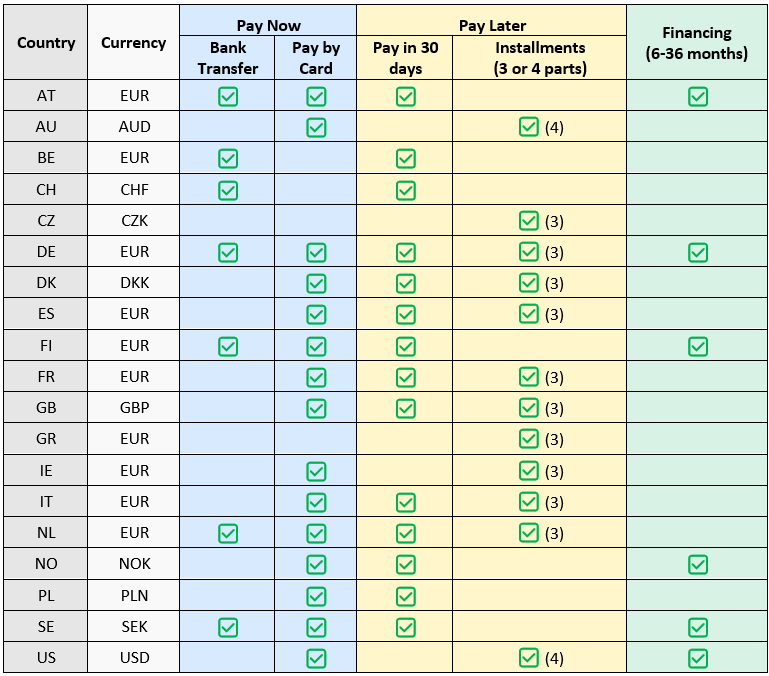
The table provides an indicative overview. Actual availability may vary depending on Klarna's policies, the user's profile and the local context. For up-to-date details see the official Klarna documentation.
Payment experience for the buyer
During the payment process the buyer enters the phone number and/or the e-mail address associated with their Klarna account. The system recognises the user automatically, avoiding the need to enter any further data.
After signing in, Klarna guides the user through the checkout, where they can select their preferred payment option between Pay Now, Pay Later and Financing. The availability of the options depends on several factors:
- User profile
- Country of residence
- Purchase amount
- Klarna's policies
Separated and unified capture
To set or change how transactions are handled for the payment method:
-
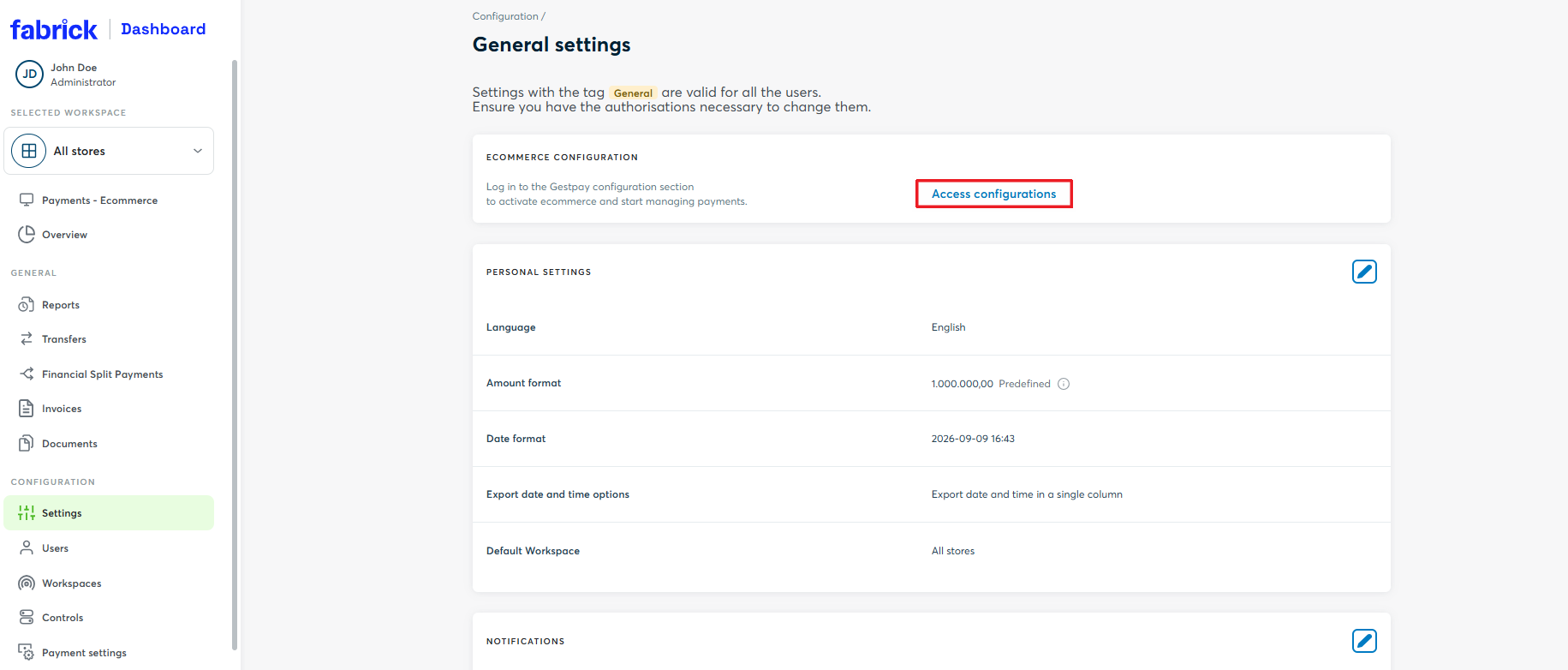
Log in to the Dashboard and go to Settings → Access the configurations
-
Once redirected to the back office, go to Configurations → Environment and click MOTO: a side panel opens with the list of active payment methods
-
Find the payment method and select the mode you want between Unify transaction and Separate
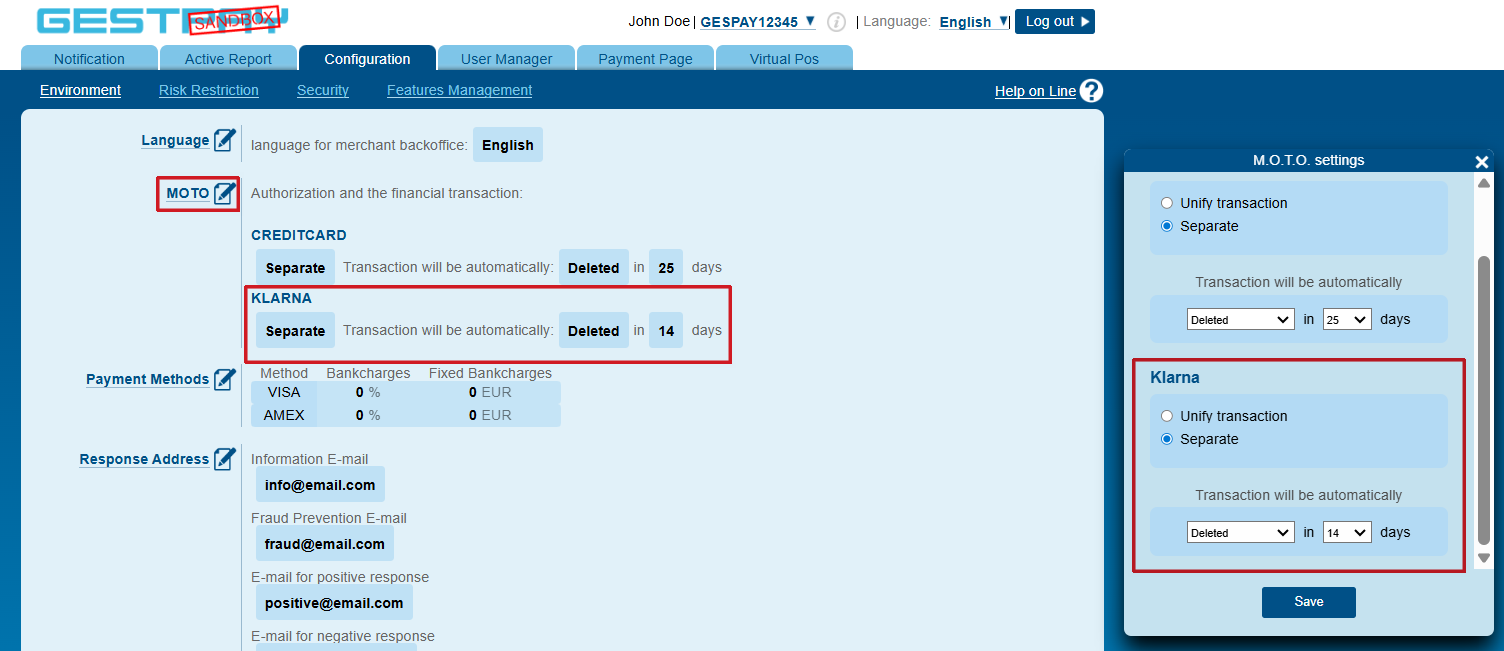
For more details on how the two modes work, see the separated and unified capture section.
Settlement timing
Settlement of Klarna transactions is managed by Fabrick as Payment Facilitator.
The timing depends on the Payment Facilitator agreement signed between the merchant and Fabrick. With daily settlement, the payment is credited at T+9 from the transaction capture date (where T is the day of the capture).
| Transaction date | Day of the week | T+9 calendar days | Day of the week at T+9 | Credited when? |
|---|---|---|---|---|
| 10/03/2025 | Monday | 19/03/2025 | Wednesday | ✅ 19/03/2025 (business day) |
| 15/03/2025 | Saturday | 24/03/2025 | Monday | ✅ 24/03/2025 (business day) |
| 25/04/2025 | Friday (public holiday) | 04/05/2025 | Sunday | ⏩ 05/05/2025 (Monday) |
If the settlement date falls on a non-business day (public holiday or weekend), settlement is postponed to the next business day. This logic applies to all Klarna payment options (Pay Now, Pay Later, Financing): the merchant receives the settlement within the stated timeframe regardless of the option chosen by the customer.
Dispute management
Klarna's policy states that the merchant, as the supplier of the goods and/or services, is responsible for resolving disputes raised by the customer. Disputes are handled through the Klarna Merchant Portal (learn more).
The resolution timeframes vary according to the type of dispute:

Timeframes run from the return date provided to Klarna by the customer. If the return date is less than 21 days, the escalation date is automatically postponed by 21 days from the return date.
If a dispute is not resolved within the expected timeframe, Klarna's customer service steps in to help the parties reach an agreement. This intervention may result in an additional fee charged to the merchant, applied retroactively where the outcome finds the merchant at fault.
No cost is charged to the merchant when the customer is found at fault, fails to provide the information requested by Klarna, or withdraws the dispute of their own accord.
For more information on disputes: Klarna Merchant Disputes
Klarna on Fabrick Payment Orchestra: activation and integration types
Activation request
To start accepting Klarna payments you need to accept the dedicated terms Fabrick reserves for its customers, signing the agreement that enables Fabrick to act as Payment Facilitator.
You can request the activation of Klarna through Fabrick:
- By contacting your sales representative
- By contacting support at the following link
During activation you must provide Fabrick with the e-mail address of the administrator that will be used to register on the Klarna Merchant Portal.
Once the required contractual and technical procedures are complete:
- Klarna sends a message with the instructions to access the Klarna Merchant Portal to the e-mail address provided.
- You can verify that the payment method is active in the Dashboard, under Workspace → Shops → [Select shop] → Settings
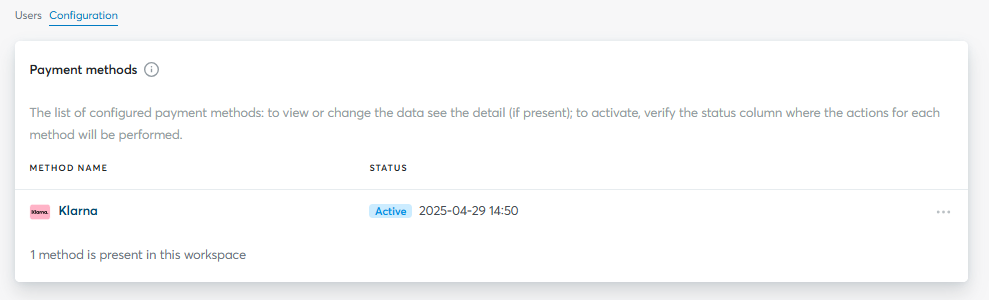
From this moment on, your e-commerce is ready to accept Klarna payments through Fabrick Payment Orchestra.
Integration types
Fabrick offers two integration types for Klarna:
-
Hosted integration
Supported integrations
✓Checkout Page✓Pay By Link✓Web Component✓LightboxKlarna is displayed directly on the Fabrick payment page. Fabrick handles the display of the payment method and the entire processing phase, but unlike other payment methods the mandatory data must be sent.
-
API integration
Supported integrations
✓API OnlyThe redirect to Klarna is handled directly through the API. You need to initialise the transaction with
payment/create, send the mandatory data and handle the buyer's redirect.
To request a payment with Klarna you must populate the Billing Address object, in particular the CountryCode field, and the Product Details object, with the Name, UnitPrice and Quantity fields.
If the phone number is not sent in the request and the buyer enters incorrect data on the Klarna page, a failure page is displayed with no option to re-enter the data. This behaviour cannot be reproduced in sandbox.
Two preliminary steps are required to integrate Klarna in sandbox:
- Request the sandbox credentials and the enablement of the Klarna payment method (onboarding on Payment Orchestra) from Fabrick support
- Use the sample customer data provided by Klarna for the target market
Klarna does not accept real personal data in the test environment. Use the sample customer data for the target market: the e-mail address determines the outcome of the transaction.
The examples on this page use the data for the approved flow in the Italian market.
Hosted integration
To display Klarna on the payment page you need to add the mandatory fields required by the payment method to the payment/create call. When the user selects Klarna, they enter the phone number or the e-mail associated with their Klarna account and complete the payment by choosing one of the available options (Pay Now, Pay Later, Financing).
To set up the call for the hosted integration, go to the creating the transaction and redirecting to Klarna section and remove the paymentType field from the payment/create call.
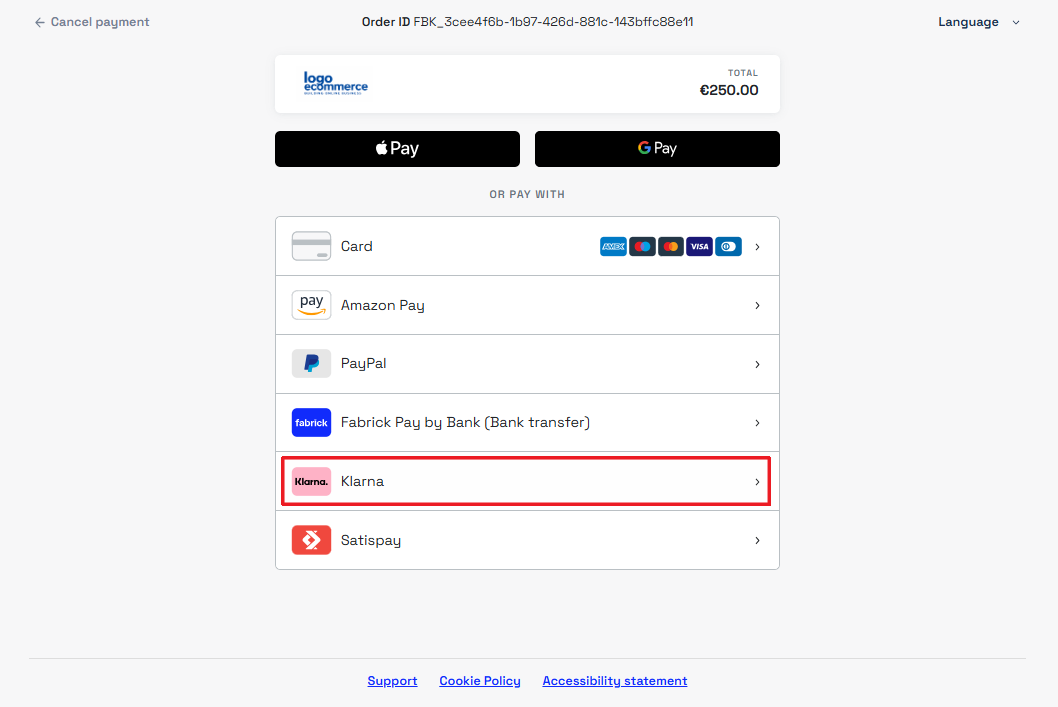
When the user selects Klarna, they are redirected to the service to log in and complete the payment.
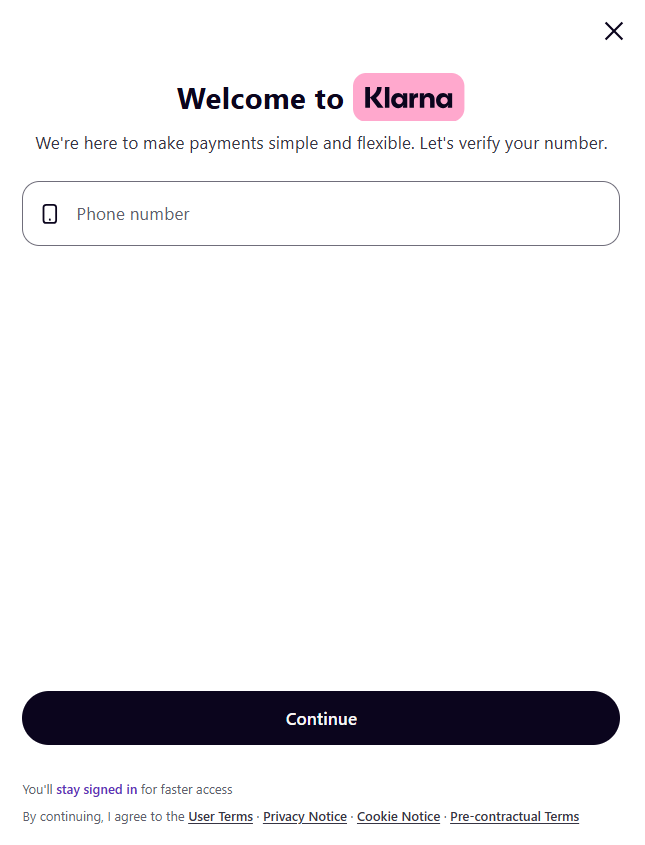
API integration
To request a Klarna payment using the API integration, you need to initialise the transaction with payment/create using the KLARNA tag in the paymentType field, include the mandatory data and handle the buyer's redirect to the payment method.
Creating the transaction and redirecting to Klarna
- Mandatory fields
- Full call
Request
POST /api/v1/payment/create
Host (sandbox): sandbox.gestpay.net
Host (production): ecomms2s.sella.it
Authorization: apikey ****************
Content-Type: application/json
{
    "shopLogin": "GESPAY12345",
    "amount": "294.90",
    "currency": "EUR",
    "shopTransactionID": "FBK_OrderID",
    "paymentType": ["KLARNA"], // Remove this line for the hosted integration
    "paymentChannel": { "channelType": ["LINK"] },
    "OrderDetails": {
        "BillingAddress": {
            "CountryCode": "IT"
        },
        "ProductDetails": [
            {
                "Name": "Explorer Backpack",
                "UnitPrice": "180.00",
                "Quantity": "1"
            },
            {
                "Name": "Runner Pro",
                "UnitPrice": "89.90",
                "Quantity": "1"
            },
            {
                "Name": "Shipping",
                "UnitPrice": "25",
                "Quantity": "1"
            }
        ]
    }
}
Request
POST /api/v1/payment/create
Host (sandbox): sandbox.gestpay.net
Host (production): ecomms2s.sella.it
Authorization: apikey ****************
Content-Type: application/json
{
    "shopLogin": "GESPAY12345",
    "amount": "541.49",
    "currency": "EUR",
    "shopTransactionID": "FBK_OrderID",
    "paymentType": ["KLARNA"], // Remove this line for the hosted integration
    "paymentChannel": { "channelType": ["LINK"] },
    "OrderDetails": {
        "PaymentPageDetails": {
            "LogoUrl": "https://www.example.com/logo.svg"
        },
        "ProviderPageDetails": {
            "BackgroundUrl": "https://www.example.com/bg.svg",
            "BackgroundWidth": "100",
            "PageTitle": "Complete your payment",
            "PrivacyUrl": "https://www.example.com/privacy",
            "TermsAndCondsUrl": "https://www.example.com/terms"
        },
        "CustomerDetail": {
            "FirstName": "Test",
            "Lastname": "Person-it"
        },
        "BillingAddress": {
            "FirstName": "Test",
            "Lastname": "Person-it",
            "Company": "Example S.r.l.",
            "StreetName": "Via Corradino Sella 10",
            "City": "Biella",
            "ZipCode": "13900",
            "State": "Piemonte",
            "CountryCode": "IT",
            "Email": "customer+it@klarna.com",
            "PrimaryPhone": "+393339741231"
        },
        "ShippingAddress": {
            "FirstName": "Test",
            "Lastname": "Person-it",
            "Company": "Example S.r.l.",
            "StreetName": "Via Corradino Sella 10",
            "City": "Biella",
            "ZipCode": "13900",
            "State": "Piemonte",
            "CountryCode": "IT",
            "Email": "customer+it@klarna.com",
            "PrimaryPhone": "+393339741231",
            "ShippingMethod": "CARRIER"
        },
        "ProductDetails": [
            {
                "Description": "Travel backpack",
                "SKU": "512678_M",
                "Name": "Explorer Backpack",
                "UnitPrice": "180.00",
                "Quantity": "1",
                "ImageUrl": "https://www.example.com/images/explorer-backpack.jpg",
                "ProductInfoUrl": "https://www.example.com/products/explorer-backpack",
                "Type": 5
            },
            {
                "Description": "Sports shoes",
                "SKU": "789456_42",
                "Name": "Runner Pro",
                "UnitPrice": "89.90",
                "Quantity": "1",
                "ImageUrl": "https://www.example.com/images/runner-pro.jpg",
                "ProductInfoUrl": "https://www.example.com/products/runner-pro",
                "Type": 5
            },
            {
                "Description": "Smart watch",
                "SKU": "998877_BLK",
                "Name": "SmartWatch X",
                "UnitPrice": "246.59",
                "Quantity": "1",
                "ImageUrl": "https://www.example.com/images/smartwatch-x.jpg",
                "ProductInfoUrl": "https://www.example.com/products/smartwatch-x",
                "Type": 5
            },
            {
                "Name": "Shipping",
                "UnitPrice": "25",
                "Quantity": "1",
                "Type": 6
            }
        ],
        "ProviderData": "{\"customer_account_info\":[{\"unique_account_identifier\":\"customer+it@klarna.com\",\"account_registration_date\":\"2017-02-13T10:49:20Z\",\"account_last_modified\":\"2019-03-13T11:45:27Z\",\"loyalty_level\":\"intermediate\",\"customer_email\":\"customer+it@klarna.com\",\"customer_phone\":\"+393339741231\"}]}"
    }
}
The response returns the redirect link for the buyer to Klarna in the payload.userRedirect.href field.
Response
{
  "error": {
    "code": "0",
    "description": "request correctly processed"
  },
  "payload": {
    "paymentToken": "f0419188-8a78-4918-913c-a491e4e78084",
    "paymentID": "1881129911957",
    "userRedirect": {
      "href": "https://sandbox-web.axerve.com/orchestra/checkout/a/f991s1ba01d24eacaa3fac4b2145262a/b/36ab092425ff34515f7430e38babb28b84f16a31d63102b829072a1366c13580ae128e86-d779-4d98-88a2-0c035bcbd42eiAQ8ZaRT3IFyanLLjcIxtsuc3DTwycBdj5FD7FjuhlKm-mNnpirMdm9p3O8bhycmHVVPz6QOyo811UzHG3csjOSlH2KbF2EiUIxEwWFPAvk9TdUDrgWtyKLJYWayfzbZlP4iULt9eHTvhJEhK21sS8Smd0hX"
    },
    "qrCode": null
  }
}
The item total, calculated by multiplying UnitPrice by Quantity on each line, must match the amount specified in the amount field.
The returned link can be used under a Pay with Klarna button, in line with the Klarna design guidelines.
Fields to send in the call to Klarna
The parameters to include in payment/create are listed in the tables below. Mandatory fields are shown in bold.
Billing Address
| Field | Max | Description |
|---|---|---|
OrderDetails.BillingAddress.FirstName | 65 | Customer's first name |
OrderDetails.BillingAddress.Lastname | 65 | Customer's last name |
OrderDetails.BillingAddress.Company | 75 | Company name |
OrderDetails.BillingAddress.StreetName | 100 | Address (alphanumeric characters only) |
OrderDetails.BillingAddress.Email | 100 | Customer's e-mail |
OrderDetails.BillingAddress.City | 50 | City |
OrderDetails.BillingAddress.ZipCode | 50 | Postal code |
OrderDetails.BillingAddress.State | 50 | Region or state |
OrderDetails.BillingAddress.CountryCode | 2 | ISO 3166 alpha-2 country code (e.g. IT, DE, GB) |
OrderDetails.BillingAddress.PrimaryPhone | 100 | Phone number with international prefix |
Shipping Address
| Field | Max | Description |
|---|---|---|
OrderDetails.ShippingAddress.FirstName | 65 | Recipient's first name |
OrderDetails.ShippingAddress.Lastname | 65 | Recipient's last name |
OrderDetails.ShippingAddress.Company | 75 | Company name |
OrderDetails.ShippingAddress.StreetName | 75 | Address (alphanumeric characters only) |
OrderDetails.ShippingAddress.Email | 100 | Recipient's e-mail |
OrderDetails.ShippingAddress.City | 50 | City |
OrderDetails.ShippingAddress.ZipCode | 20 | Postal code |
OrderDetails.ShippingAddress.State | 50 | Region or state |
OrderDetails.ShippingAddress.CountryCode | 2 | ISO 3166 alpha-2 country code |
OrderDetails.ShippingAddress.PrimaryPhone | 30 | Phone number with prefix |
OrderDetails.ShippingAddress.ShippingMethod | — | Shipping method: STORE, PICKUP_POINT, CARRIER |
Customer Info
| Field | Max | Description |
|---|---|---|
OrderDetails.CustomerDetail.FirstName | 65 | Customer's first name |
OrderDetails.CustomerDetail.Lastname | 65 | Customer's last name |
Product Details
| Field | Max | Description |
|---|---|---|
OrderDetails.ProductDetails.Description | 255 | Item description |
OrderDetails.ProductDetails.SKU | 50 | Stock Keeping Unit |
OrderDetails.ProductDetails.Name | 100 | Item name |
OrderDetails.ProductDetails.UnitPrice | 12 | Unit price |
OrderDetails.ProductDetails.Quantity | 3 | Quantity |
OrderDetails.ProductDetails.ImageUrl | 2048 | Item image URL |
OrderDetails.ProductDetails.ProductInfoUrl | 2048 | Product page URL |
OrderDetails.ProductDetails.Type | 2 | Item type (see Product Type table) |
Klarna Product Type
| Value | Type | Notes |
|---|---|---|
| 4 | Discount | Negative value. Reduces the order total. |
| 5 | Physical article | Physical purchase. |
| 6 | Shipping fee | Shipping costs. |
| 8 | Digital article | Digital purchase (e.g. a licence). |
| 9 | Gift Card | Positive: gift card purchase. Negative: order total reduced with a gift card. |
| 10 | Store credit | Negative value. Reduces the order total with in-store credit. |
Payment page customisation
| Field | Max | Description |
|---|---|---|
OrderDetails.PaymentPageDetails.LogoUrl | 2048 | Logo displayed on the page |
OrderDetails.ProviderPageDetails.BackgroundUrl | 2048 | Background image |
OrderDetails.ProviderPageDetails.BackgroundWidth | 21 | Background image width |
OrderDetails.ProviderPageDetails.PageTitle | 255 | Page title |
OrderDetails.ProviderPageDetails.PrivacyUrl | 2048 | Link to the privacy policy |
OrderDetails.ProviderPageDetails.TermsAndCondsUrl | 2048 | Link to the terms and conditions |
Shipping data (Fulfillment)
Used in the capture call to send tracking information to Klarna:
| Field | Max | Description |
|---|---|---|
FullFillment.FullFillmentlst.FullfillmentDetail.TrackingCompany | 512 | Carrier name |
FullFillment.FullFillmentlst.FullfillmentDetail.TrackingNumbers | 1024 | Tracking number |
FullFillment.FullFillmentlst.FullfillmentDetail.TrackingUrls | 2048 | Tracking URL |
If the carrier is one of the Klarna Carrier Partners, the buyer will be able to track the shipment directly from the Klarna app.
Extra Merchant Data (EMD)
Depending on the business sector, Klarna may require additional information (Extra Merchant Data) to carry out an accurate risk assessment and improve conversion rates. EMD are mandatory for the following sectors:
| Sector | Required EMD | Details |
|---|---|---|
| Travel | air_reservation_details, train_reservation_details, bus_reservation_details, ferry_reservation_details, car_rental_reservation_details, hotel_reservation_details, trip_reservation_details | Passenger and itinerary information |
| Marketplace | marketplace_seller_info, marketplace_winner_info | Sub-seller information and product category |
| Ticketing | events | Event information |
| Customer info | customer_account_info, payment_history_full, payment_history_simple | Identification of registered customers to improve the experience |
| In-store pickup | other_delivery_address | Pickup point address for risk analysis |
How to send EMD
EMD must be included in the OrderDetails.ProviderData field of the payment/create call, populated with the data packages required for your business sector.
- in_store_payment
- customer_account_info
- customer_tokens
{
    "OrderDetails": {
        "ProviderData": "{\"in_store_payment\":[{\"merchant_store_id\":\"LONDON12\",\"store_terminal_id\":\"AD12342D\",\"store_address\":{\"city\":\"London\",\"country\":\"GB\",\"postal_code\":\"W1B 1JA\",\"street_address\":\"New Burlington St 10\"}}]}"
    }
}
{
    "OrderDetails": {
        "ProviderData": "{\"customer_account_info\":[{\"unique_account_identifier\":\"customer@email.it\",\"account_registration_date\":\"2017-02-13T10:49:20Z\",\"account_last_modified\":\"2019-03-13T11:45:27Z\"}]}"
    }
}
{
    "OrderDetails": {
        "ProviderData": "{\"customer_tokens\":[{\"avg_order_value\":5000,\"avg_purchase_frequency_count\":1,\"avg_purchase_frequency_interval\":\"month\",\"min_order_value\":500,\"max_order_value\":50000}]}"
    }
}
Field details for customer_tokens
The customer_tokens package describes to Klarna the financial characteristics of the subscription associated with the token.
| Field | Type | Description |
|---|---|---|
avg_order_value | integer | Price of the subscription service, expressed in non-negative minor units of the purchase currency (e.g. 2999 corresponds to €29.99) |
avg_purchase_frequency_count | integer | Number of charges expected within the interval specified in avg_purchase_frequency_interval |
avg_purchase_frequency_interval | enum | Cadence unit of the subscription. Accepted values: day, week, month, year |
min_order_value | integer | Where the subscription can be modified, the lowest value offering, in non-negative minor units of the purchase currency |
max_order_value | integer | Where the subscription can be modified, the highest value offering, in non-negative minor units of the purchase currency |
Amounts must be expressed as integers in the currency subunit: for the euro these are cents, so 1999 equals €19.99.
ProviderData accepts a serialised JSON string, not a nested JSON object. Inner quotation marks must therefore be preceded by the escape character \.
To find out which EMD package applies to your business sector, contact your Fabrick sales representative. Details of the fields in each package are available on Klarna Docs - Extra Merchant Data.
Additional features of the payment method
Partial capture and refund of the transaction
Klarna supports partial captures and partial refunds. The ProductDetails object is optional in capture and refund operations: if used, it must be populated with the individual items involved in the operation and with their mandatory fields, so that Klarna can update the order correctly on the buyer's side.
You can process a partial or full refund in two ways:
- Directly from the Fabrick Dashboard
- Through the
POST payment/captureandPOST payment/refundAPI calls
- Partial capture of the transaction
- Partial refund of a captured transaction
Request
POST /api/v1/payment/capture
Host (sandbox): sandbox.gestpay.net
Host (production): ecomms2s.sella.it
Authorization: apikey ****************
Content-Type: application/json
{
    "shopLogin": "GESPAY12345",
    "currency": "EUR",
    "bankTransactionID": "614", // or "paymentID": "21421310038753"
    "amount": "269.90",
    "settlementID": "SID-1",
    "FullFillment": {
        "FullFillmentlst": [
            {
                "TrackingCompany": "TNT",
                "TrackingNumbers": "TNT100",
                "TrackingUrls": "https://www.tnt.com/tnt100",
                "ProductDetails": [
                    {
                        "Description": "Travel backpack",
                        "SKU": "512678_M",
                        "Name": "Explorer Backpack",
                        "UnitPrice": "180.00",
                        "Quantity": "1",
                        "ImageUrl": "https://www.example.com/images/explorer-backpack.jpg",
                        "ProductInfoUrl": "https://www.example.com/products/explorer-backpack",
                        "Type": 5
                    },
                    {
                        "Description": "Sports shoes",
                        "SKU": "789456_42",
                        "Name": "Runner Pro",
                        "UnitPrice": "89.90",
                        "Quantity": "1",
                        "ImageUrl": "https://www.example.com/images/runner-pro.jpg",
                        "ProductInfoUrl": "https://www.example.com/products/runner-pro",
                        "Type": 5
                    }
                ]
            }
        ]
    }
}
Request
POST /api/v1/payment/refund
Host (sandbox): sandbox.gestpay.net
Host (production): ecomms2s.sella.it
Authorization: apikey ****************
Content-Type: application/json
{
    "shopLogin": "GESPAY12345",
    "currency": "EUR",
    "bankTransactionID": "614", // or "paymentID": "21421310038753"
    "amount": "89.90",
    "settlementID": "SID-1",
    "orderDetails": {
        "ProductDetails": [
            {
                "Description": "Sports shoes",
                "SKU": "789456_42",
                "Name": "Runner Pro",
                "UnitPrice": "89.90",
                "Quantity": "1",
                "ImageUrl": "https://www.example.com/images/runner-pro.jpg",
                "ProductInfoUrl": "https://www.example.com/products/runner-pro",
                "Type": 5
            }
        ]
    }
}
Tokenization and recurring payments
Payment Orchestra allows you to tokenize the Klarna payment method chosen by the buyer, so it can be reused for subsequent payments without the buyer having to re-enter their payment details. The token can be used in two contexts:
- With the buyer present at checkout (e.g. a method saved in a wallet), to speed up subsequent payments without requiring a new interaction with the Klarna page.
- Without the buyer present, for charges initiated directly by the merchant (e.g. a subscription renewal).
Tokenization modes
| Mode | Description | When to use it |
|---|---|---|
| On-demand | The token is created without a predefined charging cycle. It can be used both for charges initiated by the merchant with no fixed schedule, and for payments where the buyer, present at checkout, selects the saved method themselves. | Wallets and streamlined checkout, customer-initiated reorders, unscheduled merchant-initiated charges |
| Subscriptions | The token is created with a recurring charging cycle at a fixed interval, expressed in days. | Subscriptions and subscription services with a renewal cycle known in advance |
The mode applied depends on the fields sent in the token creation request; once the transaction is complete, you can obtain the token to be used for subsequent payments.
Enabling tokenization and fields to send
Tokenization is enabled by including the klarnaDescription field in the payment/create call. Without this field, Payment Orchestra processes a standard payment and does not request the tokenization of the payment method.
The fields already required for a Klarna payment remain mandatory in the tokenization request, with the exception of ProductDetails, which must not be sent.
| Field | Requirement | Description |
|---|---|---|
klarnaDescription | Mandatory — enables tokenization | Description of the billing agreement associated with the tokenization |
transDetails.recurringTransaction.frequency | Conditional — present only in Subscriptions mode | Number of days in the recurring charging cycle |
Activation conditions
| Behaviour | Field | Condition |
|---|---|---|
| Standard payment, no tokenization | klarnaDescription | ❌ not present |
| On-demand tokenization | klarnaDescription | ✅ present |
transDetails.recurringTransaction.frequency | ❌ not present | |
Subscriptions tokenization.frequency expresses the number of days in the recurring cycle. | klarnaDescription | ✅ present |
transDetails.recurringTransaction.frequency | ✅ present |
Creating the token
The token can be generated only with a transaction of amount 0: it cannot be requested alongside a payment. The tokenization request does not charge any amount to the buyer.
The call follows the same request/response schema as a standard Klarna payment, with these differences:
- the amount must be set to
0 - the
ProductDetailsobject must not be sent - the
klarnaDescriptionfield must be added, to tell the system that a token has to be generated
In requests in Subscriptions mode it is mandatory to populate OrderDetails.ProviderData with the customer_tokens package (see customer_tokens package fields).
- Subscriptions
- On-demand
Request
POST /api/v1/payment/create
Host (sandbox): sandbox.gestpay.net
Host (production): ecomms2s.sella.it
Authorization: apikey ****************
Content-Type: application/json
{
    "shopLogin": "GESPAY12345",
    "amount": "0",
    "currency": "EUR",
    "shopTransactionID": "FBK_OrderID",
    "paymentType": ["KLARNA"], // Remove this line for the hosted integration
    "paymentChannel": { "channelType": ["LINK"] },
    "klarnaDescription": "Monthly subscription - Plus Plan",
    "transDetails": {
        "recurringTransaction": {
            "frequency": "90"
        }
    },
    "OrderDetails": {
        "BillingAddress": {
            "CountryCode": "IT"
        },
        "ProviderData": "{\"customer_tokens\":[{\"avg_order_value\":5000,\"avg_purchase_frequency_count\":1,\"avg_purchase_frequency_interval\":\"month\",\"min_order_value\":500,\"max_order_value\":50000}]}"
    }
}
Request
POST /api/v1/payment/create
Host (sandbox): sandbox.gestpay.net
Host (production): ecomms2s.sella.it
Authorization: apikey ****************
Content-Type: application/json
{
    "shopLogin": "GESPAY12345",
    "amount": "0",
    "currency": "EUR",
    "shopTransactionID": "FBK_OrderID",
    "paymentType": ["KLARNA"], // Remove this line for the hosted integration
    "paymentChannel": { "channelType": ["LINK"] },
    "klarnaDescription": "Saved payment method - Customer wallet",
    "OrderDetails": {
        "BillingAddress": {
            "CountryCode": "IT"
        }
    }
}
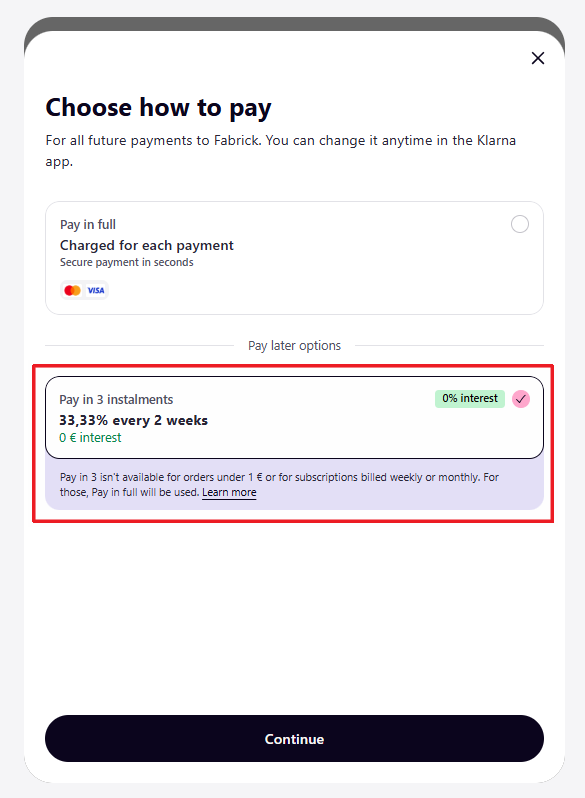
In Subscriptions tokenizations only, if transDetails.recurringTransaction.frequency is set to a value greater than or equal to 90 — that is, a quarterly cycle or longer — the buyer can choose to pay in instalments directly on the Klarna page. The option selected is then applied to all subsequent payments made with that token.
Retrieving the token
Once the buyer has completed the transaction, the system responds with transactionResult set to WAITING. Then retrieve the generated token with GET /payment/detail, in the payload.token field, and store it for subsequent payments.
Request
GET /api/v1/payment/detail/{paymentID}
Host (sandbox): sandbox.gestpay.net
Host (production): ecomms2s.sella.it
Authorization: apikey ****************
Content-Type: application/json
Response
{
    "error": {
        "code": "0",
        "description": "request correctly processed"
    },
    "payload": {
        "transactionType": "detail",
        "transactionResult": "WAITING",
        "transactionState": "",
        "transactionErrorCode": "",
        "transactionErrorDescription": "",
        "bankTransactionID": "",
        "shopTransactionID": "",
        "shopTransactionID_2": "",
        "authorizationCode": "",
        "paymentID": "",
        "currency": "",
        "country": "",
        "company": "",
        "tdLevel": "",
        "threeDS": {
            "authenticationResult": null,
            "transDetails": null
        },
        "events": null,
        "buyer": null,
        "risk": null,
        "customInfo": null,
        "alertCode": "",
        "alertDescription": "",
        "cvvPresent": "",
        "dcc": null,
        "maskedPAN": "",
        "paymentMethod": "",
        "productType": "",
        "token": "KLYI2BVZ4R35IKCT",
        "tokenExpiryMonth": "",
        "tokenExpiryYear": "",
        "tokenDetails": null,
        "fraudPrevention": null,
        "automaticOperation": null
    }
}
Using the token for subsequent payments
Payments made with the token are Klarna transactions in every respect: the POST /payment/create request must therefore include the mandatory fields required by the payment method, as for any other Klarna transaction (see Fields to send in the call to Klarna).
Request
POST /api/v1/payment/create
Host (sandbox): sandbox.gestpay.net
Host (production): ecomms2s.sella.it
Authorization: apikey ****************
Content-Type: application/json
{
    "shopLogin": "GESPAY12345",
    "amount": "29.99",
    "currency": "EUR",
    "shopTransactionID": "FBK_OrderID",
    "OrderDetails": {
        "BillingAddress": {
            "CountryCode": "IT"
        },
        "ProductDetails": [
            {
                "Name": "Monthly subscription - Plus Plan",
                "UnitPrice": "29.99",
                "Quantity": "1"
            }
        ]
    }
}
Response
{
    "error": {
        "code": "0",
        "description": "request correctly processed"
    },
    "payload": {
        "paymentToken": "f0419188-8a78-4918-913c-a491e4e78084",
        "paymentID": "1881129911957",
        "userRedirect": null,
        "qrCode": null
    }
}
In the POST /payment/submit call, use the token to process the payment:
PaymentTokenheader: set it to thepaymentTokenreceived in the previous step- Body: add
paymentTypeDetails.klarna.tokenset to the Klarna token stored previously
Request
POST /api/v1/payment/submit
Host (sandbox): sandbox.gestpay.net
Host (production): ecomms2s.sella.it
PaymentToken: f0419188-8a78-4918-913c-a491e4e78084
Content-Type: application/json
{
    "shopLogin": "GESPAY12345",
    "paymentType": "KLARNA",
    "paymentTypeDetails": {
        "klarna": {
            "token": "KLYI2BVZ4R35IKCT"
        }
    }
}
Response
{
    "error": {
        "code": "0",
        "description": "request correctly processed"
    },
    "payload": {
        "transactionType": "submit",
        "transactionResult": "OK",
        "transactionErrorCode": "0",
        "transactionErrorDescription": "Transaction correctly processed",
        "bankTransactionID": "4672",
        "shopTransactionID": "FBK_OrderID",
        "shopTransactionID_2": "",
        "authorizationCode": "KL3413",
        "paymentID": "1881129911957",
        "currency": "EUR",
        "country": "",
        "company": null,
        "tdLevel": "",
        "buyer": {
            "name": "",
            "email": ""
        },
        "risk": {
            "riskResponseCode": "",
            "riskResponseDescription": ""
        },
        "customInfo": {},
        "alertCode": "",
        "alertDescription": "",
        "cvvPresent": "",
        "maskedPAN": "",
        "paymentMethod": "",
        "productType": "",
        "token": "",
        "tokenExpiryMonth": "",
        "tokenExpiryYear": "",
        "userRedirect": {
            "href": "https://sandbox.gestpay.net/pagam/AxerveThankYou.aspx"
        }
    }
}
Cancelling and querying the token
The Cancel and Details operations use the same endpoints (see the Tokenization section), fields and response structures already used for the other tokenized payment methods on Payment Orchestra. Klarna's behaviour does not require any additional parameters.
Support
Fabrick
- Status page: https://status.fabrick.com/
- Support: https://landing.fabrick.com/fabrick-dashboard-support
Klarna
- Docs: https://docs.klarna.com/
- Merchant Portal: https://portal.klarna.com/