Amazon Pay
Why choose Amazon Pay
Amazon Pay is an alternative payment method that allows buyers to complete their purchases using the payment and shipping information already saved in their Amazon account. The benefit is immediate: the buyer does not have to enter any data manually, for a fast and familiar checkout experience.
For further information see the official Amazon Pay documentation
Services and features available through the Fabrick integration
Integrating Amazon Pay with Fabrick Payment Orchestra gives you access to the following features:
- Checkout with no data entry: the buyer uses the payment and shipping details already stored in their Amazon account.
- Support for physical and digital products: two configuration types, PayAndShip and PayOnly.
- Two integration models: ExpressCheckout, where Amazon handles the shipping address during the purchase process, and ProcessOrder, where the merchant sends the shipping address in the payment request.
- Separated or unified authorization and financial confirmation: the capture can be unified with the authorization or requested at a later time (see Separated and unified capture).
- Advanced transaction management: support for full, partial and multiple captures and refunds.
- Retrieving the shipping address: the address collected by Amazon can be queried through the API (see Retrieving the shipping address).
- International coverage: operations can be configured on one or more regions between EU, UK, US and JP.
- Asynchronous notifications (IPN): status updates on authorizations, captures and refunds are notified by Amazon to Payment Orchestra through Instant Payment Notification.
The buyer must have an active Amazon account to complete the payment with Amazon Pay.
Integration models and supported configurations
Payment Orchestra supports two integration models with Amazon Pay, ExpressCheckout and ProcessOrder, which can be used according to the type of product sold.
- PayAndShip for physical products, where a valid shipping address must be provided to Amazon to manage the order
- PayOnly for digital products, where no shipping address is sent
The available configurations are as follows:
| Configuration | Product type | Shipping address |
|---|---|---|
| ExpressCheckout & PayAndShip | Physical products | Retrieved automatically from the buyer's Amazon account, it must not be provided by the merchant in the payment request |
| ExpressCheckout & PayOnly | Digital products | Not required |
| ProcessOrder & PayAndShip | Physical products | Mandatory: it must be provided by the merchant in the payment request. It is displayed as read-only on the Amazon checkout and cannot be changed by the buyer |
| ProcessOrder & PayOnly | Digital products | Not required |
The integration model and the product type are defined when the payment method is activated, at shop level (shopLogin), and cannot be changed on the individual payment request. All the requests of a shop are processed according to the assigned configuration.
With the PayOnly configuration the payment flow is identical between ExpressCheckout and ProcessOrder: since no shipping address is required, the checkout has the same structure regardless of the configured model.
Separated and unified capture
To set or change how transactions are handled for the payment method:
-
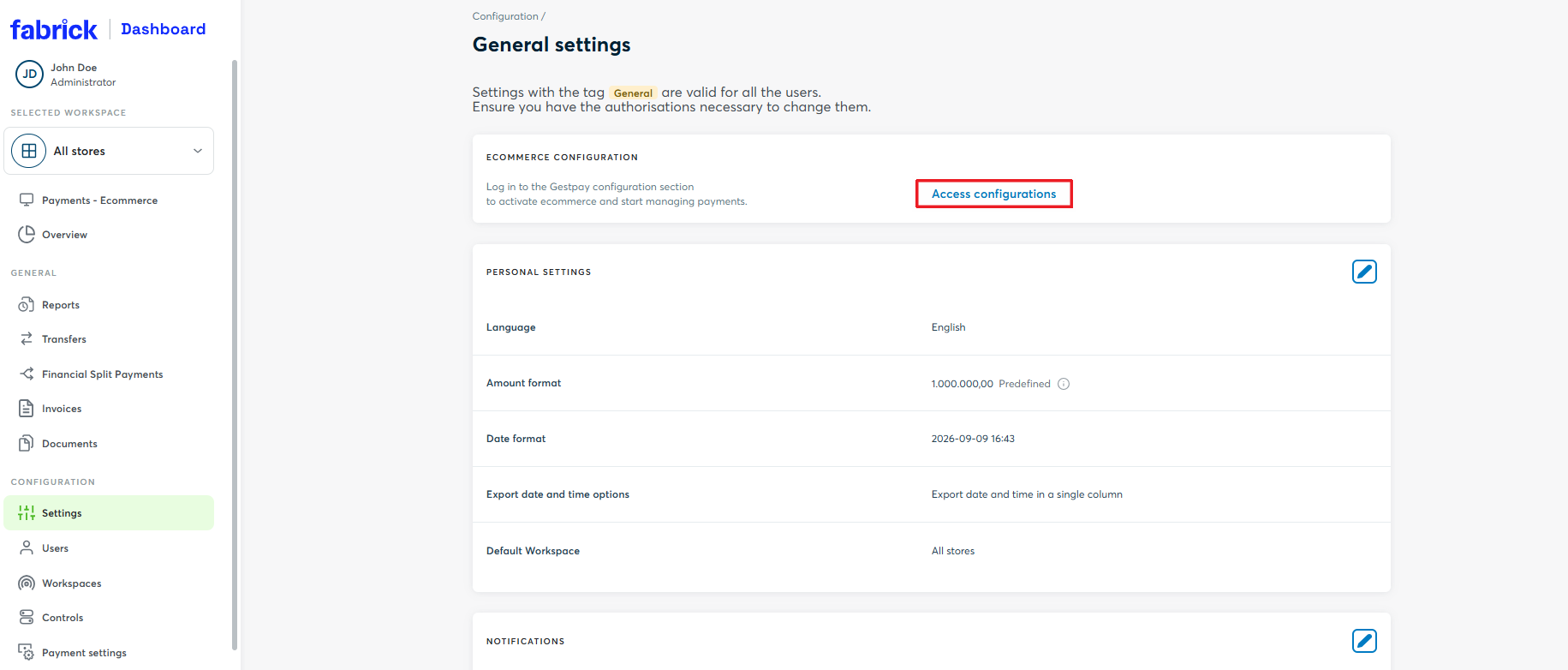
Log in to the Dashboard and go to Settings → Access configurations
-
Once redirected to the back office, go to Configuration → Environment and click MOTO: a side panel opens with the list of active payment methods
-
Find the payment method and select the mode you want between Unify transaction and Separate
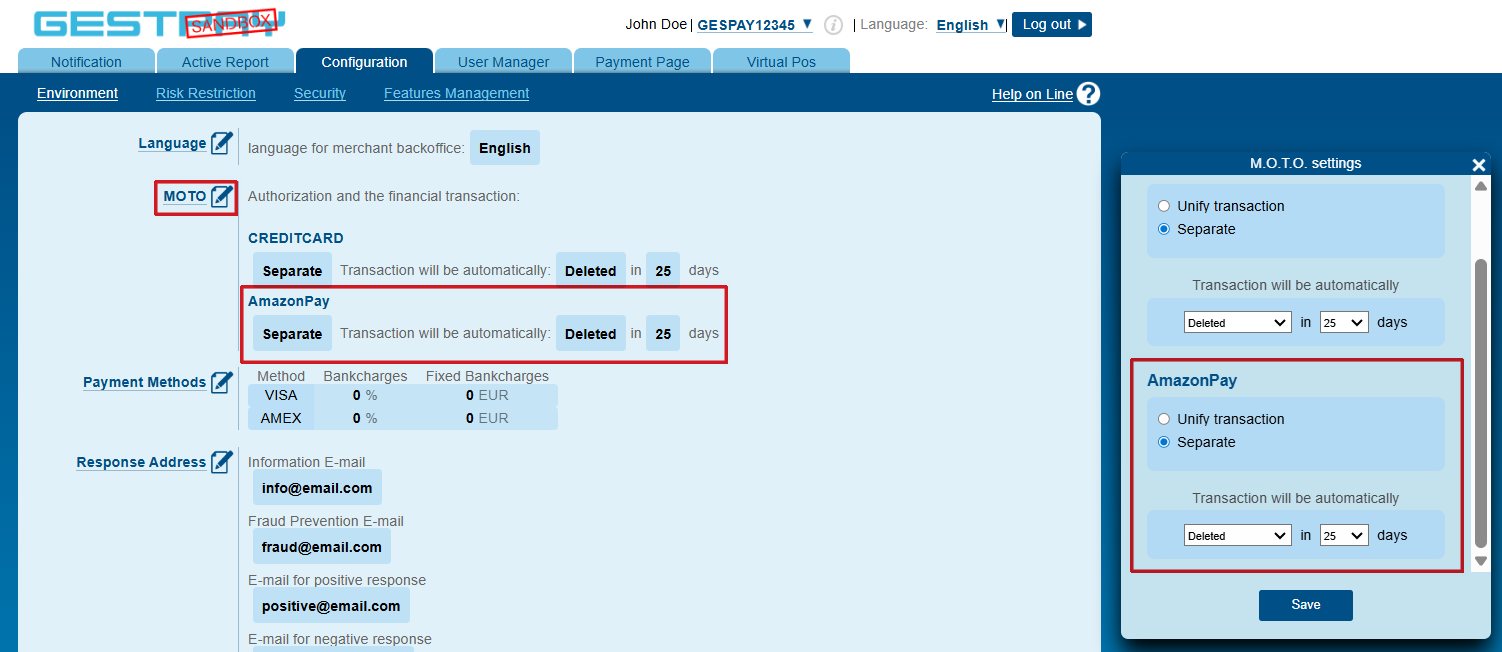
For more details on how the two modes work, see the separated and unified capture section.
Amazon Pay on Fabrick Payment Orchestra: activation and integration types
Tasks required before activation
Before requesting the activation of the payment method, the merchant must complete a number of preliminary tasks on the Amazon Pay portal.
Registering the Amazon Pay Merchant account
The merchant must have an active Amazon Pay Merchant account. If one is not already available, you need to register through Amazon Seller Central and complete the Merchant account configuration procedure (detailed procedure).
Retrieving the credentials
To request the activation of Amazon Pay on Payment Orchestra, the merchant must provide Fabrick with three credentials:
| Credential | How to obtain it |
|---|---|
| Merchant ID | Assigned automatically by Amazon once the Amazon Pay Merchant account registration is complete |
| Client ID | Requires the creation of at least one Amazon Pay Store from the Manage client ID/store ID(s) section of Amazon Seller Central (detailed procedure) |
| MWS Auth Token | Generated through the Amazon Pay procedure for Solution Providers (detailed procedure) |
While generating the MWS Auth Token, Amazon asks for the Developer Name and the Developer ID of the Solution Provider. These values identify Fabrick as a Solution Provider authorised by Amazon Pay:
| Field | Value |
|---|---|
| Developer Name | GestPay |
| Developer ID | 5535-2867-1582 |
At the end of the procedure Amazon makes the MWS Auth Token available, which must then be provided to Fabrick.
Configuring the IPN endpoint
Amazon Pay uses Instant Payment Notification (IPN) to asynchronously notify status updates on authorizations, captures and refunds. Before the service is activated, the merchant must configure the Payment Orchestra IPN endpoint in Amazon Pay (detailed procedure).
| Environment | IPN URL |
|---|---|
| Sandbox | https://sandbox.fabrick.com/api/fabrick/third-parties/amazonpay/gateway/v4.1/webhook |
| Production | https://api.fabrick.com/api/fabrick/third-parties/amazonpay/gateway/v4.1/webhook |
The endpoint currently configured must not be changed or removed. Removing it would interrupt the notifications to the systems already integrated. The procedure only involves adding a new endpoint, which will operate alongside the existing one.
Configuring the allowed domains
Amazon Pay requires the configuration of the Allowed JavaScript Origins, that is, the authorised domains from which the Amazon Pay checkout is served. This configuration is required for the production environment only: no allowed domain is required in sandbox (detailed procedure).
| Parameter | Value |
|---|---|
| Allowed JavaScript Origins | https://web.fabrick.com, https://web.axerve.com |
After adding a domain, Amazon Pay starts a verification procedure that can take up to 48 hours. If the domain is rejected, click the "Appeal" button available next to each URL in the same Seller Central section, entering the following text in the description field: "Allowed Redirect URL as of Amazon's Service Provider allowlist (Fabrick/GestPay)". Once the verification is complete, check again that the domain is approved.
Activation request
Once the tasks described in the previous paragraphs are complete, you can request the activation of Amazon Pay by providing Fabrick with the following information:
| Information | Description |
|---|---|
| Integration model | ExpressCheckout or ProcessOrder |
| Type of products sold | PayAndShip (physical products, shipping address required) or PayOnly (digital products, shipping address not required) |
| Regions of operation | One or more between EU, UK, US and JP |
| Merchant ID | Amazon Pay Merchant identifier |
| Client ID | Client ID generated on Amazon Seller Central |
| MWS Auth Token | Authorisation token generated through the Amazon Pay procedure for Solution Providers |
To start accepting Amazon Pay payments, you can request the activation:
- By contacting your sales representative
- By contacting support at the following link
Once the required procedures are complete:
- Fabrick enables Amazon Pay on the shop and informs the merchant.
- You can verify that the payment method is active in the Dashboard, under Workspace → Shops → [Select shop] → Settings
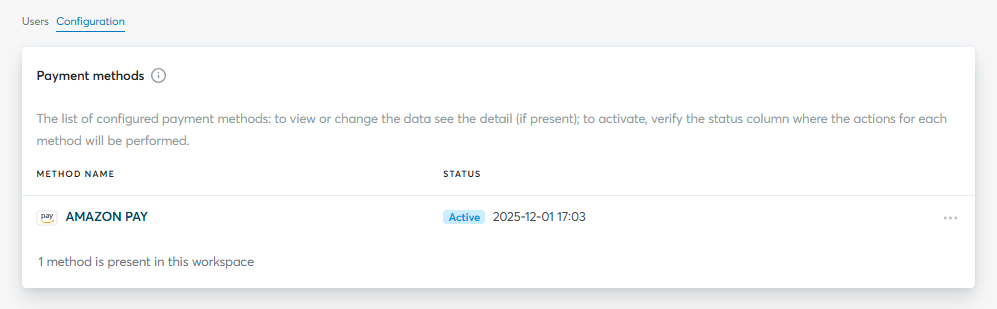
From this moment on, your e-commerce is ready to accept Amazon Pay payments through Fabrick Payment Orchestra.
Integration types
Fabrick offers two integration types for Amazon Pay:
-
Hosted integration
Supported integrations
✓Checkout Page✓Pay By Link✓Web Component✗LightboxWith the Express Checkout and Process Order & PayOnly configurations, Amazon Pay is displayed directly on the Fabrick payment page, with no development work required on the merchant's side. Fabrick handles the display of the payment method and the entire processing phase. With the Process Order & PayAndShip configuration, on the other hand, the shipping address must be included in the payment request in order to display the method, and it is handled directly by the merchant.
Amazon Pay not available in LightboxAmazon Pay is not compatible with the Lightbox integration: even if it is enabled for the
shopLogin, the method is not shown on the selection page. -
API integration
Supported integrations
✓API OnlyWith this integration type the redirect to Amazon Pay is handled directly through the API. You need to initialise the transaction with
payment/createand handle the buyer's redirect.
To run tests in the sandbox environment you need to create at least one dedicated Amazon Pay buyer account, used exclusively to simulate purchases during testing (detailed procedure).
Hosted integration
To display Amazon Pay on the payment page with the Process Order & PayAndShip configuration, you need to add the shippingAddress object to the payment/create call and populate the mandatory fields required by the payment method.
To set up the call for the hosted integration, go to the creating the transaction and redirecting to Amazon Pay section and remove the paymentType field from the payment/create call.
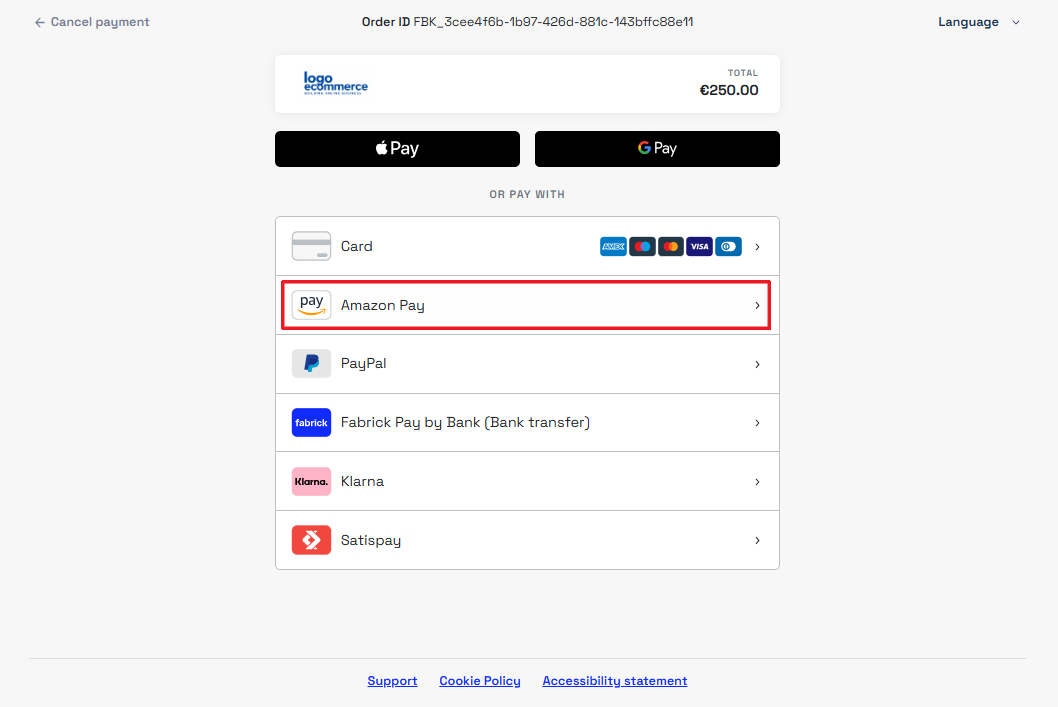
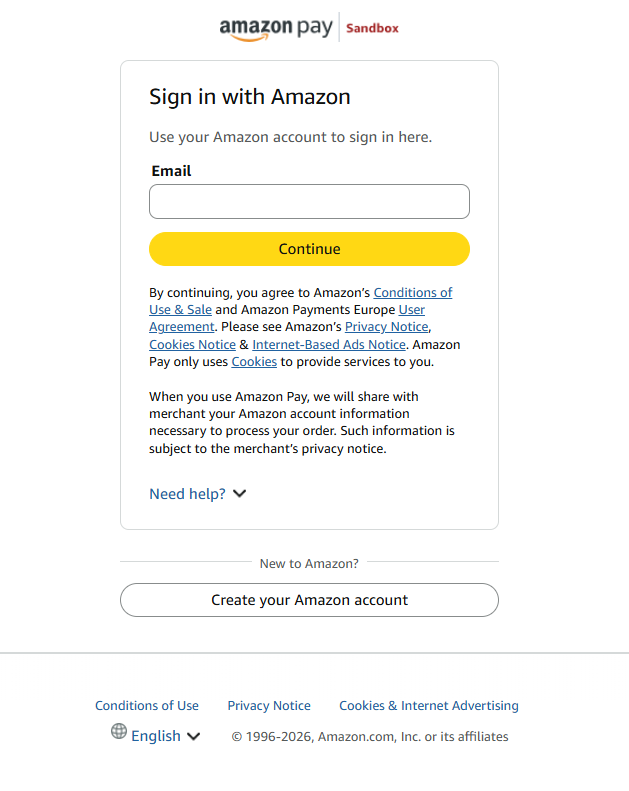
When the user selects Amazon Pay, they are redirected to the service to log in and complete the payment.
API integration
To request an Amazon Pay payment using the API integration, you need to initialise the transaction with payment/create using the AMAZONPAY tag in the paymentType field and handle the buyer's redirect to the payment method.
Creating the transaction and redirecting to Amazon Pay
- ExpressCheckout
- ProcessOrder & PayAndShip
- ProcessOrder & PayOnly
With the ExpressCheckout model the shipping address — where required by the product type — is retrieved directly from the buyer's Amazon account during the checkout. The merchant therefore does not need to include any shipping data in the request.
The same structure applies to the ExpressCheckout & PayAndShip and ExpressCheckout & PayOnly configurations.
Request
POST /api/v1/payment/create
Host (sandbox): sandbox.gestpay.net
Host (production): ecomms2s.sella.it
Authorization: apikey ****************
Content-Type: application/json
{
    "shopLogin": "GESPAY12345",
    "amount": "10",
    "currency": "EUR",
    "shopTransactionID": "FBK_OrderID",
    "paymentType": ["AMAZONPAY"], // Remove this line for the hosted integration
    "paymentChannel": { "channelType": ["LINK"] }
}
With the ProcessOrder & PayAndShip configuration the merchant sells physical products and must provide the shipping address in the payment request. The address is displayed as read-only to the buyer during the Amazon checkout and cannot be changed.
Request
POST /api/v1/payment/create
Host (sandbox): sandbox.gestpay.net
Host (production): ecomms2s.sella.it
Authorization: apikey ****************
Content-Type: application/json
{
    "shopLogin": "GESPAY12345",
    "amount": "10",
    "currency": "EUR",
    "shopTransactionID": "FBK_OrderID",
    "paymentType": ["AMAZONPAY"], // Remove this line for the hosted integration
    "paymentChannel": { "channelType": ["LINK"] },
    "orderDetails": {
        "shippingAddress": {
            "firstName": "John",
            "lastName": "Doe",
            "streetName": "Piazza Gaudenzio Sella 1",
            "city": "Biella",
            "zipCode": "13900",
            "countryCode": "IT",
            "state": "BI",
            "email": "buyer@email.com",
            "primaryPhone": "3331234567"
        }
    }
}
With the ProcessOrder & PayOnly configuration the merchant sells digital products and the shipping address is not required. The structure of the request is identical to the one used for the ExpressCheckout model.
Request
POST /api/v1/payment/create
Host (sandbox): sandbox.gestpay.net
Host (production): ecomms2s.sella.it
Authorization: apikey ****************
Content-Type: application/json
{
    "shopLogin": "GESPAY12345",
    "amount": "10",
    "currency": "EUR",
    "shopTransactionID": "FBK_OrderID",
    "paymentType": ["AMAZONPAY"], // Remove this line for the hosted integration
    "paymentChannel": { "channelType": ["LINK"] }
}
The response returns the redirect link for the buyer to Amazon Pay in the payload.userRedirect.href field.
Response
{
  "error": {
    "code": "0",
    "description": "request correctly processed"
  },
  "payload": {
    "paymentToken": "f0419188-8a78-4918-913c-a491e4e78084",
    "paymentID": "1881129911957",
    "userRedirect": {
      "href": "https://sandbox-web.axerve.com/orchestra/checkout/a/f991s1ba01d24eacaa3fac4b2145262a/b/36ab092425ff34515f7430e38babb28b84f16a31d63102b829072a1366c13580ae128e86-d779-4d98-88a2-0c035bcbd42eiAQ8ZaRT3IFyanLLjcIxtsuc3DTwycBdj5FD7FjuhlKm-mNnpirMdm9p3O8bhycmHVVPz6QOyo811UzHG3csjOSlH2KbF2EiUIxEwWFPAvk9TdUDrgWtyKLJYWayfzbZlP4iULt9eHTvhJEhK21sS8Smd0hX"
    },
    "qrCode": null
  }
}
The returned link can be used under a Pay with Amazon Pay button, in line with the Amazon Pay brand guidelines.
Fields to send in the call to Amazon Pay
The parameters to include in payment/create are listed in the table below. Mandatory fields are shown in bold.
The shippingAddress object is mandatory in the ProcessOrder & PayAndShip configuration only.
Shipping Address
| Field | Type | Description |
|---|---|---|
OrderDetails.ShippingAddress.FirstName | string | Recipient's first name |
OrderDetails.ShippingAddress.LastName | string | Recipient's last name |
OrderDetails.ShippingAddress.StreetName | string | Street name and number |
OrderDetails.ShippingAddress.City | string | City |
OrderDetails.ShippingAddress.ZipCode | string | Postal code |
OrderDetails.ShippingAddress.CountryCode | string | ISO 3166-1 alpha-2 country code (e.g. IT) |
OrderDetails.ShippingAddress.State | string | Province or state |
OrderDetails.ShippingAddress.Email | string | Recipient's e-mail address |
OrderDetails.ShippingAddress.PrimaryPhone | string | Recipient's phone number |
Retrieving the shipping address
With the ExpressCheckout & PayAndShip configuration the shipping address is collected directly by Amazon Pay during the checkout and does not travel in the payment request.
If the merchant needs to use this information for their own business processes (for example to prepare and ship the order), Payment Orchestra makes the buyer's address available through the GET payment/detail API.
The information is contained in the orderReferenceDetails object; an example response is shown below:
Request
GET /api/v1/payment/detail/{paymentID}
Host (sandbox): sandbox.gestpay.net
Host (production): ecomms2s.sella.it
Authorization: apikey ****************
Content-Type: application/json
Response
{
    "error": {
        "code": "0",
        "description": "request correctly processed"
    },
    "payload": {
        "transactionType": "detail",
        "transactionResult": "APPROVED",
        "transactionState": "AUT",
        "transactionErrorCode": "0",
        "transactionErrorDescription": "Transaction correctly processed",
        "bankTransactionID": "4550",
        "shopTransactionID": "FBK_OrderID",
        "shopTransactionID_2": "",
        "authorizationCode": "AZ0631",
        "paymentID": "21421310038753",
        "currency": "EUR",
        "country": "",
        "company": "AMAZONPAY",
        "tdLevel": "",
        "threeDS": {
            "authenticationResult": null,
            "transDetails": null
        },
        "events": [
            {
                "event": {
                    "eventtype": "AUT",
                    "eventamount": "10.00",
                    "eventdate": "01/09/26 09:44:03",
                    "eventARN": "",
                    "eventID": "",
                    "eventReferred": ""
                }
            }
        ],
        "buyer": {
            "name": "",
            "email": ""
        },
        "risk": {
            "riskResponseCode": "",
            "riskResponseDescription": ""
        },
        "customInfo": null,
        "alertCode": "",
        "alertDescription": "",
        "cvvPresent": "FALSE",
        "dcc": null,
        "maskedPAN": "",
        "paymentMethod": "AMAZONPAY",
        "productType": "",
        "token": "",
        "tokenExpiryMonth": "",
        "tokenExpiryYear": "",
        "tokenDetails": null,
        "fraudPrevention": {
            "check": "FALSE",
            "state": "",
            "description": "",
            "order": ""
        },
        "automaticOperation": {
            "type": "CAN",
            "date": "26/09/26 00:00:00",
            "amount": "10.00"
        },
        "orderReferenceDetails": {
            "paymentServiceProviderAttributes": {
                "paymentServiceProviderOrderId": "GESPAY12345_4550"
            },
            "orderReferenceStatus": {
                "lastUpdateTimestamp": "20260901T074402Z",
                "state": "Completed"
            },
            "orderLanguage": "en-GB",
            "expirationTimestamp": "20270228T074343Z",
            "idList": null,
            "sellerOrderAttributes": {
                "storeName": "FBK_OrderID",
                "sellerOrderId": "FBK_OrderID"
            },
            "orderTotal": {
                "amount": "10",
                "currencyCode": "EUR"
            },
            "buyer": {
                "name": "John Doe",
                "email": "buyer@email.com"
            },
            "releaseEnvironment": null,
            "amazonOrderReferenceId": "S02-3823915-3820630",
            "creationTimestamp": "2026-09-08 18:36:57.028",
            "requestPaymentAuthorization": "true",
            "billingAddress": {
                "addressType": "Physical",
                "physicalAddress": {
                    "city": "Biella",
                    "phone": "+393331234567",
                    "countryCode": "IT",
                    "postalCode": "13900",
                    "name": "John Doe",
                    "addressLine1": null,
                    "addressLine2": "Via Corradino Sella 10"
                }
            },
            "destination": {
                "destinationType": "Physical",
                "physicalDestination": {
                    "city": "Biella",
                    "phone": null,
                    "countryCode": "IT",
                    "postalCode": "13900",
                    "name": "John Doe",
                    "addressLine1": "Via Corradino Sella, 10 Biella",
                    "addressLine2": null,
                    "stateOrRegion": null
                }
            }
        }
    }
}
FAQ
Do I need an Amazon account to pay with Amazon Pay?
Yes. The buyer must have an active Amazon account to be able to complete the payment with Amazon Pay.
How is the configuration of my shop determined?
The configuration is defined when the payment method is activated, based on the merchant's operating model, and is applied at shop level. It cannot be changed on the individual payment request: to modify the active configuration you need to contact support.
Can I have different configurations for different shops?
Yes. The configuration is applied at shop level (shopLogin): if the merchant manages several shops on Payment Orchestra, each of them can be configured independently. Activation is also handled separately for each shop.
With the ExpressCheckout & PayAndShip configuration, which shipping address is used?
The default shipping address stored in the buyer's Amazon account is used; the buyer can still select a different one during the Amazon checkout.
With the ProcessOrder & PayAndShip configuration, can the buyer change the shipping address during the checkout?
No. The address provided by the merchant in the payment request is displayed as read-only on the Amazon checkout and cannot be changed by the buyer.
Can I perform several captures on a single authorization?
Yes. Payment Orchestra supports multiple and partial captures on a single authorization, up to the authorized amount.
Can I perform several refunds on a single transaction?
Yes. Payment Orchestra supports multiple refunds on a single capture, up to the captured amount.
Support
Fabrick
- Status page: https://status.fabrick.com/
- Support: https://landing.fabrick.com/fabrick-dashboard-support
Amazon Pay